Models 5843, 5844, 5843S and 5844S
RS232 or TTL
2-
2
A
PPLICATION NOTE
In Point-to-Point operation, the communication logic (control software) of the IED’s must manage:
1) The transmission of data signa
ls.
2) The receipt of data sign
als.
3)
Any "handshaking" required must be accomplished through softw
are.
235
Master
TR
COM
2
3
5
Slave
TR
COM
DTE
DCE
ON
OFF
DTE
DCE
ON
OFF
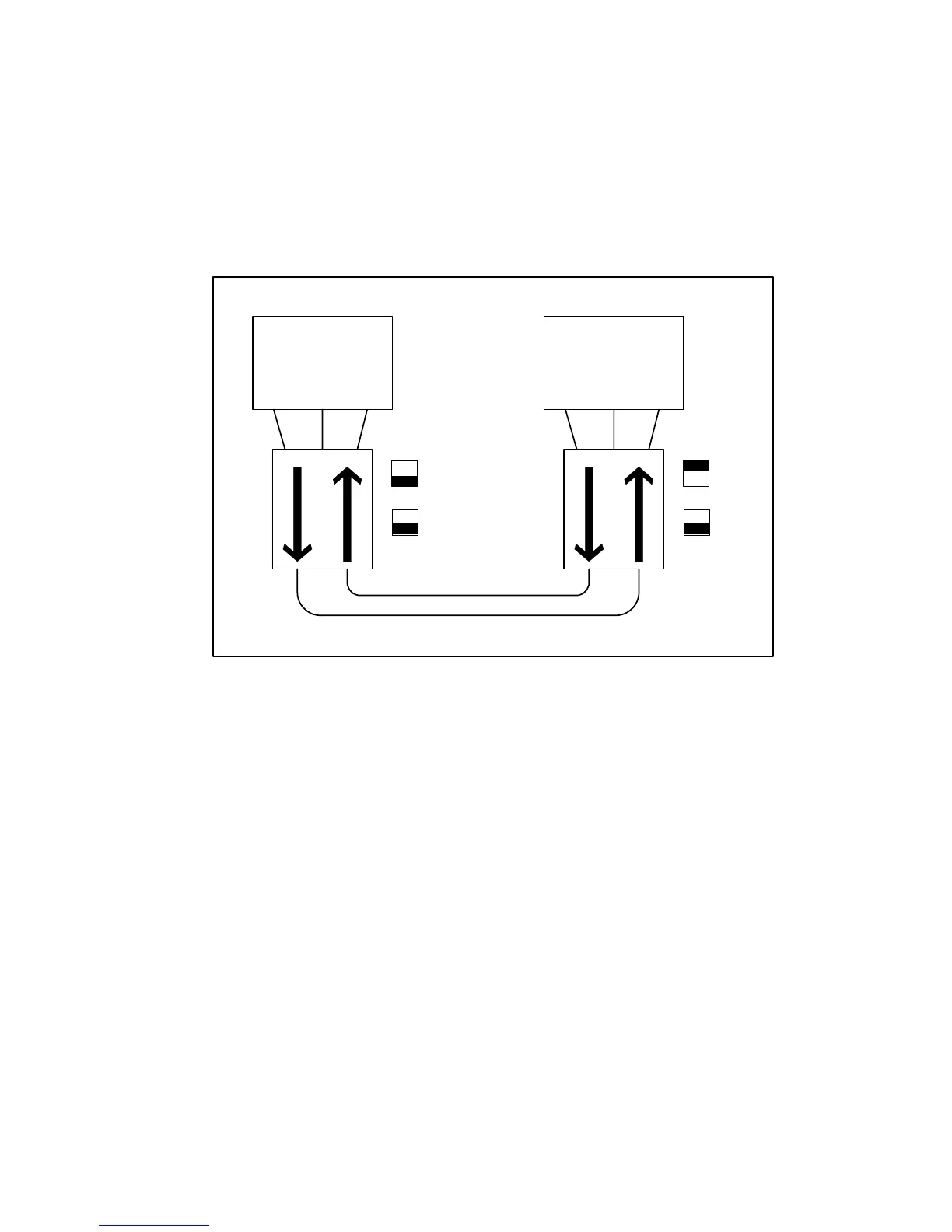
FIGURE
6. Point-to-Point Configuration
2.1.1 Installation
1.
Set the DTE/DCE Switch to the appropriate position for each Link/Repeater and its respec
tive IED.
2.
Set the Repeat Switch on all of the units to the "OFF" pos
ition.
3.
Connect the Link/Repeater to the IED's RS-232 or TTL communication port (including any adapter
that may be needed)
.
4.
Connect the Fiber Optic Cables (T of one device to R of the second device)
.
5.
Connect power to the Link/Repeater as follows
:
A) If the unit is to be powered through the D-connector (9 to 15 VDC on pin 9 referenc
ed to pin
5)
, then the unit is energized when it is connected to the D-connector (the power LED w
ill
illum
inate)
.
B) Connect power leads to the power connector and then energize the power source. The
unit
is
now powered (the power LED will illuminate)
.



 To Next Page