This document outlines the installation, operation, and maintenance procedures for the Garland Master Series Full-Size Gas Convection Ovens. These ovens are designed for commercial cooking applications, emphasizing efficiency and consistent results.
Function Description
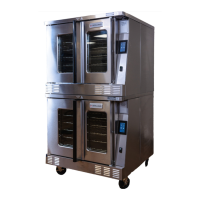
The Garland Master Series Full-Size Gas Convection Ovens are designed to provide precise and efficient cooking through forced air convection. The convection system circulates heated air evenly throughout the oven cavity, ensuring consistent cooking and baking results across multiple racks. This design helps reduce cooking times and achieve uniform browning compared to conventional ovens. The ovens are available in single and double-deck configurations, offering flexibility for various kitchen capacities. They utilize gas as their primary fuel source for heating, with electrical components for controls, fan operation, and lighting.
The ovens feature either a Master 200 Solid State Control with an Electromechanical Timer or an Electronic Control, depending on the model. The Master 200 control allows users to set the cooking temperature, fan speed (high or low), and a mechanical timer for up to 60 minutes. The electronic control offers a more advanced interface with a touchscreen display, providing access to pre-programmed recipes (Press and Go Menu), manual cooking mode, settings adjustments, and a cleaning mode. Both control types incorporate safety features, such as stopping heat and fan operation when the oven door is opened during a cook cycle. The electronic control also includes a "Cool Down" mode that activates the fan to rapidly reduce the oven cavity temperature.
The Cook-N-Hold feature, available on some models, allows for a seamless transition from a cooking cycle to a holding temperature, maintaining food quality and warmth until serving. This is particularly useful in busy commercial kitchens where precise timing and temperature management are crucial.
Usage Features
Operating the Garland Master Series ovens is designed to be straightforward, whether using the electromechanical or electronic control.
For Master 200 Solid State Control with Electromechanical Timer:
- Start-Up: To begin, the user presses the "Cook/Off/Cool Down" rocker switch to the "Cook" position. A green lamp indicates the oven is powered in cook mode. The oven then heats to the temperature set on the thermostat dial, with an amber lamp indicating active heating.
- Temperature Control: The temperature range is adjustable from 150°F to 500°F (66°C to 260°C) by rotating the temperature dial.
- Fan Speed: The fan speed can be set to either high (1670 RPM) or low (1430 RPM) using a dedicated rocker switch.
- Timer: A mechanical timer can be set from 2 to 60 minutes. It sounds a buzzer at the end of the cycle, which is turned off by rotating the dial counter-clockwise. It's important to note that the timer does not control heating.
- Lights: Interior oven lights are activated by pressing a momentary switch on the control panel.
- Cool Down: Pressing the "Cook/Off/Cool Down" rocker switch to the "Cool Down" position activates the fan to cool the oven cavity. For optimal cool-down, the door should be open slightly.
For Electronic Control:
- Start-Up: Turning on the main power switch activates the controller, displaying a splash screen followed by the home screen. The home screen provides icons for the "Press and Go Menu" (recipes), "Settings Mode," "Manual Mode," and "Pause for Cleaning."
- Manual Mode: This mode allows users to set the cook temperature, fan speed (low, high, or pulse for holding mode), main cook timer (24-hour), secondary cook timer (for different rack positions), and interior light. It also enables selection of Cook & Hold temperatures.
- Press and Go Menu: Offers quick access to existing, pre-programmed recipes, simplifying operation for frequently prepared items.
- Settings Mode: Accessed via a password-protected keypad, this mode allows configuration of units (deg. F or C), ECO Mode Temperature, Cook & Hold Temperature, Alarm Volume, and software updates (technician access only).
- Cleaning Mode: Freezes the screen for a short period to facilitate cleaning between operators.
- Safety Features: Both control types ensure that opening the oven door during a cook cycle stops the heat and fan, and the electronic control displays a "door is open" symbol. If the door is open for more than three seconds, the electronic control enters a "Cool Down" mode, activating the fan until the oven reaches a safe temperature.
General Usage Recommendations:
- Preheat the oven thoroughly (approximately 20 minutes) before use.
- Reduce cooking temperatures by 25° to 50° compared to conventional ovens, as convection cooking is more efficient.
- Maintain records of cooking times, temperatures, and load sizes for various products to ensure consistent results.
- Load the oven quickly to minimize heat loss.
- Remove products promptly after the timer goes off to prevent overcooking.
- Center pans on racks and load shelves evenly to ensure proper air circulation.
- Avoid overloading the oven; six pans are suggested for most items, though up to 13 pans can be used for smaller items with adjusted cooking times.
- Never place anything directly on the bottom of the oven cavity, as this obstructs airflow.
- Use oven mitts when handling hot pans and trays.
- Be cautious of hot exterior surfaces during operation.
Maintenance Features
Regular maintenance is crucial for the longevity and optimal performance of the Garland Master Series ovens.
Safety First:
- Always disconnect the line cord from the power supply before cleaning or servicing the oven.
Break-In Period:
- When new, operate the oven for one hour at 375°F (191°C) before normal cooking. After cooling, wipe the interior and racks with a clean, damp cloth.
Exterior Cleaning:
- Establish a regular cleaning schedule.
- Wipe exposed, cleanable surfaces with a mild detergent and hot water when cool.
- For stubborn residue, use a lightweight non-metallic scouring pad, rubbing in the direction of the metal's grain. A thin paste of water and scouring powder can be used for heavy deposits.
- Clean the control panel with hot water, soap, and a soft cloth. Avoid hard abrasives, solvent-type materials, or metallic scouring pads, as they can scratch or cloud the surface.
- Never spray perforated areas of the control panel with steam or water jets to prevent moisture from damaging electrical components.
Interior Cleaning:
- Establish a regular cleaning schedule or wipe up spills on the same day they occur.
- Cool down the oven before cleaning.
- Remove oven racks and rack guides. These can often be run through a dishwasher.
- Clean the oven cavity with soap and water using a non-metallic scouring pad. For accumulated dirt and grease, a mild ammonia solution or commercial oven cleaner (e.g., Easy-Off or Dow) can be used.
- To reinstall rack guides, place the bottom against the cavity wall, lift up, pull the top away from the wall, then push the top against the wall and push down to lock it into place.
Fan Area Maintenance:
- If aluminum foil is regularly used, perform preventive maintenance on the fan area.
- Turn the power switch to "Off."
- Remove oven racks and rack guides.
- Remove the air baffle and clean any stains or deposits.
- Check the blower wheel and air baffle for aluminum foil particles or food deposits, and clean the blower wheel fins (caution: fins may be sharp).
- Reinstall the air baffle, rack guides, and oven racks. Regular performance of this task helps maintain peak oven performance.
Motor Care:
- The convection oven motor is maintenance-free, featuring self-lubricating sealed ball bearings.
- To prolong motor life, especially after baking or roasting, allow the oven to cool down before shutting it off completely. On digital "M" models, the fan runs until the oven cools to 150°F (66°C). On Master 200 series controls, use the "Cool Down" position. Optimal cool-down is achieved with the door slightly open. This prevents heat from the blower wheel from conducting down the shaft into the motor armature, which could shorten its life.
Adhering to these guidelines will help ensure the Garland Master Series Full-Size Gas Convection Ovens operate safely and efficiently for an extended period.

 Need help?
 General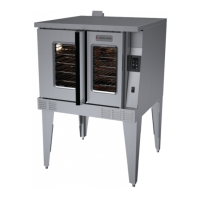


 To Next Page