EasyManua.ls Logo

Garland P1GCCAS - User Manual

Garland P1GCCAS
4 pages
Print Icon
To Next Page IconTo Next Page
Loading...
User Guide
AggreagtorTAP | P1GCxAS | 1.2.50
This document describes the front panel, LED indications, interfaces, rear panel, rear switch and
installation procedure for the P1GCCAS and the P1GCSAS. This portable network TAP series is ideal for
10/100/1000MB copper network monitoring. The innovative design allows these TAPs to be easily
installed into any copper 10/100/1000MB network segment.
The P1GCSAS uses SFPs for the monitor ports which can be either copper or fiber SFPs. The Media
Types table shows the Garland Part Number for SFPs that are typically used in this application.
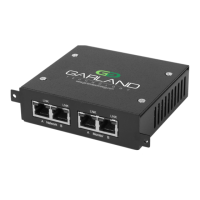
Front Panel
LED Indications
Port A LFP Green indicates LFP on Off indicates LFP off
Port A LNK Link/Activity LED
Port B LFP Green indicates LFP on Off indicates LFP off
Port B LNK Link/Activity LED
Port C BP LED N/A
Port C LNK Link/Activity LED
Port D BP LED N/A
Port D LNK Link/Activity LED
* In SYNC mode the LFP LEDs on both Network port A and B are green when there are no ethernet cables
connected.
* The P1GCSAS does not have LEDs for the Monitoring Ports C and D.
Rear Panel
Garland Technology | 716.242.8500 | garlandtechnology.com/support
Copyright © 2022 Garland Technology, LLC. All rights reserved. 1

Other manuals for Garland P1GCCAS

Question and Answer IconNeed help?

Do you have a question about the Garland P1GCCAS and is the answer not in the manual?

Summary

Front Panel Overview

Front Panel LED Indications

Details the function and status of LEDs for different ports on the front panel.

Rear Panel Configuration

Rear Panel Switch Settings

Defines the switch settings for various speed and tap modes.

Mode and Interface Assignment

Breakout Mode Interface Assignment

Assigns ports to network and monitor interfaces in Breakout mode.

Aggregate Mode Interface Assignment

Assigns ports to network and monitor interfaces in Aggregate mode.

Span Mode Interface Assignment

Assigns ports to traffic input and span interfaces in Span mode.

Installation and Setup

Device Installation Procedure

Step-by-step guide for installing the network TAP into a rack.

DIP Switch Configuration

Guidance on using DIP switches to configure the operating mode.

Network and Power Connections

Instructions for connecting network cables and power supply.

Media Types and Support

Supported Media Types

Details supported SFPs for copper, SM fiber, and MM fiber.

Garland Technology Support

Contact information for technical support and inquiries.

Summary

Front Panel Overview

Front Panel LED Indications

Details the function and status of LEDs for different ports on the front panel.

Rear Panel Configuration

Rear Panel Switch Settings

Defines the switch settings for various speed and tap modes.

Mode and Interface Assignment

Breakout Mode Interface Assignment

Assigns ports to network and monitor interfaces in Breakout mode.

Aggregate Mode Interface Assignment

Assigns ports to network and monitor interfaces in Aggregate mode.

Span Mode Interface Assignment

Assigns ports to traffic input and span interfaces in Span mode.

Installation and Setup

Device Installation Procedure

Step-by-step guide for installing the network TAP into a rack.

DIP Switch Configuration

Guidance on using DIP switches to configure the operating mode.

Network and Power Connections

Instructions for connecting network cables and power supply.

Media Types and Support

Supported Media Types

Details supported SFPs for copper, SM fiber, and MM fiber.

Garland Technology Support

Contact information for technical support and inquiries.

Overview

This document describes the Garland Technology AggregatorTAP P1GCxAS / P1GCSAS, a portable network TAP series designed for monitoring copper network segments.

Function Description:

The P1GCxAS / P1GCSAS series TAPs are designed to provide non-intrusive access to network traffic for monitoring purposes. They allow network administrators to observe data flowing through a copper 10/100/1000MB network segment without affecting network performance or introducing points of failure. The P1GCSAS model specifically utilizes Small Form-Factor Pluggable (SFP) modules for its monitor ports, offering flexibility to use either copper or fiber SFPs depending on the monitoring tool's interface requirements. This innovative design facilitates easy installation into existing network infrastructure.

Important Technical Specifications:

  • Network Compatibility: 10/100/1000MB copper networks.
  • Monitor Port Type (P1GCSAS): SFP-based, supporting both copper (SFPTX) and fiber (SFPLX for SM Fiber, SFPSX for MM Fiber) SFPs for 1 Gbps. For 10/100 Mbps, only copper (SFPTX) SFPs are supported.
  • Operating Modes: Breakout, Aggregate, Span, and Sync Mode. These modes are configured via DIP switches located on the rear panel.
    • Breakout Mode: Ports A and B act as Network Interfaces, while Ports C and D are dedicated Monitor ports (1 and 2 respectively).
    • Aggregate Mode: Ports A and B are Network Interfaces, and Ports C and D both provide an aggregated feed of Monitor port (1/2).
    • Span Mode: Port A acts as the Traffic input port (2/3/4), and Ports B, C, and D each provide a Span port (1).
  • Link Failure Propagation (LFP): This feature mirrors the link state to adjacent live network interfaces. When the TAP is in SYNC mode, LFP is automatically enabled, and DIP Switch 7's setting is ignored.
  • Fail Mode: The unit supports fail mode open on ports 1 and 2, ensuring network continuity even in the event of power loss to the TAP.
  • Power Cycling: The unit requires a power cycle after any modifications to the DIP switch settings for changes to take effect.

Usage Features:

  • Front Panel: Features LED indicators for Link Failure Propagation (LFP) and Link/Activity (LNK) for Network Ports A and B, as well as Link/Activity for Monitor Ports C and D. The P1GCSAS model does not have LEDs for Monitoring Ports C and D.
    • LFP LED: Green indicates LFP is on, off indicates LFP is off.
    • LNK LED: Indicates link status and network activity.
    • SYNC Mode LFP Behavior: In SYNC mode, LFP LEDs on both Network ports A and B will be green even without Ethernet cables connected.
  • Rear Panel: Houses the DIP switches for configuring the TAP's operating mode and other settings, including Speed Mode (1G Auto Neg, 1G Full Duplex, 100M Auto Neg, 100M Full Duplex, 10M Auto Neg, 10M Full Duplex, Sync Mode), Tap Mode (BRE, AGG, Span), Monitor Port Speed (100M ON, 1G OFF), and LFP Mode.
  • Installation Procedure:
    1. Unpack the device and attach an optional rack mount bracket (sold separately).
    2. Install the assembly into a 1U slot of a network rack.
    3. Configure the operating mode using the DIP switches before connecting power.
    4. Connect ports A and B to the live network devices using standard Ethernet cables.
    5. Connect ports C and D to monitoring tools.
    6. Connect the power supply to the unit and an available power source.
  • Auto MDIX: Ports A, B, C, and D support Auto MDIX, simplifying cable connections.
  • Regenerating Outputs: SPAN mode can be used for regenerating outputs, allowing multiple monitoring tools to receive the same traffic feed.
  • Fiber Model Considerations: For fiber models, using SPAN or regeneration mode may require both A and B ports to be connected to obtain a link on either port.

Maintenance Features:

  • Configuration Changes: Any changes to the DIP switch settings necessitate a power cycle of the unit to apply the new configuration.
  • Support: Garland Technology provides customer support for questions and assistance.

Garland P1GCCAS Specifications

General IconGeneral
BrandGarland
ModelP1GCCAS
CategoryNetwork Hardware
LanguageEnglish

Related product manuals