EasyManua.ls Logo

Garmat Frontier - User Manual

Garmat Frontier
19 pages
Print Icon
To Next Page IconTo Next Page
Loading...
Operations & Maintenance Manual
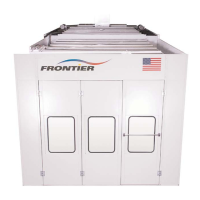
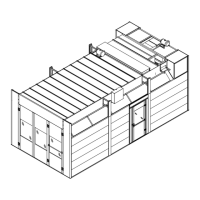
Frontier Spray Booth
1401 W. Stanford, Englewood, Colorado 80110
Phone: (800) 442-7628 Fax: 303-781-2683
www.garmat.com
BUILT IN THE
USA
June 22, 2004
Question and Answer IconNeed help?

Do you have a question about the Garmat Frontier and is the answer not in the manual?

Summary

Operations and Safety

General Safety Precautions

Covers critical warnings, general safety suggestions, and specific hazards for safe operation.

Vehicle and Painter Preparation

Details car preparation and painter safety gear for optimal finishing.

Booth Entry and Specific Warnings

Specifies safe vehicle entry procedures and lists critical operational warnings.

Control Systems

Standard Frontier Controls

Describes the physical buttons and switches on the Standard Frontier control panel.

Deluxe Frontier Controls

Details the instruments and indicators on the Deluxe Frontier control panel.

Deluxe Touch Screen Controls

Explains the functions of the Deluxe model with a touch screen, including the main electrical panel.

Maintenance and Filters

Filter Maintenance Procedures

Provides guidelines for replacing exhaust and ceiling filters at specified intervals.

Scheduled Maintenance Tasks

Outlines daily, 1000-hour interval, and recommended maintenance activities.

System Component Care

Covers care for control air, panels, motors, heaters, and surface cleaning.

Troubleshooting and Operation

Operator Troubleshooting Chart

Provides a chart for diagnosing and resolving operator-level issues.

Booth Operational Modes

Details the sequence of operations for Power On, Spray, Bake, and Shutdown modes.

Gas Train and Air Systems

Explains the functionality of the gas train power circuit and compressed air for spraying.

Filter Change Record

Overview

This document is an Operations & Maintenance Manual for the Garmat® Frontier Spray Booth, a device designed and manufactured in the United States to provide an optimal environment for applying fine automotive finishes. The manual outlines operational procedures, safety suggestions, and maintenance instructions to ensure both a high-quality finish and safe, efficient use of the booth.

Function Description

The Garmat® Frontier Spray Booth is an enclosed paint booth system that facilitates the application and curing of automotive finishes in a controlled, dust-free environment. It operates through several distinct modes: POWER ON, SPRAY, BAKE, COOL DOWN, and SHUTDOWN, each managed by a Programmable Logic Controller (PLC) and accessible via a control panel, which may include a touch screen interface.

In POWER ON mode, the booth's control voltages are active, and the system is ready for operation. The green POWER pilot light indicates this status. The booth's electrical system is designed with safety interlocks, including an Emergency Stop (EM) switch and overload contacts for motors, which will shut down all operations if triggered.

The SPRAY mode is initiated to provide a clean airflow for paint application. In this mode, the intake and exhaust fans are activated to maintain a controlled environment, preventing dust contamination. The system can operate indefinitely in spray mode until manually switched off or into bake mode. If the burner switch is in the WINTER position, the gas train power circuit is energized to provide heated air for spraying, while in SUMMER, it remains off.

The BAKE mode is used for curing painted vehicles. When activated, the system performs a purge cycle, maintaining spray mode temperature, before initiating a timed bake cycle. During bake mode, the changeover damper opens pneumatically, and the booth lighting is typically turned off. The temperature controller adjusts to a higher set point, and the gas train circuit is energized to provide heat for curing. The bake timer, which can be set for specific durations, manages this process.

After the bake cycle, the booth enters a COOL DOWN sequence, which is part of the SHUTDOWN mode. During cool down, the power to the changeover damper solenoid and RP relay is interrupted, allowing the damper to close. The booth lights come back on, and the temperature returns to the spray temperature. The system then completely shuts down after a set internal time cycle (typically 10 minutes). The logic of the PLC prevents restarting until the OFF-SPRAY-BAKE switch is set to the OFF position.

The booth also incorporates a Gas Train Power Circuit for heating, which includes safety features such as low and high gas pressure switches, a proof of closure switch, and a high-temperature switch. An airflow switch (intake pressure switch) ensures proper air movement before the burner operates. The flame safety module monitors the burner's pilot and flame, triggering an alarm (red burner light) if issues like no spark, no fuel delivery, or no flame sensing occur.

For spray applications, a Compressed Air System within the booth is controlled by a solenoid in the Main Control Panel, ensuring compressed air is available only when specific safety conditions (RA air over electric switch, Door Air switch, and Exhaust Pressure switch) are met.

Usage Features

The Garmat® Frontier Spray Booth emphasizes ease of use combined with critical safety protocols.

Vehicle Preparation and Entry: Before entering the booth, vehicles must be thoroughly washed and blown off with compressed air to minimize dust. Masking should be done outside the booth. When moving a vehicle in or out, the booth fans must be running to reduce contamination. Vehicles should be driven slowly and carefully, avoiding rapid acceleration or braking. For vehicles equipped with propane (LPG) fuel, the fuel tank must be less than half full before entering the booth to allow for expansion during the bake cycle.

Painter Preparation: Painters are advised to wear approved respirators whenever applying finishes and to use close-weave nylon paint suits with hoods. Suits should be cleaned regularly and worn only when painting. All dust should be removed from the suit and equipment before entering the booth. The booth must be operating whenever personnel enter. Painters should limit entry and exit during paint coats.

Control Panel Options: The booth offers various control panel configurations:

  • Standard Frontier (44006(X)): Features push buttons for SPRAY (starts intake/exhaust fans), OFF (turns off fans), LIGHT (toggles lighting), and INCREASE/DECREASE PRESSURE (opens/closes pressure damper).
  • Deluxe Frontier (46008(X)): Includes an EMERGENCY STOP switch (red), LIGHTS ON/OFF switch, OFF/SPRAY/BAKE switch, BURNER SUMMER/WINTER switch, and various pilot lights (green for normal operation, red for problems with intake motor, exhaust motor, or burner safeguard). It also features an HOURMETER to track spray hours for filter replacement and a BAKE TIMER with adjustable settings for curing.
  • Deluxe with Touch Screen Option: Provides a touch screen interface for all controls, including EM STOP, LIGHTS ON/OFF, OFF/SPRAY/BAKE, BURNER SUMMER/WINTER. It displays operational status with green (normal) or red (alarm) lights, an HOURMETER for spray/bake times, BAKE TIMERS with a countdown, TEMPERATURE CONTROL with set points, and CABIN PRESSURE display, which can be set automatically or manually. The touch screen also allows for recipe settings for spray and bake temperatures, purge, bake, and cool down times.

Safety Warnings: The manual highlights several critical warnings:

  • Failure to heed warnings could result in property damage, personal injury, or death.
  • Approved respirators must be worn when applying finishes.
  • The booth must be operating whenever entering.
  • Do not enter the booth during the bake cycle.
  • If gas is smelled, open windows, do not operate electrical switches, extinguish open flames, and call the gas supplier immediately.
  • Do not use or store flammable materials near the intake air heater appliance.
  • Do not expose the equipment to excessive moisture or rain; pressure washing or hose washing the interior/exterior will void the cabin warranty and can cause electrical shorts or rust.
  • Used exhaust filter material is flammable and susceptible to spontaneous combustion; dispose of properly.
  • Do not walk, stand, or store objects on the roof.
  • All electrical supply sources to the main electrical panel must be disconnected before removing covers for maintenance.

Maintenance Features

Regular maintenance is crucial for optimal performance and longevity of the Garmat® Frontier Spray Booth. The manual provides a detailed schedule and instructions for various components.

Daily Maintenance:

  • Check booth pressure: Ensure it operates within the proper range (0.02 Inches of Water Column, indicated by green on the touch screen).
  • Clean the floor: Sweep the floor while the booth is in operation. Mopping with a well-rung-out mop is also acceptable.
  • Check exhaust filters: Visually inspect the exhaust filters.

1000-Hour Interval (Annually) Maintenance: This comprehensive checklist should be reviewed, and any malfunctions repaired immediately.

  • Motors: Replace fan belts and adjust for proper tension (½" deflection at midpoint with moderate pressure). Tension testers are available from belt suppliers. Belts should be adjusted after the first 40 hours of use and every three months thereafter. Motors generally require quarterly lubrication with a good quality grease; a ¼ squeeze on a normal hand pump grease gun is sufficient. Over-greasing can damage bearing seals.
  • Fans: Check fan blade surfaces, clean if necessary, and oil them after cleaning. Do not use silicon-based oil. Oil changeover damper hinges; some have grease zerks.
  • Booth: Examine all door seals and replace with Garmat-approved seals only. Change ceiling filters. Check and replace exhaust filters if necessary. Lubricate larger hinges with grease zerks.
  • Control Air: The compressed air supplied to the booth must be clean and dry. Water separators and filter systems should be installed upstream of the main electrical control panel and changed annually. Examine the regulator/filter and oiler for control air (located at the side of the main control panel). Set pressure between 45-60 psi, drain the filter, and refill the oiler with air tool oil.
  • Control Panel: Review pressure and temperature settings. For touch screen options, peel away the cover and check operation.
  • Heater Section: Gas-fired heaters require little maintenance. Inspect the burner manifold for debris or moisture. The flame rod in the burner should be replaced annually. The burner manifold should be completely cleaned out every four years by a qualified service technician.

Filter Replacement Schedule:

  • Exhaust Filters: Change at 50-60 hour intervals. Located in the two towers at the back of the booth. To replace, rotate access door latches, swing doors open, and slide out filter racks. Separate the two halves of the rack, remove old material, clean thoroughly, and place new material (slightly larger) into the larger half before reassembling and replacing. Reset EXHAUST filter hours on the touch screen and record the date, time, and hour meter reading.
  • Ceiling Filters: Change at 1000-1200 hour intervals. Held in place by removable filter frames in the ceiling. Rotate support bolts clear of the frame, remove the frame, clean it with a tack rag, place new filter media, tuck it into the frame, and raise it back into the opening. Hand-tighten support bolts. Reset CEILING filter hours on the touch screen. The FLAME ROD in the burner should also be replaced at this time.
  • Intake Filters: Change at 1000-hour intervals.

General Cleaning:

  • Internal and External Surfaces: Use a soft, dry cloth for cleaning. For extremely dirty surfaces, use a soft cloth dipped in a soap and water solution (or weak detergent solution), wrung out before wiping. Wipe again with a soft, dry cloth.
  • Prohibited Cleaners: Never use alcohol, paint thinner, benzine, or chemically treated cloths, as these can damage the booth's finish.
  • Water Exposure: Avoid pressure washing or hosing down the interior or exterior of the booth, as this can cause electrical shorts, shocks, water collection in light fixtures, and rust deterioration, voiding the warranty.

Adjustments:

  • Purge Timer: An internal PLC function, adjustable in minutes, but not below 3 minutes as per national codes. Consult paint supplier for recommended flash-off time.
  • Bake Timers: Internal PLC function, adjustable in minutes. Consult paint supplier for recommended bake times.
  • Cool Down Timer: Internal PLC function, typically set to a maximum of 10 minutes. Allows the booth to complete the bake cycle, cool down, and shut off automatically.
  • Adjustments with FTX Handheld Unit: Purge, bake, and cool down cycles are adjusted by a qualified technician using an FTX handheld unit.
  • Adjustments with Touch Screen: If equipped, purge, bake, and cool down cycles can be adjusted from the bake timer display screen or recipe settings display screen.

The manual emphasizes that any repairs beyond adjustments should be performed by a qualified technician or local distributor if the user is unsure how to proceed. It also stresses the importance of disconnecting all electrical supply and locking it off before removing covers on mechanical components for maintenance.

Garmat Frontier Specifications

General IconGeneral
CategoryService Equipment
ModelFrontier
ManufacturerGarmat
CapacityVaries by model
DimensionsVaries by model
WeightVaries by model

Related product manuals