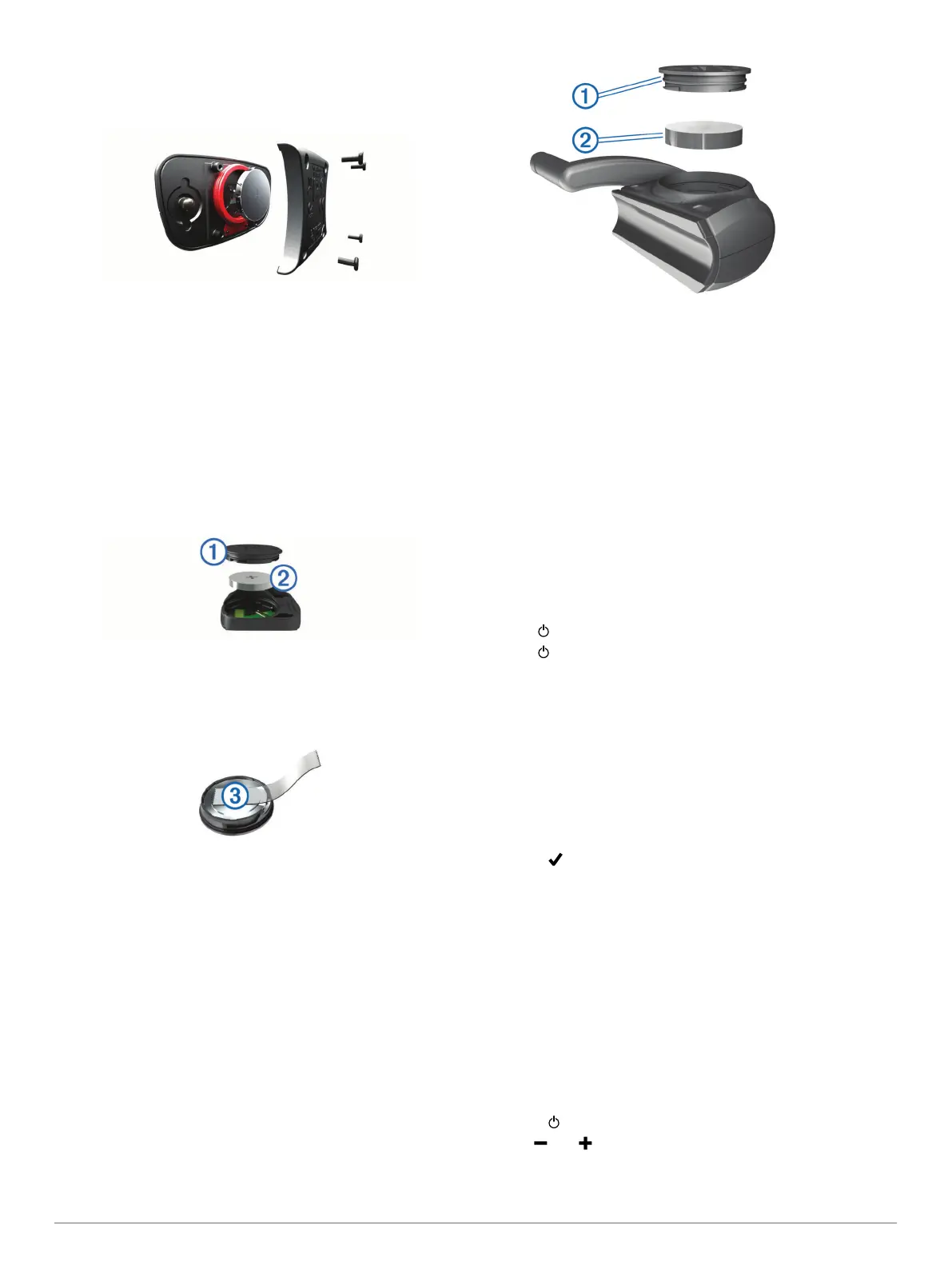
Replacing the Heart Rate Monitor Battery
1
Use a small Phillips screwdriver to remove the four screws on
the back of the module.
2
Remove the cover and battery.
3
Wait 30 seconds.
4
Insert the new battery with the positive side facing up.
NOTE: Do not damage or lose the O-ring gasket.
5
Replace the back cover and the four screws.
NOTE: Do not overtighten.
After you replace the heart rate monitor battery, you may need
to pair it with the device again.
Replacing the Speed Sensor or Cadence Sensor
Battery
The LED flashes red to indicate a low battery level after two
revolutions.
1
Locate the circular battery cover
À
on the back of the sensor.
2
Twist the cover counter-clockwise until the marker points to
unlocked and the cover is loose enough to remove.
3
Remove the cover and the battery
Á
.
TIP: You can use a piece of tape
Â
or a magnet to remove
the battery from the cover.
4
Wait 30 seconds.
5
Insert the new battery into the cover, observing polarity.
NOTE: Do not damage or lose the O-ring gasket.
6
Twist the cover clockwise until the marker points to locked.
NOTE: The LED flashes red and green for a few seconds
after battery replacement. When the LED flashes green and
then stops flashing, the device is active and ready to send
data.
Replacing the GSC 10 Battery
1
Locate the circular battery cover
À
on the side of the GSC
10.
2
Use a coin to twist the cover counter-clockwise until it is
loose enough to remove (the arrow points to unlocked).
3
Remove the cover and the battery
Á
.
4
Wait 30 seconds.
5
Insert the new battery with the positive side facing up.
NOTE: Do not damage or lose the O-ring gasket.
6
Use a coin to twist the cover clockwise back into place (the
arrow points to locked).
After you replace the GSC 10 battery, you must pair the GSC 10
with the device again.
Troubleshooting
Resetting the Device
If the device stops responding, you may need to reset it. This
does not erase any of your data or settings.
1
Hold for 10 seconds.
2
Hold for one second to turn on the device.
Clearing User Data
You can restore all of the device settings to the factory default
values.
NOTE: This deletes all user-entered information, but it does not
delete your history.
1
Turn off the device.
2
Place your finger on the top left corner of the touchscreen.
3
While holding your finger on the touchscreen, turn on the
device.
4
Select .
Maximizing Battery Life
• Decrease the backlight (Decreasing the Backlight,
page 16).
• Shorten the backlight timeout (Adjusting the Backlight
Timeout, page 17).
• Select the Smart recording interval (Data Recording Settings,
page 14).
• Turn on the Auto Power Down feature (Using the Auto
Power Down Feature, page 17).
• Turn off the Bluetooth wireless feature (Bluetooth Settings,
page 13).
Decreasing the Backlight
1
Select to open the status page.
2
Use and to adjust the brightness.
16 Troubleshooting



 To Next Page