EasyManua.ls Logo

Garmin Edge Remote - Page 2

Garmin Edge Remote
14 pages
Print Icon
To Next Page IconTo Next Page
To Previous Page IconTo Previous Page
Loading...
Edge®
Remote
Instructions
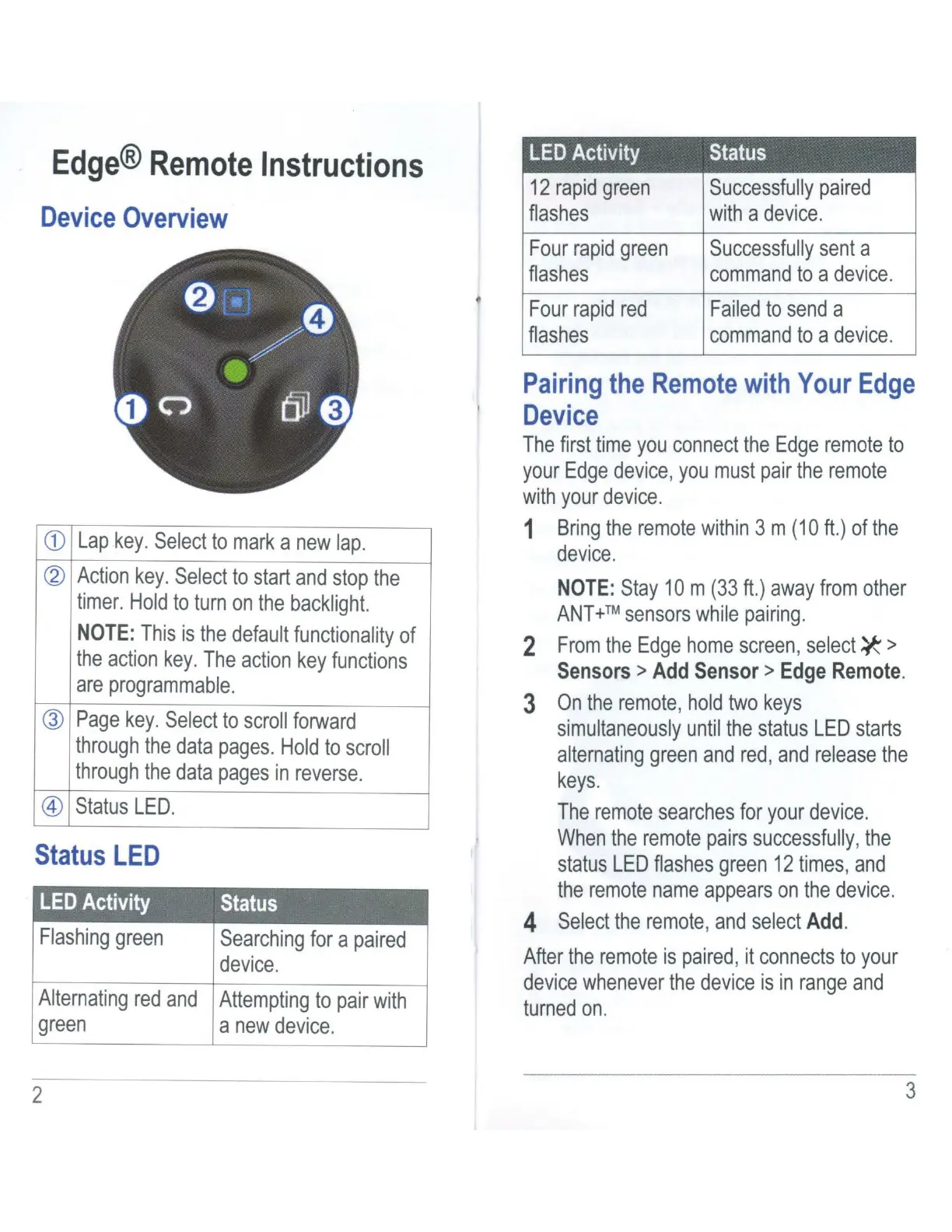
Device
Overview
CD
Lap
key.
Select
to
mark
a
new
lap.
~
Action
key.
Select
to
start
and
stop
the
timer.
Hold
to
turn
on
the
backlight.
NOTE:
This
is
the
default
functionality
of
the
action
key
.
The
action
key
functions
are
programmable
.
®
Page
key.
Select
to
scroll
forward
through
the
data
pages.
Hold
to
scroll
through
the
data
pages
in
reverse.
@
Status
LED
.
Status
LED
LED
Activity
Status
Flashing
green
Searching
for
a
paired
device
.
Alternating
red
and
Attempting
to
pair
with
green
a
new
device.
2
LED
Activity
Status
12
rapid
green
Successfully
paired
fiashes
with
a
device.
Four
rapid
green
Successfully
sent
a
fiashes
command
to
a
device.
Four
rapid
red
Failed
to
send
a
flashes
command
to
a
device
.
Pairing
the
Remote
with
Your
Edge
Device
The
first
time
you
connect
the
Edge
remote
to
your
Edge
device,
you
must
pair
the
remote
with
your
device.
1
Bring
the
remote
within
3 m
(10ft.)
of
the
device.
NOTE:
Stay
10m
(33ft.)
away
from
other
ANT
+™
sensors
while
pairing.
2
From
the
Edge
home
screen,
select*'>
Sensors>
Add
Sensor>
Edge
Remote
.
3
On
the
remote,
hold
two
keys
simultaneously
until
the
status
LED
starts
alternating
green
and red, and
release
the
keys.
The
remote
searches
for
your
device.
When
the
remote
pairs
successfully,
the
status
LED
flashes
green
12
times
,
and
the
remote
name
appears
on
the
device.
4
Select
the
remote,
and
select
Add
.
After
the
remote
is
paired,
it
connects
to
your
device
whenever
the
device
is
in
range
and
turned
on.
3

Related product manuals