EasyManua.ls Logo

Garmin GDL 69/69A - User Manual

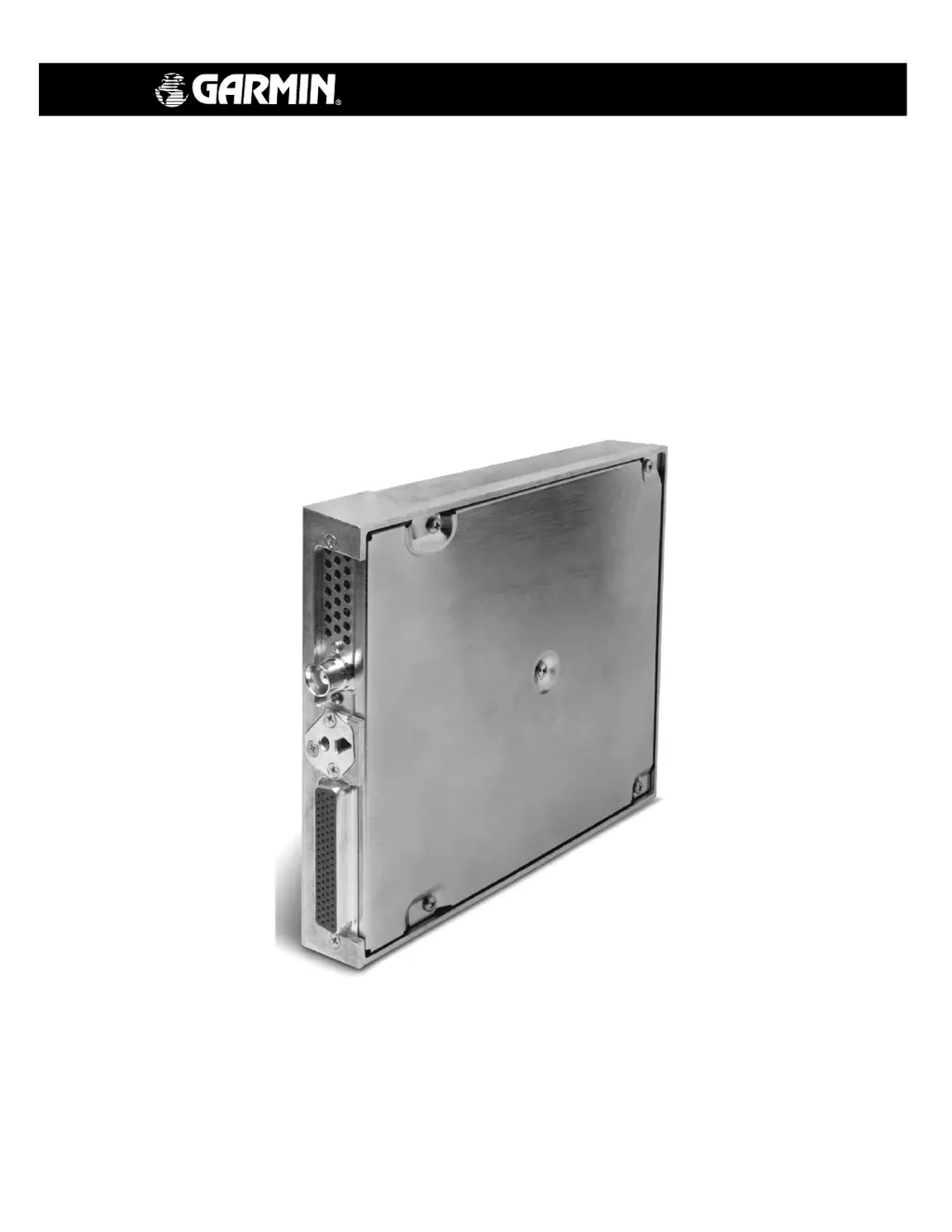
Garmin GDL 69/69A
70 pages
Print Icon
To Next Page IconTo Next Page
Loading...
190-00355-02 June 2006 Revision E
GDL 69/69A
Installation Manual

Table of Contents

Questions and Answers

  • S
    Sergio CastilloJul 31, 2025
    What to do if there is no audio output from my Garmin GDL 69/69A GDL 69A?
    • T
      Thomas NguyenJul 31, 2025
      If you're experiencing no audio output from your Garmin GDL 69A Receiver, here are a few things to check: * First, make sure that your unit is a GDL 69A and not a GDL 69, as the latter does not have an audio feature. * Verify the wiring of the audio suppression input, ensuring it's correctly connected to the active high or active low input sense. * Check the wiring from the GDL 69A to the audio panel. * Confirm that the 'Mute' function is not enabled. * Try increasing the volume by pressing the Volume Up button. * If audio is only outputting on Channel 1, verify that your audio XM service has been activated.
  • T
    Tanya CastilloAug 5, 2025
    Why is the XM signal low quality or not working on my Garmin Receiver?
    • S
      Stephanie JamesAug 5, 2025
      If you are experiencing a low quality or no XM signal on your Garmin Receiver, consider the following: * Ensure that the XM antenna has a clear, unobstructed view of the satellite constellation. * Check the antenna cable and connectors for any damage or loose connections. * Verify the correct antenna loss value is set in the configuration module. * Confirm that the antenna ground plane is adequate.
  • S
    Sarah SanchezAug 12, 2025
    What to do if my Garmin GDL 69/69A displays incorrect or no XM subscribed services?
    • T
      Tracy BatesAug 12, 2025
      If your Garmin Receiver is not displaying the correct XM subscribed services, or showing no services at all: * First, verify your subscription status with XM Satellite Radio. * Also, it's possible that the GDL 69/69A unit was not properly activated.
  • C
    Chad BatesAug 17, 2025
    Why doesn't XM audio mute on my Garmin GDL 69A Receiver when stall or gear inputs are activated?
    • C
      cantrelllisaAug 17, 2025
      If the XM audio entertainment on your Garmin GDL 69A Receiver does not mute when audio suppression interfaced inputs (stall, gear) are activated: * Verify the wiring of the audio suppression inputs. * Verify the alarm activation state of warning active high and active low.
  • K
    Kenneth RodriguezAug 25, 2025
    How to fix 'No communication with GDL 69/69A' on my Garmin Receiver?
    • P
      Patrick TateAug 25, 2025
      If your Garmin Receiver is not communicating with the GDL 69/69A, you should: * Check the power wiring and pin out. * Verify the correct communication port setting on the display/control device.

Summary

General Description

1.8 Technical Specifications

Provides technical specifications for the GDL 69/69A unit and associated antennas.

Installation Procedure

2.4 Equipment Mounting

Details rack location and installation procedures for the GDL 69/69A.

2.5 Cabling and Wiring

Covers wiring installation, harness construction, and connector assembly.

System Interconnects

3.2 Functional Descriptions

Explains the function of power, configuration module, RS-232, and Ethernet ports.

System Configuration;Checkout

4.2 Initialization of Configuration Module

Covers configuration module setup for MX20 and GDU 104x systems.

Troubleshooting

Troubleshooting Guide

Provides actions for common GDL 69/69A operational problems.

Limitations

Periodic Maintenance

Garmin GDL 69/69A Specifications

General IconGeneral
Subscription RequiredYes
Operating Temperature-20°C to +55°C
TypeSatellite Weather Receiver
ServiceSiriusXM Satellite Weather
AntennaExternal antenna required
CoverageNorth America
CompatibilityCompatible with select Garmin aviation displays

Related product manuals