EasyManua.ls Logo

Garmin tempe - Device Attachment and Pairing; Installing the Device; Pairing the Sensor with Your Device

Garmin tempe
7 pages
Print Icon
To Next Page IconTo Next Page
To Previous Page IconTo Previous Page
Loading...
2
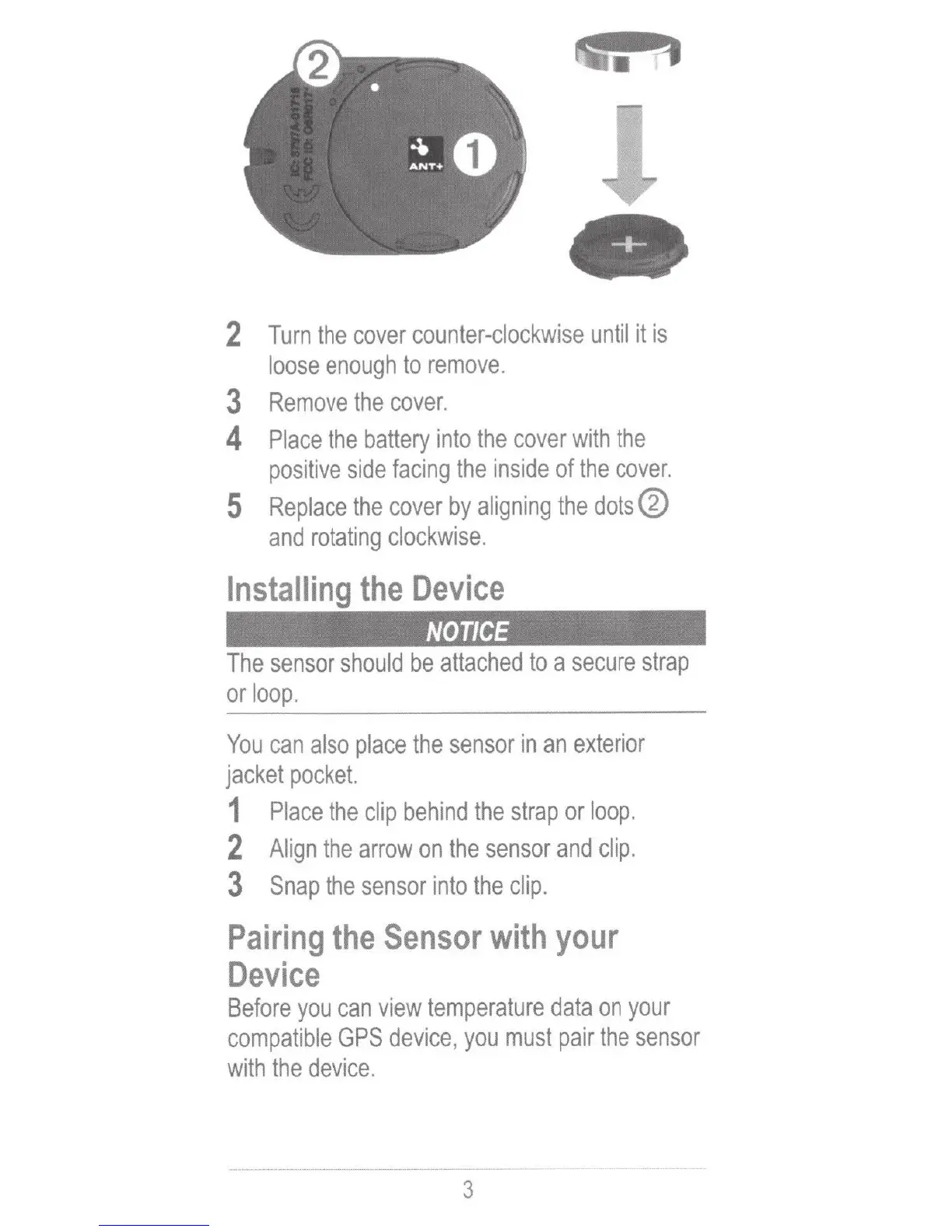
Turn
the
cover
counter-clockwise
until
it
is
loose
enough
to
remove
.
3
Remove
the
cover.
4
Place
the
battery
into
the
cover
with
the
positive
side
facing
the
inside
of
the
cover.
5
Replace
the
cover
by
aligning
the
dotsĀ®
and
rotating
clockwise.
Installing
the
Device
NOTICE
The
sensor
should
be
attached
to
a
secure
strap
or
loop
.
You
can
also
place
the
sensor
in
an
exterior
jacket
pocket.
1
Place
the
clip
behind
the
strap
or
loop.
2
Align
the
arrow
on
the
sensor
and
clip.
3
Snap
the
sensor
into
the
clip.
Pairing
the
Sensor
with
your
Device
Before
you
can
view
temperature
data
on
your
compatible
GPS
device
,
you
must
pair
the
sensor
with
the
device.
3