EasyManua.ls Logo

Garmin TruSwing - Page 10

Garmin TruSwing
20 pages
Print Icon
To Next Page IconTo Next Page
To Previous Page IconTo Previous Page
Loading...
TruSwing
TM
Quick
Start
Manual
Getting
Started
&WARNING
.___
___
_
See
the
Important
Safety
and
Product
Information
guide
in
the
product
box
for
product
warnings
and
other
important
information.
Charging
the
Device
&WARNING
This
product
contains
a
lithium-ion
battery.
To
prevent
the
possibility
of
personal
injury
or
product
damage
caused
by
battery
exposure
to
extreme
heat,
store
the
device
out
of
direct
sunlight.
NOTICE
To
prevent
corrosion,
thoroughly
dry
the
USB
port,
the
weather
cap,
and
the
surrounding
area
before
charging
or
connecting
to
a
computer.
The
device
is
powered
by
a
built-in
lithium-ion
battery
that
you
can
charge
using
a
USB
port
on
your
computer.
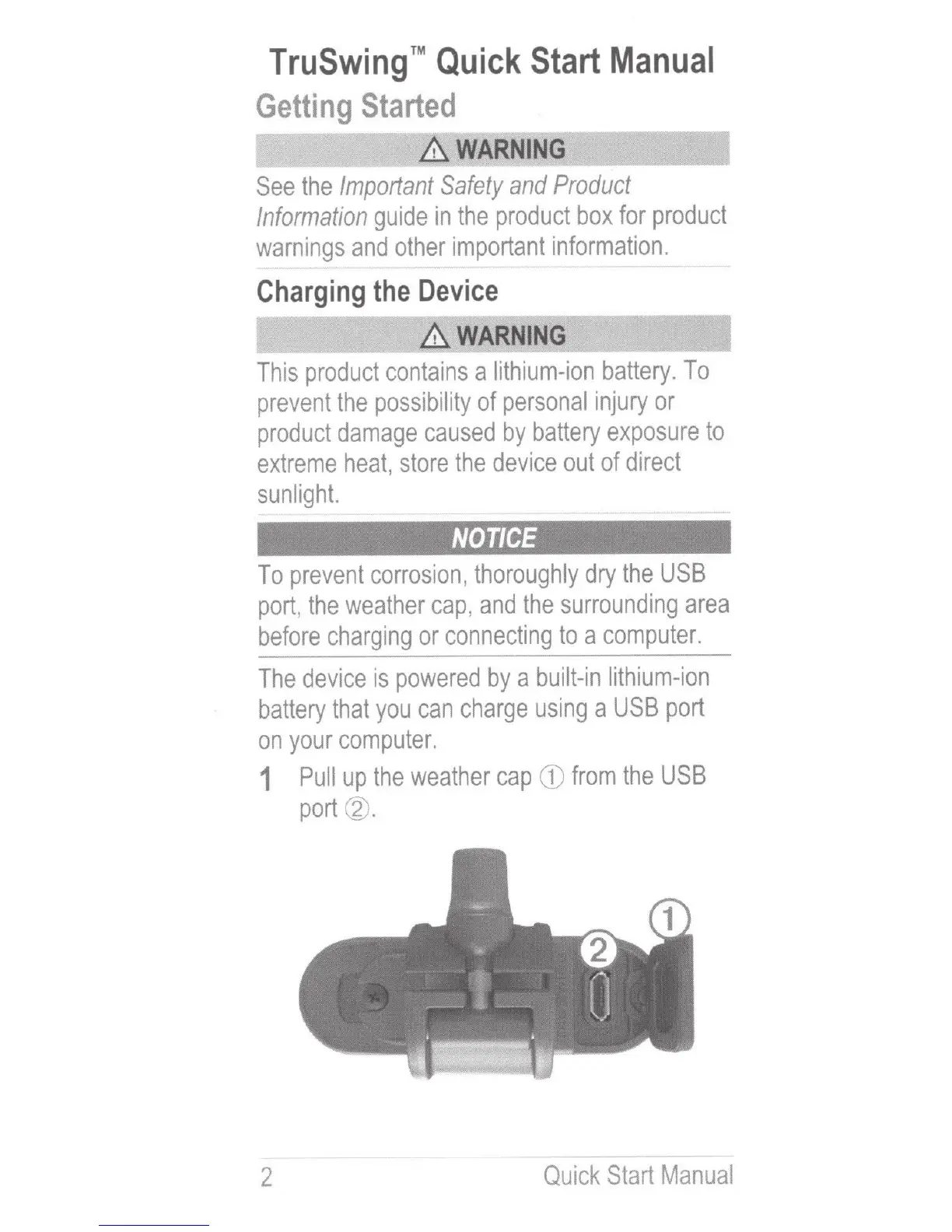
1
Pull
up
the
weather
cap
CD
from
the
USB
port
@.
2
Quick
Start
Manual

Other manuals for Garmin TruSwing

Related product manuals