EasyManua.ls Logo

Garmin TruSwing - Specifications

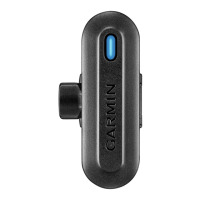
Garmin TruSwing
20 pages
Print Icon
To Next Page IconTo Next Page
To Previous Page IconTo Previous Page
Loading...
1
Turn
on
your
TruSwing
device.
2
On
your
compatible
handheld,
select
Setup
>
TruSwing.
Recording
Your
Swing
1
Turn
on
the
TruSwing
device.
2
On
your
paired
mobile
device,
select
a
club.
3
Hit
a
shot.
The
device
records
your
swing
and
uploads
data
to
your
paired
device
automatically.
NOTE:
For
best
results,
you
should
make
good
contact
with
the
ball
when
swinging.
Device
Information
Support
and
Updates
Garmin
Express
~~i
provides
easy
access
to
these
services
for
Garmin
devices.
Product
registration
Product
manuals
Software
updates
Getting
the
Owner's
Manual
You
can
get
the
most
recent
owner·s
manual
from
the
web.
1
Go
to
www.garmin.com/manuals/truswing.
2
View
or
download
the
full
owner's
manual
in
your
preferred
format.
Specifications
Operating
temperature
range
Charging
temperature
range
Quick
Start
Manual
From
-10°
to
60°C
(from
-14
°
to
140°F)
··
·················
···
··-
·-··-··-
·
·-·
·
-···
·
---
-·
--
-·---·-
From
to
40oC
(from
32°
to
104
°F)
7

Other manuals for Garmin TruSwing

Related product manuals