GARNI TECHNOLOGY APP
The official application "GARNI technology", which is available for free to
download on Google Play (for Android) and App Store (for iOS), can also be
used to view data.
For more information please
visit www.garnitechnology.com
or www.garni-meteo.cz/aplikace.
MAINTENANCE
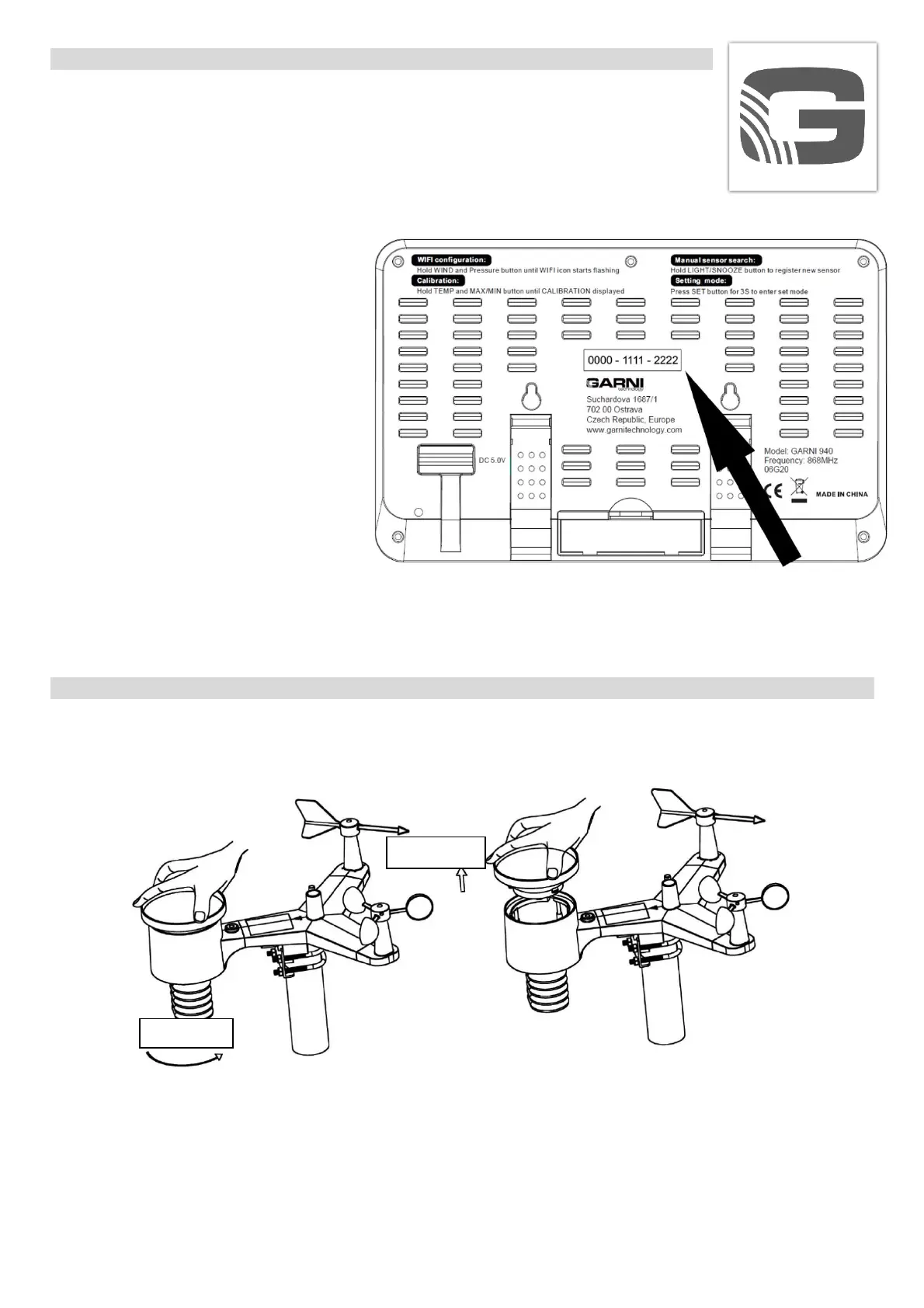
1) Clean the water collection funnel located on the integrated wireless sensor regularly, every
3 months. Turn the funnel anti-clockwise and remove it. Clean the inner mechanism with a moist
cloth and remove insects and other impurities.
2) Clean the UV radiation sensor and the solar panel with a moist cloth regularly, every 3 months.
3) Replace the batteries every 1-2 years. If the batteries are not replaced in time, the integrated
wireless sensor may be damaged.
4) In winter, treat the surface of the integrated wireless sensor with an anti-freeze spray to prevent
snow build-up on the sensor.
Lift
Open
To activate the application, enter the code (eg. 0000 - 1111 - 2222) located
on the back side of the weather station main unit, enter without dashes and
spaces. Keep this code properly.
Note: The application is provided free of charge and is not part of the product, which product is not
dependent on the application for its proper functionality. The manufacturer reserves the right to
change the functions, specifications, appearance and provision of services of the application without
prior notice.


 To Next Page
 Loading...