G F M 4 0 0 S E R I E S U S E R M A N U A L
Low Flow (borehole flow) measurement
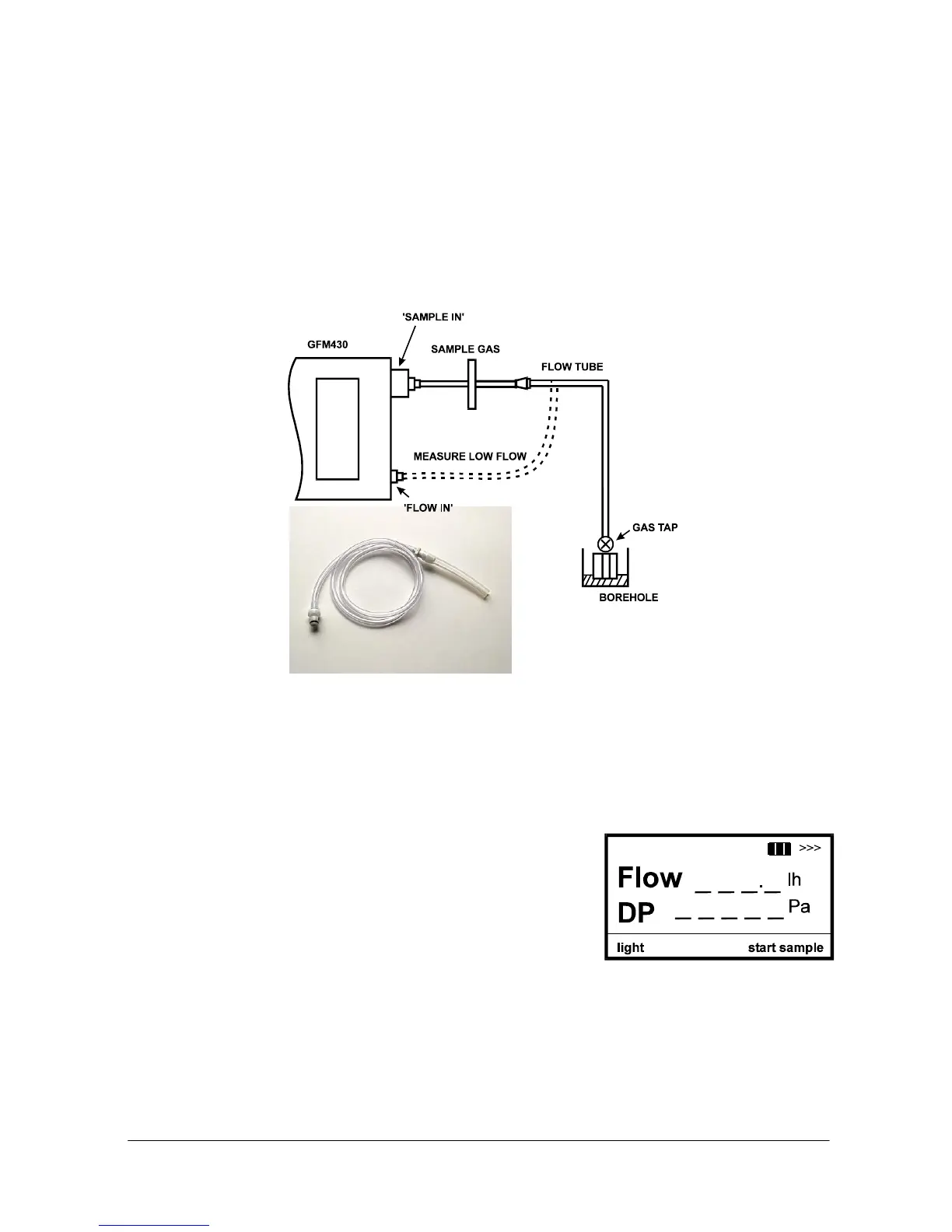
To take a borehole flow reading using the GFM430 use the flow tube connected
into the flow port on the GFM430. The flow tube disconnects from the gas sample
tube by a quick connect and is the tube with no in-line filter, connect this to the
‘flow in’ port on the instrument
.
Connect the flow pipe to the borehole gas tap and open the gas valve.
The display screen will show the above screen
with highlights over the figures. To activate
the real time reading press the ‘ Start Sample’
button and the flow and differential pressure
become live.
When the reading has stabilised, press the ‘Stop Sample’ key again to retain the
reading. This will return the highlight area around the flow and differential pressure
figures.
Turn off the borehole gas tap and remove the
gas pipe.
Auto Turn Off
To help conserve battery life, the GFM400
Series features an auto power off facility. This
ensures that the instrument will switch itself
off after 10 minutes if no keys are pressed.
The instrument will also switch off if the battery voltage is too low for it to operate.
If this happens, recharge the batteries or fit a freshly charged battery – see
Maintenance section.
GFM400 Series 16 GFM400 Series User Manual



 To Next Page