EasyManua.ls Logo

GAS GMA151BT - User Manual

GAS GMA151BT
10 pages
Print Icon
To Next Page IconTo Next Page
Loading...
FM USB / BT Digital Player
   
Question and Answer IconNeed help?

Do you have a question about the GAS GMA151BT and is the answer not in the manual?

Summary

Note on installation

Before installing the unit

Preparation steps before installing the car audio system.

Specifications of common keys

Location of the remote control

Basic Operation

Power On;Off and Mode Selection

Instructions for turning the unit on/off and changing modes.

Input and Playback Modes

Guide to using auxiliary inputs and USB/SD card playback.

Radio Tuning and Presets

How to select radio bands, tune stations, and set presets.

Basic Operation - MP3

MP3 Playback Modes

Functions for repeating, scanning, and random playback of MP3 tracks.

Basic Operation - Bluetooth & App

Bluetooth Connectivity and Audio

Pairing and using the unit with Bluetooth devices for calls and audio.

GAS RC Control App

Information about the companion mobile application for receiver control.

Basic Operation - Specifications

Specifications Overview

Technical specifications for general, audio, and FM tuner sections.

Trouble Shooting

Wiring Diagram

Safety Information

General Safety and Usage

Covers important safety notes, proper usage, and modification warnings.

Road Safety Guidelines

Precautions for safe driving while using the car audio system.

Cleaning and Maintenance Advice

Recommended methods for cleaning the unit's surface and screen.

Product Warnings and Battery Safety

Critical warnings regarding battery handling and potential hazards.

Declaration of Conformity

Statement regarding compliance with relevant directives and regulations.

Overview

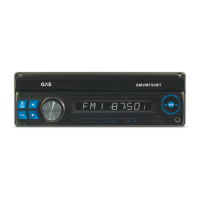
The GAS GMA151BT is an FM USB / BT Digital Player designed for in-car audio systems. This unit functions as a car radio, an MP3 player via USB and SD card, and a Bluetooth audio player, offering a versatile range of entertainment options for your vehicle.

Function Description:

The GMA151BT serves as a central hub for audio in your car. Its primary functions include:

  • Radio Tuner: It features an FM tuner with a tuning range of 87.5-108 MHz. Users can select radio bands (FM1, FM2, FM3) and manually or automatically tune to stations. The AMS (Auto Scan and Auto Store) function allows for scanning and storing up to 6 stations per frequency band.
  • USB/SD Card Playback: The unit supports playback of MP3 files from USB drives and SD cards. Once a USB or SD card is inserted, playback starts automatically, or can be selected via the MODE button. Playback features include track selection (previous/next), fast forward/rewind, repeat play (RPT), scanning tracks (INT) to play the first 10 seconds of each, and random play (RDM).
  • Bluetooth Connectivity: The device offers Bluetooth functionality for hands-free calling and audio streaming. Users can pair their mobile phone with the unit using the password "0000". For incoming calls, "calling" appears on the display, and the BND button can be pressed to answer in hands-free mode. The "◄" button ends a call, and long-pressing BND allows for repeat calls. Bluetooth audio streaming enables playback from a connected mobile device, with basic operations similar to MP3 playback (mute, skip tracks).
  • AUX-IN: An auxiliary input jack (AUX) is provided for connecting external audio devices, allowing playback from sources like smartphones or portable music players.
  • Remote Control: The unit comes with a remote control that provides comprehensive control over all functions, including power, mode switching, volume adjustment, track selection, EQ settings, display, and specific playback features like repeat and random play.
  • GAS RC Control App: For enhanced control, the GAS RC application can be downloaded from the App Store or Google Play. This app connects to the receiver via Bluetooth, offering remote control functionality, receiver settings, and display of receiver information from a smartphone.

Important Technical Specifications:

  • Power Requirements: 12V DC, negative ground operation system only.
  • Load Impedance: 4 ohm.
  • Tone Controls: +8 dB (bass 10Hz, treble 10KHz).
  • Maximum Output Level (Audio Section): 2Vrms.
  • Frequency Response (Audio Section): 20 to 20KHz.
  • Signal-to-Noise Ratio (Audio Section): 85dB.
  • Separation (Audio Section): 80dB.
  • FM Tuning Range: 87.5-108 MHz.
  • FM IF Range: 10.7MHz.
  • Usable Sensitivity (FM): 15 dB (at -30dB).
  • Usable-to-Noise Radio (FM): 60dB.
  • Stereo Separation (FM): 30dB (1 KHz).
  • Frequency Response (FM): 30~15000Hz.
  • Connectivity: USB port, SD card slot, Bluetooth, AUX-IN.
  • Outputs: Front RCA Output (R/L), Rear RCA Output (R/L).

Usage Features:

  • Power On/Off/Mode: The POWER button turns the unit on/off (long press for off) and cycles through modes (Radio → Playback → AUX-IN).
  • Clock Function (CLK): Displays the current time.
  • Sound Field/Automatic Preset Station (EQ): Adjusts sound fields and allows for automatic preset station selection.
  • Loudness (LOUD): Enhances bass and treble at low volumes.
  • Reset Function (RESET/RES): Resets the system to its initial status, accessible via a button on the front panel using a pointed object.
  • Remote Control: A dedicated remote control provides easy access to all functions, including volume, track control, mode selection, and specific playback features.
  • App Control: The GAS RC app offers a convenient way to control the unit from a smartphone, providing a modern interface for managing settings and playback.

Maintenance Features:

  • Installation Guidelines: The manual provides clear instructions for installation, emphasizing the need for a 12V DC negative ground system and proper wiring to avoid malfunction or damage. It advises disconnecting the negative battery terminal before making connections and ensuring speaker leads are correctly connected.
  • Heat Management: Users are warned not to block vents or radiator panels to prevent heat buildup and potential fire hazards.
  • Resetting the Unit: After installation or battery replacement, pressing the reset button on the front panel with a pointed object is recommended to set the unit to its initial status.
  • Troubleshooting Guide: A comprehensive troubleshooting section helps users diagnose and resolve common issues such as no power, no sound, blown fuses, or excessive skipping, providing causes and recommended actions (e.g., checking connections, replacing fuses, insulating wires).
  • Cleaning: The manual advises using only a dry or slightly moistened cloth for cleaning the car audio system, warning against solvents, cleaning agents, or dashboard sprays that could damage the surface.
  • Battery Safety: Important safety notes are included regarding the coin/button cell battery in the remote control, warning against ingestion and advising to keep batteries away from children.
  • Disposal Information: The manual includes information on the proper disposal of electrical and electronic products, indicating that they should not be disposed of with household waste but at special recycling centers.

GAS GMA151BT Specifications

General IconGeneral
BrandGAS
ModelGMA151BT
CategoryCar Receiver
LanguageEnglish

Related product manuals