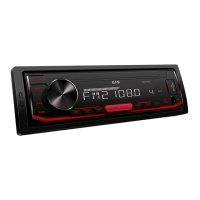
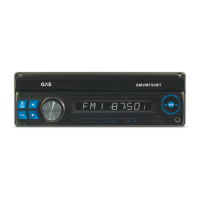
This document describes the GMVM750BT Media Receiver with Bluetooth, a 1-DIN AM/FM radio designed for in-dash installation in vehicles with a 12-volt battery and negative grounding. It features a 7-inch TFT display with touch screen functionality and supports various media playback formats including RMVB, DIVX, MP4, MP3, and WMA. The unit is equipped with USB and SD card control, a front AUX-in, and high power 4x50 watts output. For convenience, it includes a detachable front panel, remote control, and Bluetooth functionality.
The GMVM750BT serves as a comprehensive media receiver for your vehicle, offering radio, multimedia playback, and connectivity options.
-
Radio Functionality: The unit provides 1-DIN AM/FM radio with RDS (Radio Data System). It allows users to choose among five radio bands (three FM bands: FM1, FM2, FM3; and two AM bands: AM1, AM2). Each band can store up to six preset stations, totaling 30 memory stations. Radio stations can be sought automatically or manually. Users can save their favorite stations by touching and holding a preset button (P1-P6). The unit also offers mono/stereo reception control and local/distance reception control. For regions where RDS is available, AF, TA, and PTY functions are supported.
-
Multimedia Playback: The device supports playback of RMVB, DIVX, MP4, MP3, and WMA files. Media can be played from USB drives and SD cards, which are plugged into their respective ports. During playback, users can advance or go back to tracks, play/pause, and fast forward/rewind. For video playback, the aspect ratio can be adjusted to full screen, 16:9, or 4:3. Additional settings like random/repeat play and sub-title/audio channel selection are available.
-
Display and User Interface: The GMVM750BT features an in-dash 7-inch TFT display with touch screen functionality. The monitor slides out automatically when the TILT button is pressed, revealing the main GUI display. The screen angle can be adjusted in four steps using UP/DOWN arrow buttons. The display can be turned off (blackout) if not needed, and during video playback, the video signal can be sent to connected external monitors. A "Day Light Saving" feature allows adjustment of screen brightness for day or night use, or complete blackout. The main menu provides access to various modes (RADIO, USB, SD, AUX in) and settings.
-
Audio Control: Sound control includes volume adjustment via the VOL +/- button or by sliding the volume icon on the screen. Bass and treble levels can be adjusted using the SEL button, though these controls are unavailable when EQ is ON. Balance (left/right speakers) and fader (front/rear speakers) can also be adjusted. Other audio settings like preset equalizer, loudness, or subwoofer ON/OFF are accessible via the "EQ" icon on the main menu or control menus of play modes.
-
Bluetooth Functionality (Optional): The unit supports Bluetooth for wireless connectivity. In BT mode, users can pair their phone with "BT CAR STEREO" using the password "0000". Features include a dial pad for making calls, a call record to view received, missed, and dialed calls, and A2DP for playing music from a cellphone. Users can reject incoming calls and navigate through their music list (play/pause, next/previous song).
-
Connectivity and Inputs/Outputs: The GMVM750BT offers various connection points. It has a front AUX-in (3.5mm connector) for portable audio devices. On the rear, there are AV input jacks for connecting external audio/video devices like DVD or VCD players. A dedicated backup camera input (yellow RCA) is available, activated when the car is in reverse gear, requiring connection to the reverse gear switch. A video output jack (yellow RCA) allows connection to external monitors. Two sets of RCA output jacks (red for right, white for left) are provided for connecting amplifiers, equalizers, or other audio components. A subwoofer output jack on the wire harness allows connection of up to two subwoofer amplifiers.
-
Steering Wheel Control: The unit supports steering wheel control. Users connect the brown wire (Steering 1) and either the white (Steering 2A) or grey (Steering 2B) wire depending on the vehicle's steering wheel remote control. Through the OSD, users can reset settings, select from 10 functions, and assign them to available keys on their steering wheel.
-
GPS Navigation (Optional): If GPS navigation is available with the system, tapping the GPS logo on the OSD allows entry into the navigation interface for inputting destinations and starting navigation.
-
iPod Input (Optional): The unit can support iPod input using a supplied iPod wire. It allows playing music and video viewing for iPod Classic (new iPod Classic, iPod Nano, iPod Touch, and iPhone are not supported for video viewing).


 To Next Page
 Power
Power Audio Output
 Display
 Weight and Dimensions