5
CartManager User Manual
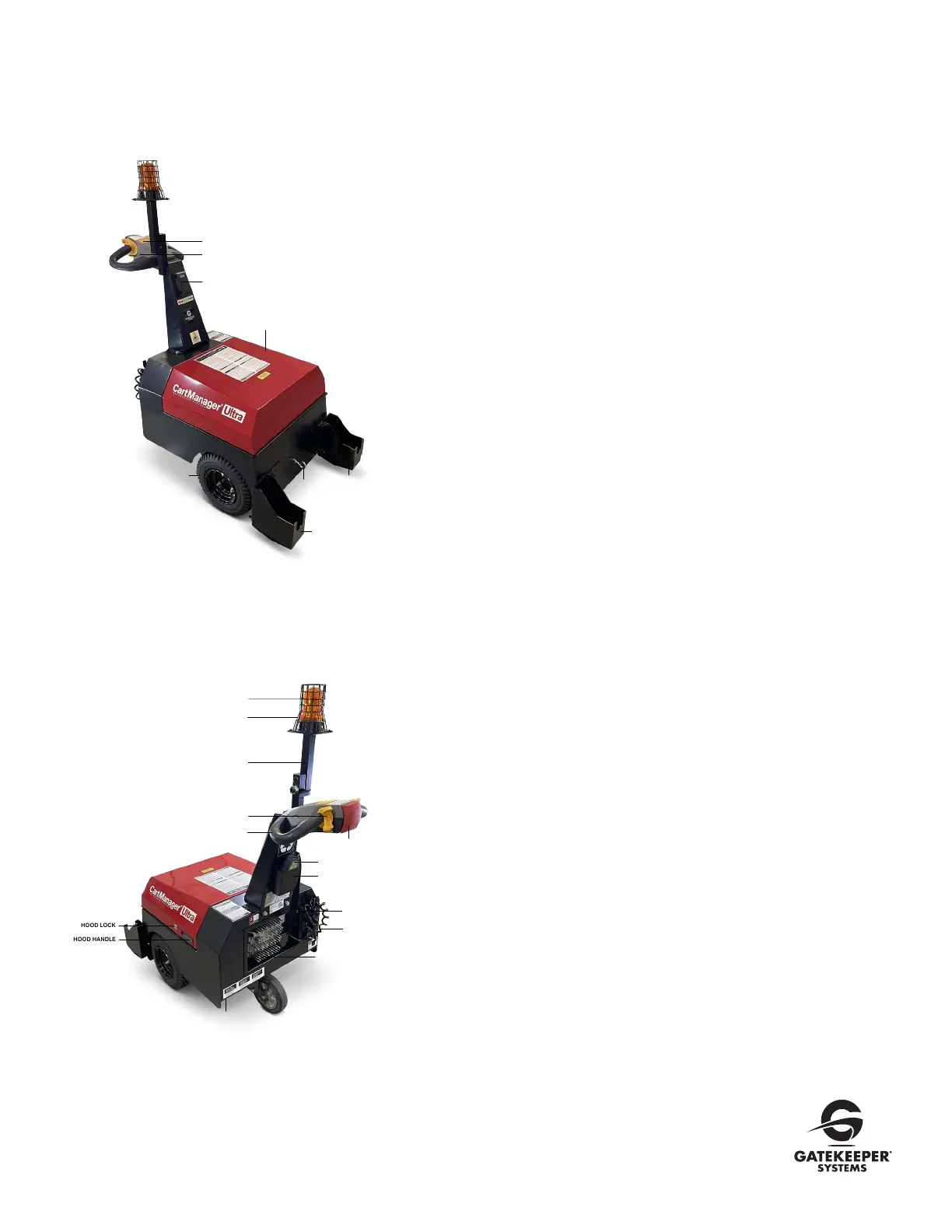
CartManager Ultra Features and Controls
Power Switch
Flip this switch to turn CartManager Ultra ON and OFF.
Horn Switch
Press to sound the horn.
Digital Throttle Display / Battery Level Indicator
Displays percentage of charge left in the batteries. Batteries should
be recharged when the remaining charge Indicator falls below 40%.
The unit can also be plugged in between runs to keep the batteries
charged.
This device will also display diagnostic codes for troubleshooting.
Hood
The hood covers and protects the batteries and other components
in the battery compartment. When opening and closing, use the
hood handle on either side of the hood. Do not grip the hood by the
front edge which may pinch fingers.
Cart Cradle
Two cart cradles are mounted on the front of the cart and spaced
so that the rear wheels of a cart fit into each cradle.
Eye Bolt
The strap that secures the carts when moving is mounted on
the Eye Bolt.
Strobe Light
Flashes as long as the power switch is turned ON.
Remote Control
Acts as a wireless key switch to enable driving and must be present
to drive the Cartmanager.
• Sends signals to Cartmanager to drive as well as sounds the horn
• Displays diagnostic codes for troubleshooting
• Displays total run time
Throttle Knob and Handle
By grasping both the handles with your hands and placing your
thumbs onto the throttle knobs, slowly rotate the throttle knobs in
a forward direction to move the CartManager Ultra forwards, by
rotating the throttle knobs in a backwards direction it will move the
CartManager Ultra in a backwards motion.
The farther you rotate the throttle knobs, the faster the unit will move.
Release the throttle knob and the CartManager Ultra will stop.
Battery Charger
Charges main batteries and monitors the battery charging process.
Features and Controls continued on page 6.
HORN SWITCH
BAT TE RY LE VE L INDICATOR
DIGITAL THROTTLE
CART CRADLE LEFT
CART CRADLE
RIGHT
EYE BOLT
POWER SWITCH
DRIVE WHEEL
HOOD
HOOD HANDLE
HOOD LOCK
STROBE GUARD
LIGHT POLE
HANDLE
REMOTE CONTROL
REMOTE CONTROL HOLDER
SWIVEL CASTER WHEEL
BRAKE RELEASE KNOB
(Underneath)
POWER CORD
EMERGENCY STOP BUTTON
THROTTLE KNOB
BATTERY CHARGER
LED STROBE LIGHT
REMOTE CONTOL
ASSOCIATION SWITCH



 To Next Page
 Loading...