5
SC32 CRIMPER CALIBRATION PROCEDURE
1.
Install the “.733” die set to calibrate
the machine using an 8G Megacrimp
®
coupling.
2. Set the Dial Vernier setting to
5.20. Rotating the dial clockwise will
increase the number and rotating it
counterclockwise will decrease the
number. When changing the setting,
always move to a higher number then
down to the desired setting
• Example: To change from 5.00 to
5.20, move the Dial Vernier up to 6.00
then down to 5.20.
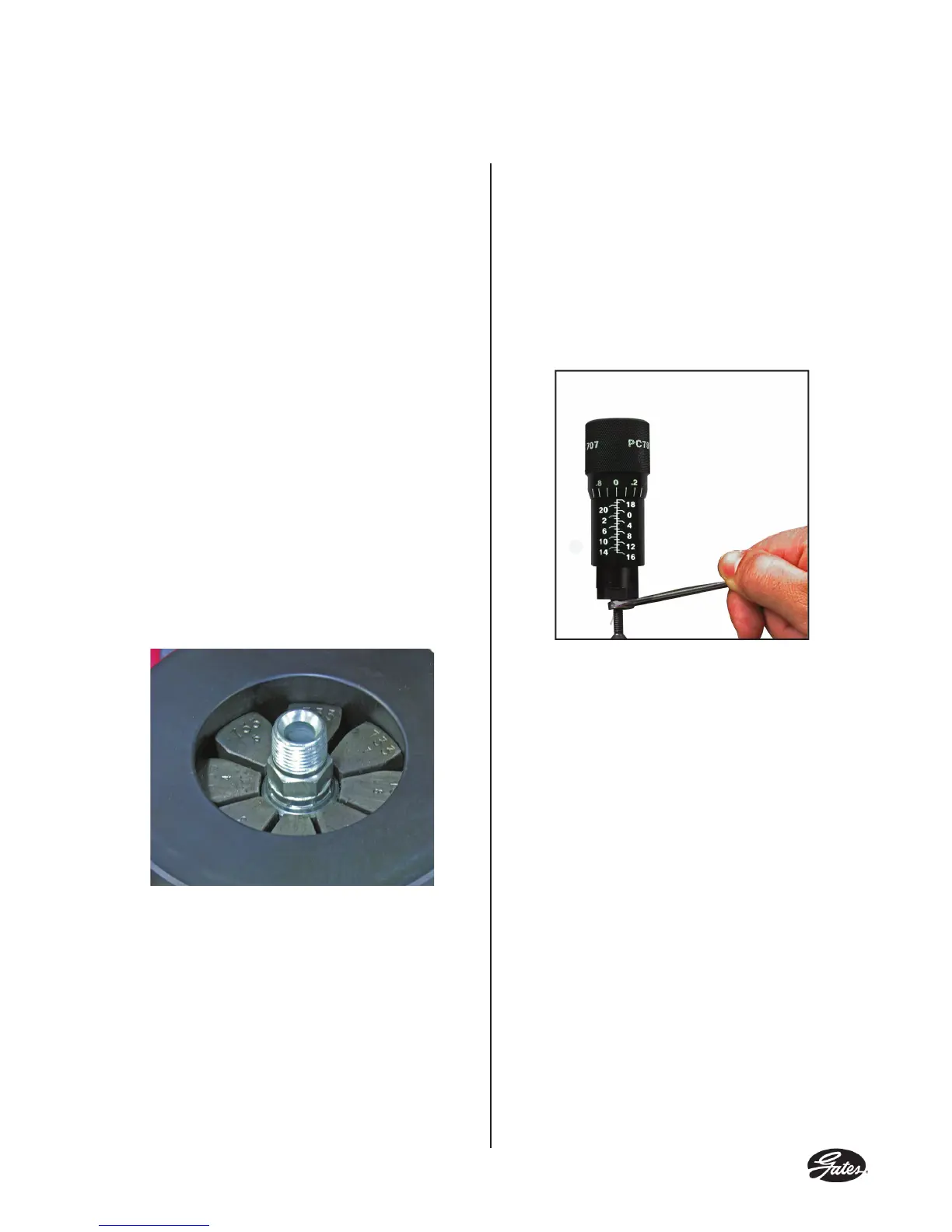
3. Insert the coupling into the die set
approximately 1/8 inch below the top of
the die. (See Photo 1)
Photo 1
4. Push and hold the start/stop switch
until the pump stops.
5. Remove the coupling and measure
the crimp diameter which should measure
1.000 +/- .003 inches. See page 8 for
measuring crimp diameter.
6. If ferrule crimp diameter is not
acceptable adjust the Dial Vernier (See
Photo 2)
Photo 2
• To increase the crimp diameter, hold
the Dial Vernier barrel with a 5/16 inch
open end wrench and rotate the stem
out of the barrel with a 5/32 inch hex
key wrench.
• To decrease the crimp diameter, hold
the Dial Vernier barrel with a 5/16 inch
open end wrench and rotate the stem
into the barrel with a 5/32 inch hex key
wrench.
7. Repeat steps 2 through 5 to verify the
correct crimp setting.


 To Next Page