station and the ‘Push to talk’ microphone will be enabled.
2. Press and hold the ‘Press to Talk’ button to talk with the visitor.
Unlocking the Door
During a call or monitoring mode, click on the ‘locker’ button to
activate the gate opener
1. Press the ‘locker’ button on ‘device’s home screen’ to unlock
the door.
2. If the ‘One-Key Unlock’ is not turned on, a popup message will
ask you to enter the unlock password (default is ‘1111’).
3. The door will unlock during the configured unlock time.
Monitoring the Outdoor Station
At any time, from the ‘Home screen’ click on a device’s image to
access the live stream from the outdoor station. The monitor mode
allows you to access all the option than during a call (take a
snapshot, record video, listen the outdoor station sound and talk
through the outdoor station microphone.
Image Capture
During a call or monitoring mode, click on to take a snapshot
of the outdoor station’s image. It can be accessed from the home
screen’s menu, in ‘Media’.
Video record
During a call or monitoring mode, click on icon to start
recording a video from the outdoor station’s image. Click again to
finish the record. It can be accessed from the home screen’s
menu, in ‘Media’.
Accessing recorded videos/images
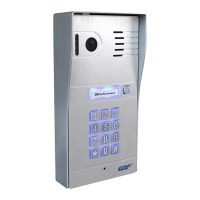
1. From the device home screen, click on the main menu icon.


 To Next Page