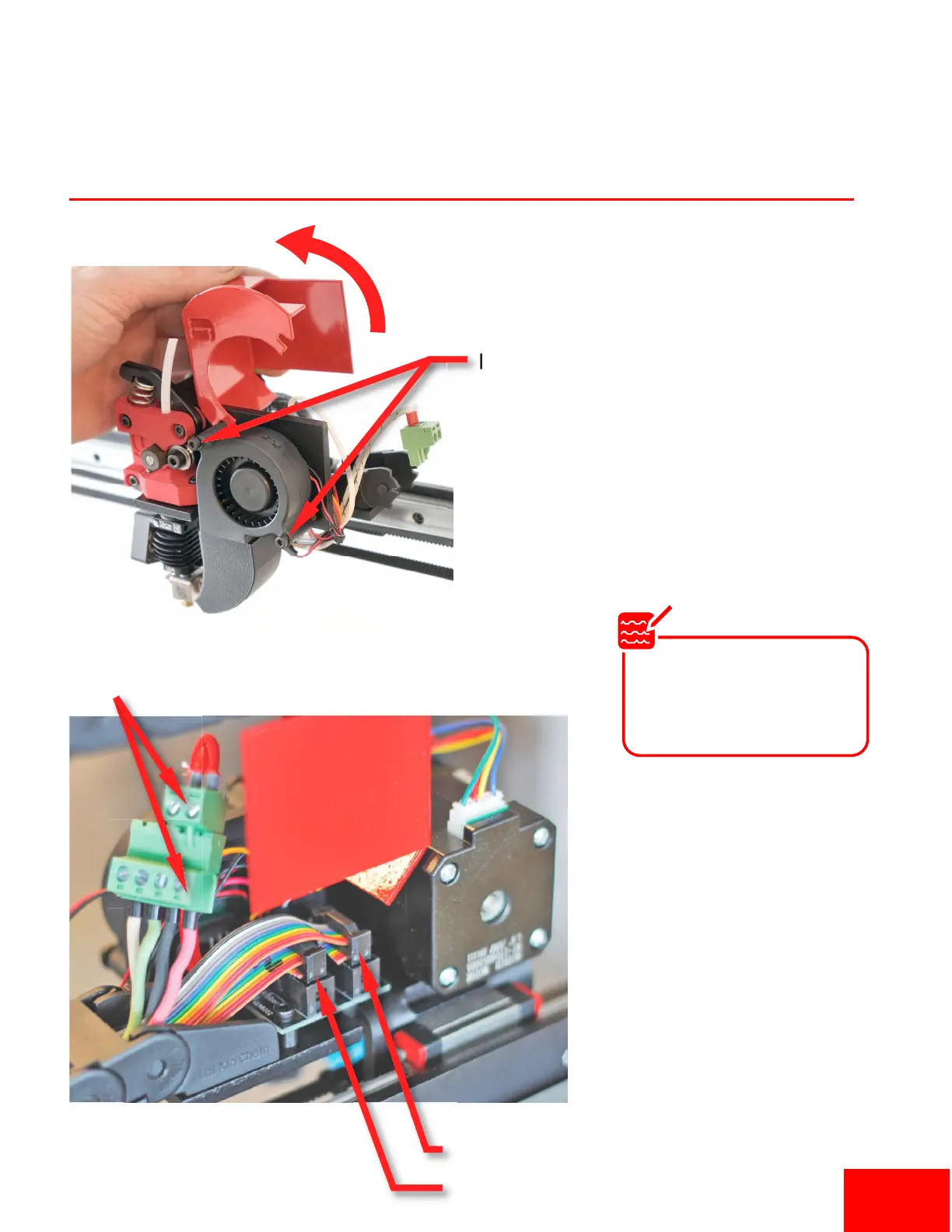
Plug In Extruder
Loosen
Flip Up
Ribbon Cable #1
Ribbon Cable #2
Plug green connector to red/black wires for
hotend #1 and green/white wires for
hotend #2 (for dual extruder setups).
1. Loosen the two bolts on the
extruder blower fan to gain access
to the electronics.
2. Plug in the ribbon cable #1 into the
socket closest to the motor and #2
in the other socket.
3. Plug the green extruder heang
wire connector into the 4-pin green
connector. Make sure to plug it into
the black and red wires for a single
extruder.
4. For dual extruders plug hotend #1
into the red/black wires and hotend
#2 in the green/white wires.
5. Rotate metal cover back down when
finished, and ghten bolts.
The green and white
wires are for the second
hotend on dual extruder
setups..
Note
Pg 2


 To Next Page