Pg 5
gMax Initial Run (Required)
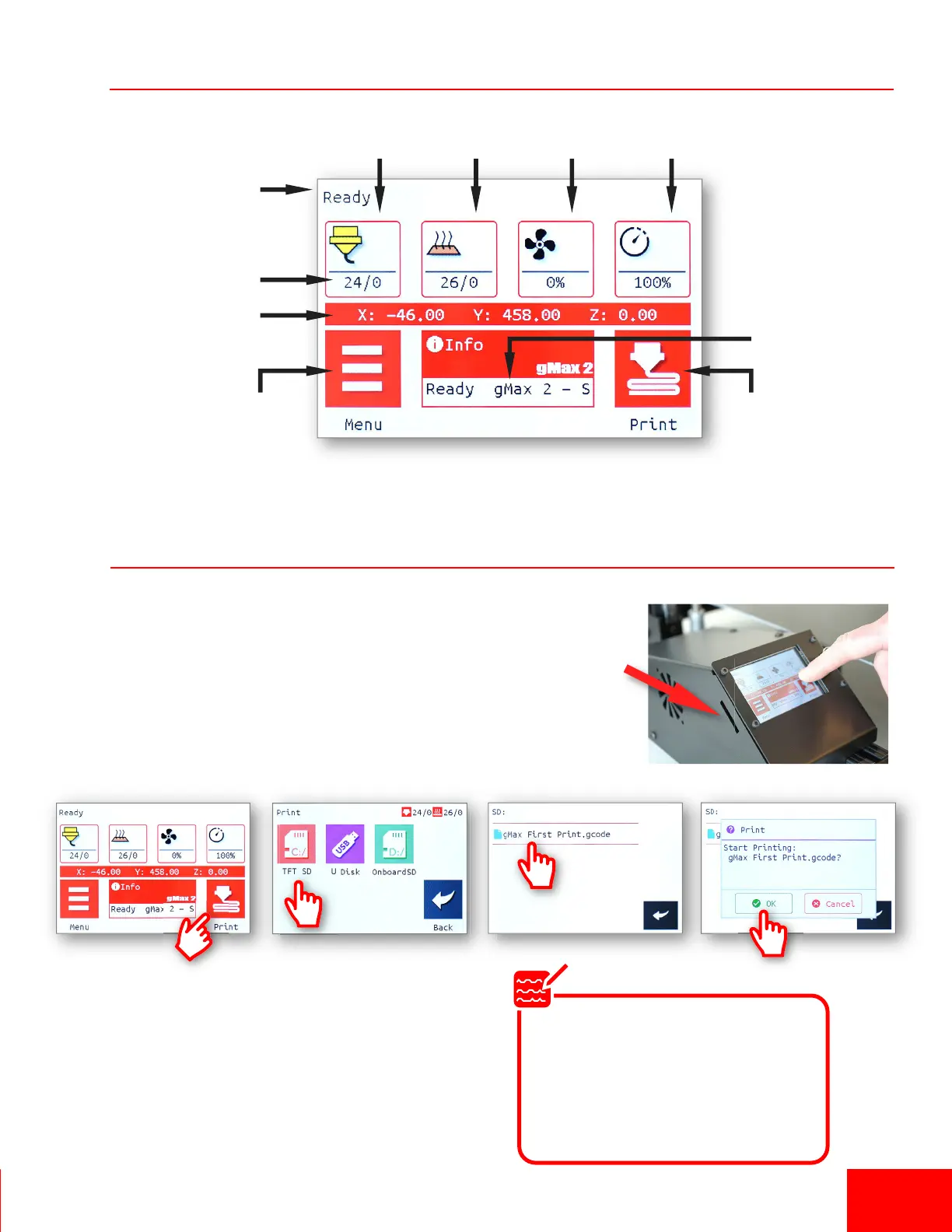
LCD Screen Breakdown
1. You must run the supplied gcode file to test your gMax printer
aer transport. Slide the SD card (upside-down) into the le side
of the LCD screen.
2. On the LCD screen, the noficaon area will say “Card Inserted”.
If not, try removing the SD card and reinserng it and make sure
the “lock” is in the off posion on the side of the card.
3. Select “Print > TFT SD > gMax IniƟal Setup”.
The test file will perform several funcons:
• X, Y, Z Axis Motor test (slow and fast)
• Mulple Homing Test
• Extrusion test (with heat)
• Fan test then cooldown
Heated
Bed Temp
Hotend #1
Temp
Noficaons
Sengs
Menu
Fan
Speed
Printer
Speed
Coordinates of
Extruder (X, Y, Z)
Current Temp /
Target Temp
Print
Menu
Noficaons
The gMax “Initial Run Test File”
should take about 15 minutes
to complete. If the printer fails
during any of these tests or the
bed probe doesn’t drop/raise
contact support.
Note


 To Next Page