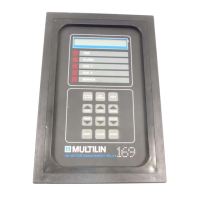
3 SETUP AND USE
g
GE Power Management
27
No. Name Description
EFFECT:
Pressing this key will put the relay into SETPOINTS mode. The flash message,
SETPOINTS HAS SIX
PAGES OF DATA
is displayed for 2 seconds. The beginning of page 1 of SETPOINTS mode is then shown:
PAGE 1: SETPOINT VALUES
MOTOR AMPS SETPOINTS
USE:
This key can be pressed at any time, in any mode, to view or alter relay setpoints. To
go from page to page the PAGE UP and PAGE DOWN keys can be used. To go from line to
line within a page the LINE UP and LINE DOWN keys can be used. To alter a setpoint, the
VALUE UP and VALUE DOWN keys can be used. All setpoints will increment and
decrement to pre-determined limits. When the desired value is reached, the STORE key
must be used to save the new setpoint. If an altered setpoint is not stored the previous
value will still be in effect. If the Access jumper is not installed a STORE will not be allowed
and the flash message "ILLEGAL ACCESS" will be displayed for 2 seconds.
FUNCTION:
The HELP key allows the user to obtain information on the function and use of
each of the other keys on the keypad and on each of the ACTUAL VALUES, SETPOINTS,
and TRIP/ALARM messages.
EFFECT:
Pressing this key will put the relay into HELP mode. If this key is pressed with
the first line of a page (i.e. a page header) on the display the message,
Press KEY of interest or
HELP again for details
will be displayed. To obtain information on the function of a particular key, the key must be
pressed. To obtain information on the previously displayed ACTUAL VALUES,
SETPOINTS, or TRIP/ALARM message the HELP key should be pressed again. If this key
is pressed with any other message shown on the display, only information on the previous
line will be available.
3HELP
USE:
This key will have no effect when a flash message or HELP message is shown on
the display. Once HELP mode is entered the LINE UP and LINE DOWN keys can be used
to view the HELP message. The CLEAR key is used to exit from HELP mode and return to
the previous display mode. The ACTUAL VALUES and SET POINTS keys can also be
used to exit HELP mode.
FUNCTION:
The PAGE DOWN and PAGE UP keys allow the user to scan the next or
previous pages of either ACTUAL VALUES or SETPOINTS modes. If either key is held for
more than 1/2 second the next or previous pages will be selected at a fast rate.
EFFECT:
Pressing the PAGE DOWN key will cause the display to show the first line of the
next page of information. Pressing the PAGE UP key will cause the display to show the first
line of the previous page.
4,5 PAGE
UP
PAGE
DOWN
USE:
These keys can be used any time the relay is in either the ACTUAL VALUES or
SETPOINTS modes.
6, 7 LINE UP
LINE DOWN
FUNCTION:
The LINE DOWN, and LINE UP keys allow the user to scan the next or
previous lines of the currently selected page. If either key is held for more than 1/2 second
the next or previous lines will be selected at a fast rate.


 To Next Page