EasyManua.ls Logo

GE 19208 - User Manual

GE 19208
9 pages
Print Icon
To Next Page IconTo Next Page
Loading...
GE Model 19208
www.jascoproducts.com
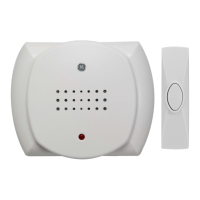
Wireless Door Chime Kit
Installation Instructions for Battery Operated
Wireless Door Chime Kit
Prior to Installation the Try-Me feature must be removed.
1. Remove the battery cover on the chime.
2. Remove the white Styrofoam block
3. Unplug the red and black wires inside the battery compartment.
4. Remove the battery pack and discard appropriately.
Chime components
Required Tools: Small flat blade screwdriver, drill, 1/16” and 5/32” drill bits,
and phillips screwdriver.
Included Hardware:
(2) Plastic screw anchors
(2) 4x20mm screws
(2) 3x20mm screws
(2) Double sided adhesive pads
Styrofoam
Block
House Code
Door
Try-Me Wires
Question and Answer IconNeed help?

Do you have a question about the GE 19208 and is the answer not in the manual?

Summary

Installation Instructions

Prior to Installation

Steps to remove the Try-Me feature before initial installation.

Chime Tune Setting

Configure Chime Melody

Instructions to set the desired chime sound using dip switches.

Setting The House Security Code

Adjusting Security Code Jumpers

Guide to changing house security code via jumpers on chime and button.

Push Button Mounting Instructions

Mounting the Push Button

Steps for installing the push button transmitter, including placement.

Chime Unit Mounting Instructions

Mounting the Chime Receiver

Procedures for securely attaching the chime unit to a wall.

Operation and Troubleshooting

Basic Usage and Issue Resolution

How to operate the chime and common troubleshooting steps for malfunctions.

GE 19208 Specifications

General IconGeneral
Caller IDYes
DisplayLCD
Handset LocatorYes
SpeakerphoneYes
Phonebook Entries50
Product TypeCordless Phone

Related product manuals