6
Programming Your Remote
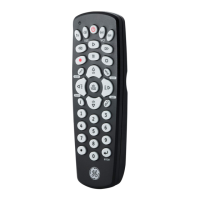
Your GE branded Universal Remote Control is designed
to control multiple audio/video devices using only one
remote. To use this remote, you will need to program
the remote to control your devices. There are two
different methods you can use to program the remote
Direct Code Entry or Auto Code Search.
• The Direct Code Entry method is the
recommended method as it is the simplest and
quickest method in most cases.
• The Auto Code Search method searches through
all the codes in the remote to find a code for
your device.
Note: This remote comes preprogrammed for Roku
®
boxes and
Samsung TVs. Press TV for Samsung TVs and strm for Roku boxes.
Direct Code Entry (Recommended)
1. Locate the Code List included with
your remote. Find the section for the
type of device you wish to control, for
example tv, dvd, cble, strm. Locate the
brand of your device and circle all the
remote codes for the brand.
2. Press and hold down the SETUP button
on the remote until the red light on the
remote control turns on. Release the
SETUP button. The red light
will remain on.
Note: The red light will either be a small light at the
top of the remote or the power ON/OFF button.
3. Press and release the device button on
the remote for the type of device you
wish to control, for example tv, dvd,
cble, strm. The red light will blink once
and remain on.
Note: Any of the device buttons on the remote can
be programmed to control any of your devices. For
example, you can use the CBL device button on
the remote to control a Satellite Receiver, Digital
Converter Box, Streaming Media Player or any
device category in the Code List.



 To Next Page