5
About the controls features. GEAppliances.com
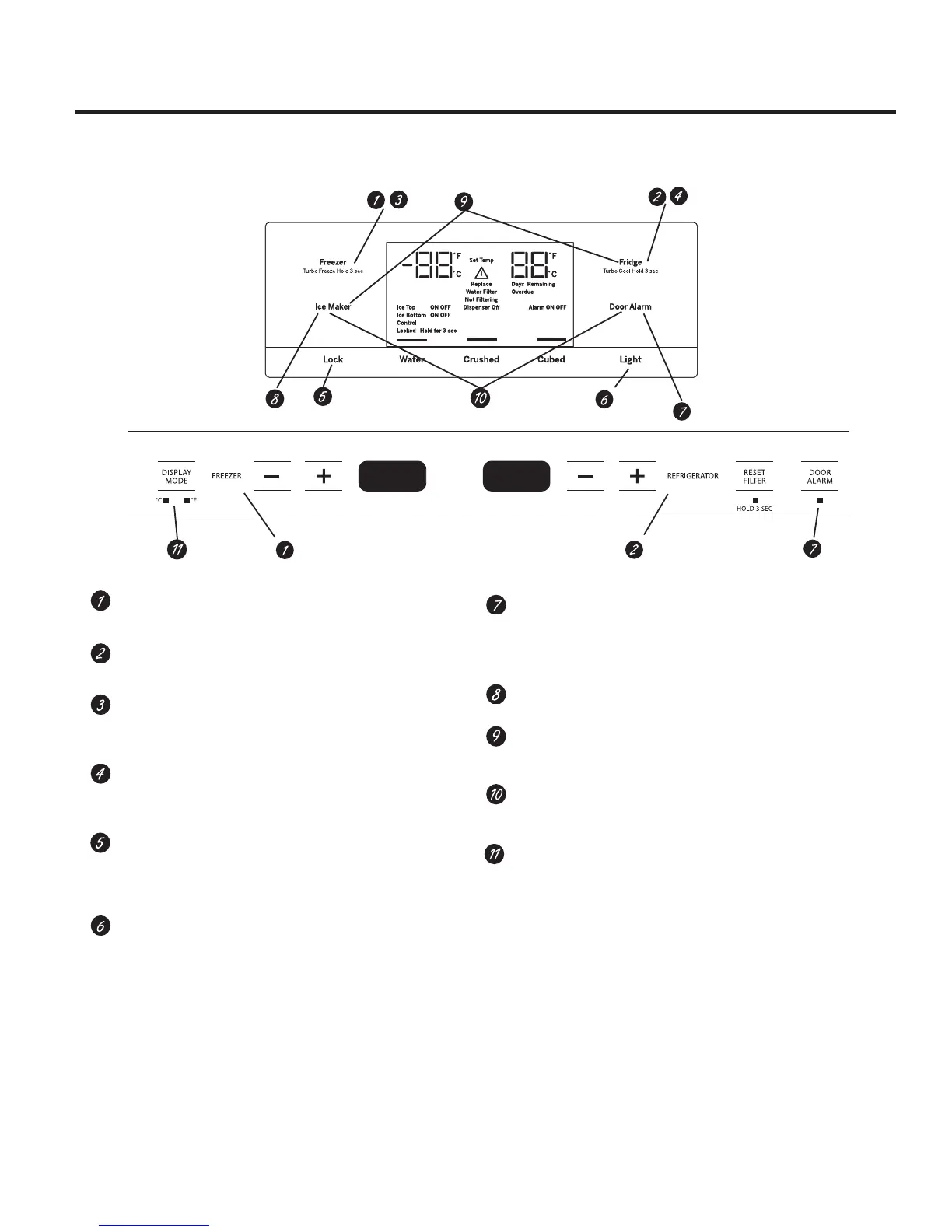
Refrigerator temp control
Adjust freezer compartment temperature.
Fresh food temp control
Adjust fresh food compartment temperature.
TurboFreeze™ setting
Activate TurboFreeze to quickly restore freezer
temperatures after frequent door openings.
TurboCool™ setting
Activate TurboCool to quickly restore fresh food
temperature after frequent door openings.
Lock controls
Press and hold 3 seconds to lock out ice and water
dispenser
and all feature and temperature buttons.
LED dispenser light
LED lighting that can be turned on/off to light your
dispenser.
Door Alarm
Sounds to alert when the freezer or fresh food doors
have been open for more than 2 minutes. Press and hold
Door Alarm pad and it will toggle the sound between low,
high and off.
Ice maker setting
Turn your ice makers on/off.
Cooling system On/Off
Press and hold Fridge & Ice Maker simultaneously for 3
seconds to turn the cooling system on or off.
Metric/English units
Press and hold Ice Maker & door alarm simultaneously for
3 seconds to switch between Metric & English units.
Display Mode, °C/°F
Change temperature display between Fahrenheit and
Celsius.
Not all features available on all models.


 To Next Page