Power Failure Protection
This
radio is
equipped
with a
microcomputer memory
holding
system
that can be
powered
(optional)
with 2
customer installed 9-volt batteries. When
normal household
power
is
interrupted,
or AC line cord is
unplugged,
the batteries will
power
the radio
to
keep
track
of
time,
and maintain radio stations
plus
alarm
times
programmed
into
memory.
When
on
battery power,
the
digital display
does
not
light,
nor will
the radio
or
alarm
operate.
Norma!
operation
will
resume after AC
power
is restored
so
you
will not
have to
re-program
any
function
or
set time.
Install
batteries as follows:
1.
Remove
battery compartment
door
(located
on
bottom
of
radio) by applying
thumb
pressure
to
area indicated
on
battery
door and then
sliding
door towards back
of
cabinet.
2.
Connect a 9-volt
battery
to each
battery
connector
plug.
The
power
failure
protec-
tion circuit will not
operate
unless both batteries
are installed.
3.
Insert batteries in
compartment
and
repiace compartment
door.
The use of
Alkaline batteries NEDA 1604A is
recommended
for
longer memory
hoiding
time.
NOTE:
Carbon zinc batteries NEDA
1604
may
be used but
memory holding
time
will
be
substantially
reduced.
Memory
holding
time for fresh
alkaline batteries will be
up
to
8
hours,
which
should
take care of
short nuisance
type
AC
power
failures.
To
preserve battery
life,
the
radio
should
remain
plugged
into
an AC outlet. The
batteries should be removed
if
the radio
is
unplugged
for
lengthy periods.
As
batteries
get
older,
their
voltage drops
and the
radio
may
not
be able to hold
memory.
Be sure and
replace your
batteries
periodically.
Batteries are
not
included with this
radio.
Power
Failure
Indicator
When AC
power
is restored
(or reconnected):
Digital
Display
will
blink
to indicate that a
power interruption
occurred
(unless optional
batteries are
installed)
and
Time,
Alarm and
Station
Memory
must be
reprogrammed.
Station
Memory Log
Jot down the
Memory position
and
frequency
of each
AM or
FM
station
you
have stored
into
your
radio's
memory
on a chart as shown below.
MEMORY
FREQUENCY
STATION
POSITION
(CALL
NUMBERS)
CALL LETTERS
LOCATION
pe
poe
PT
po
Note:
For
convenience
in
Jocating
broadcast
stations
in
your reception
area,
refer
to the
WHITE'S RADIO LOG for an
up-to-date
listing
of all
Canadian and United States
AM/FM Stations
referenced
by
location,
frequency (call numbers),
and cail
letters. The
WHITE'S RADIO LOG
is
part
of
COMMUNICATIONS WORLD
Magazine,
which can be
purchased
from most
local newsstands
or write to.
COMMUNICATIONS
WORLD,
Attn.: D.
Gabree,
380
Lexington
Avenue, N.Y., N.Y.,
10017
(Cost $2.00)
8
Brightness
Control
The
Digital Display
(2)
can be
adjusted
for
optimum
brightness
in
any
room
day
or
night
with
the DISPLAY
BRIGHTNESS
control
(12).
Antennas
AM
—
A
built-in
ferrite rod antenna
eliminates the need for an outside antenna for AM
reception.
Rotating
the radio
slightly may improve reception
for distant AM
stations.
FM
—
The
power
cord acts as
your
FM
antenna when the
connecting
bar
is
in contact with
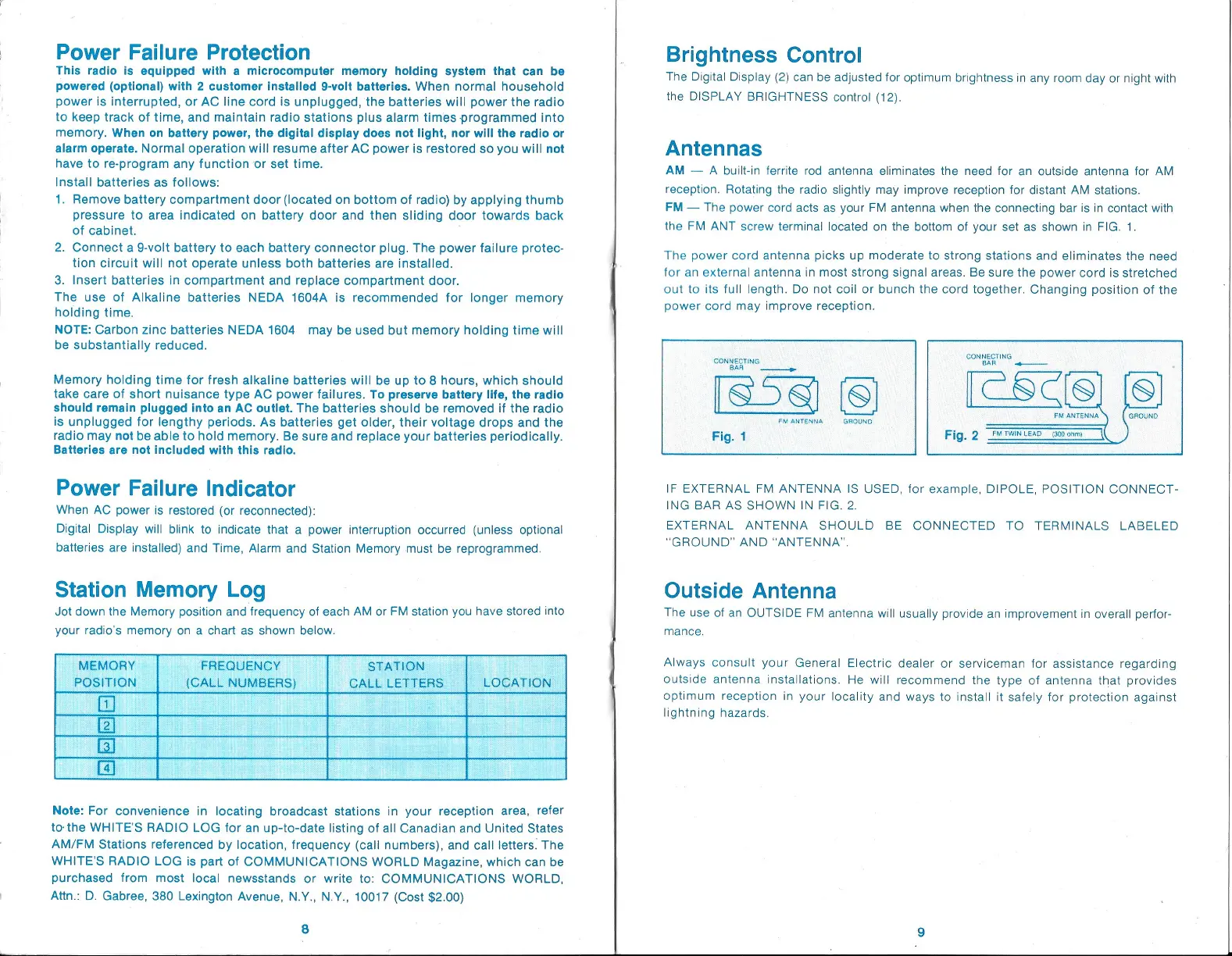
the FM ANT
screw
terminal located on the bottom of
your
set as shown in
FIG.
1.
The
power
cord
antenna
picks up
moderate to
strong
stations
and eliminates the
need
for
an external antenna in most
strong signal
areas. Be
sure the
power
cord is
stretched
out to its full
length.
Do not coil or bunch the cord
together.
Changing
position
of the
power
cord
may improve reception.
CONNECTING
CONNECTING
BAR
a
BAR
ge
[s5g
S
oy
aurewna
ceounn
FM
ANTENNA
GROUND
Fig.
2
FM
TWINLEAD
(300 chmy
IF
EXTERNAL FM ANTENNA IS
USED,
for
example,
DIPOLE,
POSITION
CONNECT-
ING
BAR
AS SHOWN
IN
FIG. 2.
EXTERNAL ANTENNA SHOULD BE
CONNECTED TO
TERMINALS
LABELED
“GROUND” AND “ANTENNA”.
Outside
Antenna
The use of an
OUTSIDE FM
antenna will
usually provide
an
improvement
in
overall
perfor-
mance.
Always
consult
your
General
Electric dealer
or serviceman for
assistance
regarding
outside
antenna
installations. He will
recommend the
type
of antenna that
provides
optimum
reception
in
your
locality
and
ways
to install it
safely
for
protection
against
lightning
hazards.


 To Next Page
 Loading...