EasyManua.ls Logo

GE 7-4870 - Page 4

GE 7-4870
11 pages
Print Icon
To Next Page IconTo Next Page
To Previous Page IconTo Previous Page
Loading...
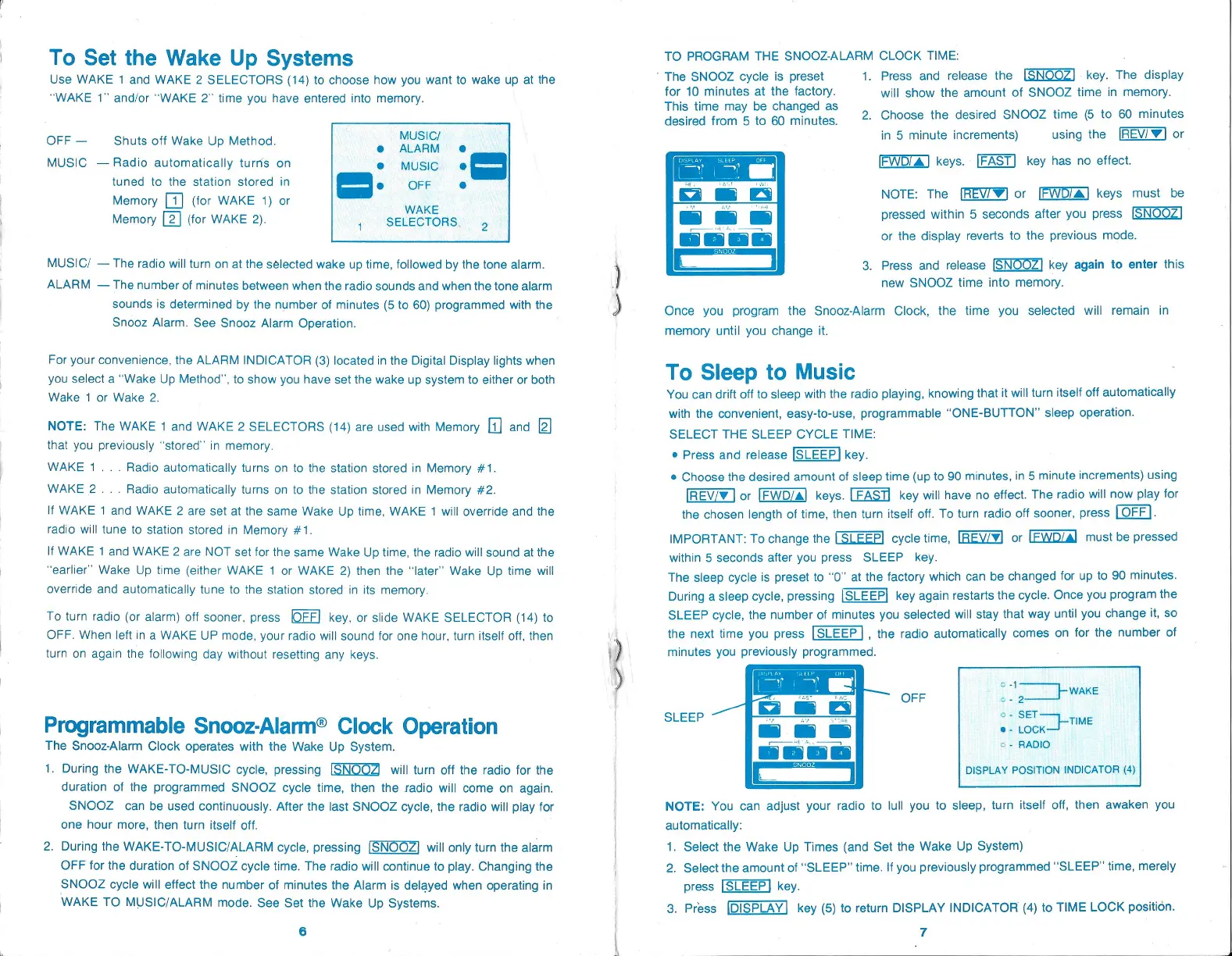
To Set the Wake
Up Systems
Use WAKE 1
and WAKE 2
SELECTORS
(14)
to choose how
you
want to
wake
up
at the
“WAKE 1”
and/or “WAKE 2”
time
you
have entered into
memory.
_
MUSIC/
OFF
Shuts off Wake
Up
Method.
e ALARM
MUSIC
Radio
automatically
turns on
tuned to the station stored
in
=.
e
Memory
(for
WAKE
1)
or
WAKE
Memory
[2]
(for
WAKE
2).
SELECTORS
MUSIC/
The
radio
will
turn
on at the selected
wake
up
time,
followed
by
the tone alarm.
ALARM
The number of
minutes between
when the radio sounds and when the
tone alarm
sounds is
determined
by
the number of
minutes
(5
to
60) programmed
with
the
Snooz
Alarm. See
Snooz Alarm
Operation.
For
your
convenience,
the ALARM
INDICATOR
(3)
located
in
the
Digital Display lights
when
you
select a
“Wake
Up
Method’,
to show
you
have
set the wake
up system
to either or both
Wake
1
or Wake 2.
NOTE: The WAKE 1
and WAKE 2
SELECTORS
(14)
are used
with
Memory
and
that
you
previously
‘stored’ in
memory.
WAKE 1...
Radio
automatically
turns on to the station
stored
in
Memory
#1.
WAKE 2...
Radio
automatically
turns on to the station stored in
Memory
#2.
If
WAKE
1
and
WAKE 2 are
set at the same Wake
Up
time,
WAKE 1 will
override and the
radio
will
tune to
station stored
in
Memory
#1.
lf
WAKE
1
and WAKE 2
are NOT set for
the same Wake
Up
time,
the
radio will
sound
at the
“earlier” Wake
Up
time
(either
WAKE 1
or WAKE
2)
then the “later” Wake
Up
time
will
override and
automatically
tune to
the station stored in
its
memory.
To turn
radio
(or alarm)
off
sooner,
press
OFF
key.
or slide WAKE SELECTOR
(14)
to
OFF.
When left
ina WAKE UP
mode,
your
radio will
sound for one
hour,
turn
itself
off,
then
turn on
again
the
following day
without
resetting any keys.
Programmable
Snooz-Alarm® Clock
Operation
The Snooz-Alarm
Clock
operates
with the Wake
Up System.
1.
During
the
WAKE-TO-MUSIC
cycle,
pressing
will
turn off
the radio for the
duration of
the
programmed
SNOOZ
cycle
time,
then the radio will come
on
again.
SNOOZ
can be used
continuously.
After the last SNOOZ
cycle,
the
radio
will
play
for
one
hour
more,
then turn itself
off.
2.
During
the
WAKE-TO-MUSIC/ALARM
cycle, pressing
will
only
turn
the alarm
OFF for
the duration of
SNOOZ
cycle
time. The radio will
continue to
play. Changing
the
SNOOZ
cycle
will
effect
the number of
minutes the Alarm is
delayed
when
operating
in
WAKE
TO
MUSIC/ALARM
mode. See Set the
Wake
Up Systems.
6
“we
TO PROGRAM
THE SNOOZ-ALARM
CLOCK
TIME:
'
The SNOOZ
cycle
is
preset
1.
Press and release
the
[SNOOZ]
key.
The
display
for 10 minutes
at the
factory.
will show
the amount of SNOOZ
time
in
memory.
This
time
may
be
changed
as
/
:
:
desired from 5
to
60
minutes.
2. Choose
the desired SNOOZ
time
(5
to 60
minutes
in
5
minute
increments)
using
the
[REV/'W] or
keys.
[FAST]
key
has
no effect.
NOTE:
The
[REV7W]
or
[FWO/a]
keys
must be
pressed
within 5 seconds
after
you press
or the
display
reverts to
the
previous
mode.
iene
ag
laa laa
=
-
2
-
2
@
= =
i
2
fo |
a
SNOOZ
Once
you program
the Snooz-Alarm
Clock,
the time
you
selected
will remain
in
3.
Press and
release
[SNOOZ]
key again
to enter
this
new SNOOZ
time
into
memory.
memory
until
you change
it.
To
Sleep
to
Music
You can drift off
to
sleep
with the radio
playing,
knowing
that
it will
turn itself off
automatically
with
the
convenient,
easy-to-use, programmable
“ONE-BUTTON”
sleep operation.
SELECT THE
SLEEP
CYCLE
TIME:
*
Press and
release
key.
¢
Choose
the desired
amount of
sleep
time
(up
to 90
minutes,
in
5
minute
increments)
using
or
keys.
key
will have
no effect.
The radio
will now
play
for
the chosen
length
of
time,
then turn itself off.
To turn radio
off
sooner,
press
LOFF].
IMPORTANT:
To
change
the
[SLEEP]
cycle
time, [REVZ¥]
or
[FWD/a)
must be
pressed
within 5 seconds
after
you
press
SLEEP
key.
The
sleep cycle
is
preset
to “0” at the
factory
which
can be
changed
for
up
to
90
minutes.
During
a
sleep cycle, pressing
[SLEEP]
key again
restarts
the
cycle.
Once
you
program
the
SLEEP
cycle,
the number of
minutes
you
selected
will
stay
that
way
until
you
change
it,
so
the
next time
you press
[SLEEP],
the
radio
automatically
comes on
for the
number of
minutes
you previously programmed.
OFF
SLEEP
DISPLAY POSITION
INDICATOR
(4}
NOTE:
You
can
adjust your
radio to lull
you
to
sleep,
turn itself
off,
then
awaken
you
automatically:
1.
Select the Wake
Up
Times
(and
Set
the Wake
Up System)
2. Select
the amount of “SLEEP”
time.
If
you previously
programmed
"SLEEP"
time,
merely
press
[SLEEP]
key.
3. Press
[DISPLAY]
key (5)
to return
DISPLAY INDICATOR
(4)
to
TIME LOCK
position.
7

Related product manuals