EN
EN
Setting the countdown timer
1. Press TIMER ON/OFF to enter timer setting
mode.
The red TIMER icon will flash on the display.
2. To select countdown time, use the
/ buttons to select the correct time.
Press and hold to fast reverse or fast forward
countdown time.
3. Press TIMER ON/OFF again to activate the
timer. The unit will beep twice to indicate
countdown has started. Remaining time shows
on the display.
The red TIMER icon will remain lit during
countdown.
4. Press TIMER ON/OFF to turn timer off at any
time or after it has sounded.
Display
10
Counter timer
General Controls
9
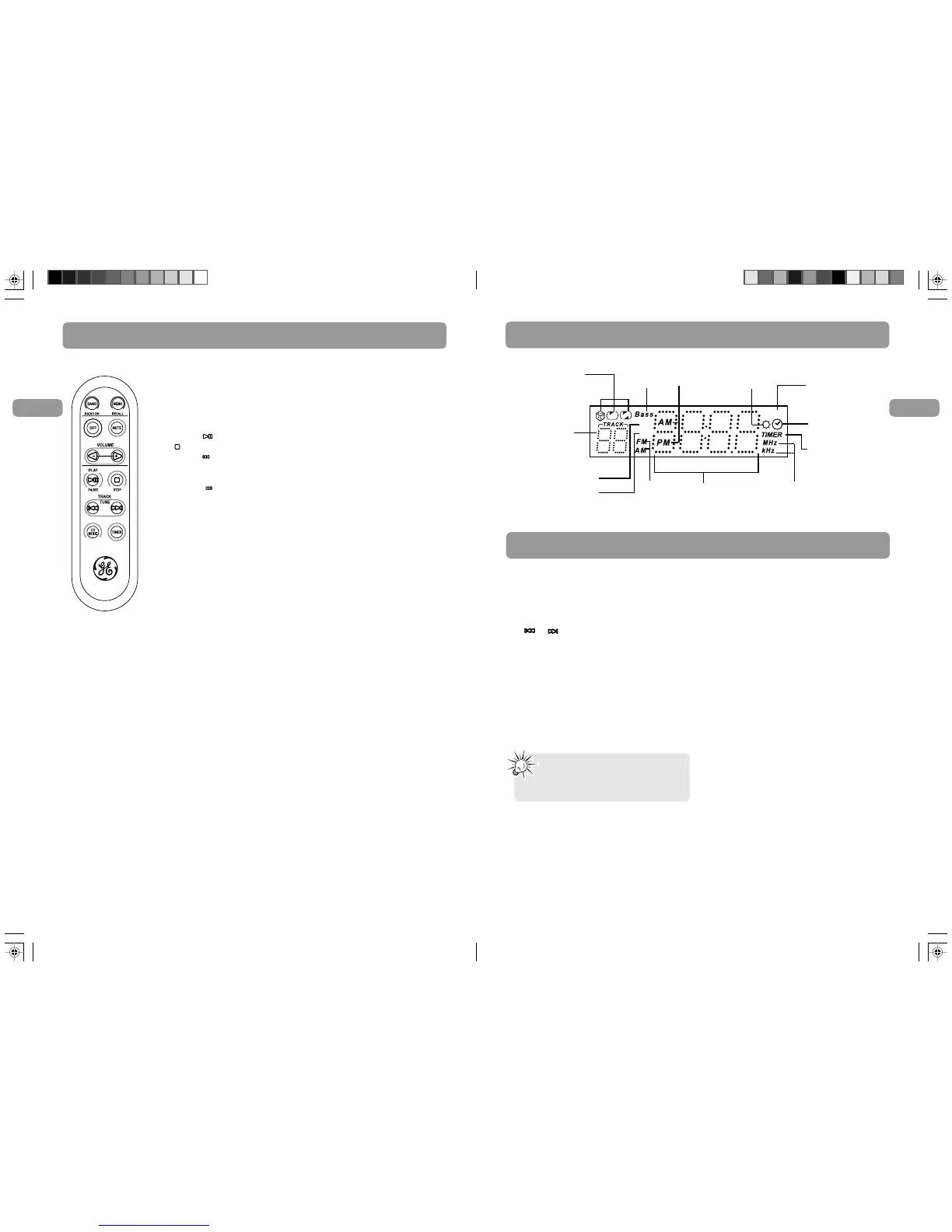
The remote control
RADIO ON / BAND - Turns on the radio, selects radio bands (AM/FM/TV)
MEMO RECALL - Recalls preset radio stations.
OFF - Turns off the unit.
MUTE - Mutes sound.
VOLUME + / - - Adjusts volume
PLAY/PAUSE - Starts and Pauses disc playback.
STOP - Stops disc playback.
TRACK TUNE - Tunes down radio frequency, selects the previous TV and
weather channel, selects previous CD disc tracks, searches backwards through a
track.
TRACK TUNE - Tunes up radio frequency, selects the next TV and weather
channel, selects next CD disc tracks, searches forward through a track.
CD MODE - Selects among CD playback modes.
TIMER - Turns timer on / off.
Inserting batteries into remote control
The remote control must be inserted with 2 “AAA” batteries (not included)
prior to use. Follow the steps below to ensure correct installation.
1. Slide the battery compartment lid open by pushing it in the direction shown
by the arrow on the back of the remote control.
2. Before inserting the batteries, observe the polarities (that is, + and -) of the
batteries, then relate the polarities to the engraved diagram inside the
battery compartment. Now insert the batteries.
3. After installation of the batteries, replace and fit the lid to cover the
batteries. You should hear a small “CLICK” sound when the lid is locked in
place.
Volume
Wx
TV
Radio frequency
unit
AM/PM time
indicator
Time/ countdown time /
radio frequency
Radio
band
In CD mode, shows
track number;
In tuner mode,
shows memory
location.
Playback modes:
Shuffle, repeat track,
repeat disc
Daylight Saving
Time indicator
Volume indicator
In clock setting mode
indicator
Countdown timer
indicator
Bass
indicator
Weather Band
TV Band
Note:
The radio or CD player is muted when
alarm turns on.


 To Next Page