CHAPTER 4: SETPOINTS DEVICE
845 TRANSFORMER PROTECTION SYSTEM – INSTRUCTION MANUAL 4–29
WiFi Quick Start Procedure
The following provides the settings information and instructions to quickly setup WiFi.
Required Equipment
• 8-Series Relay with WiFi functionality
•PC with WiFi
•Access Point
Quick Start Procedure
1. The PC WiFi Network Settings are as follows:
Passphrase: provided with the 8-Series relay
2. The Access Point Settings are given below:
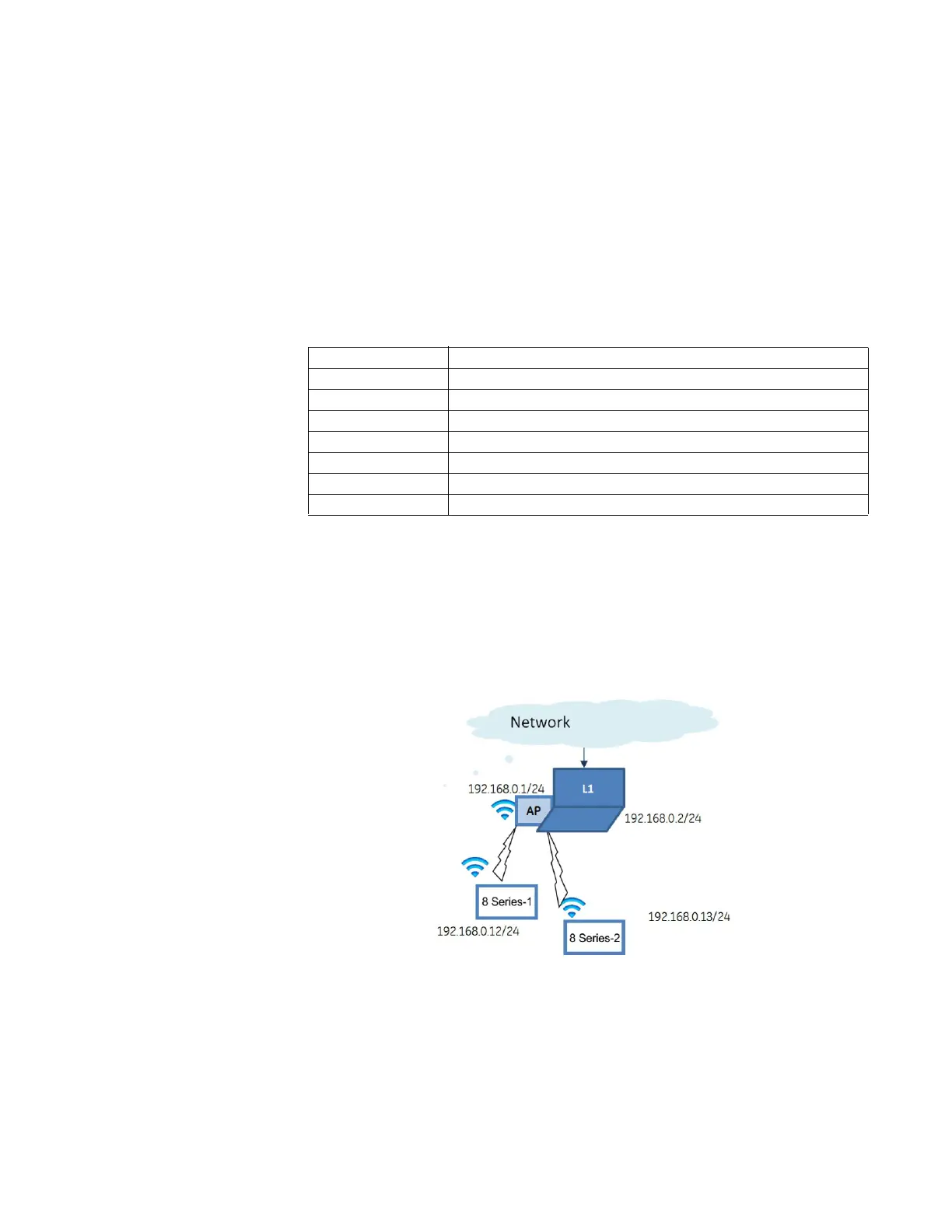
3. If the 8-Series relay(s) are in range, they automatically connect to the configured
Access Point.
4. Start EnerVista on a PC and use the Discover function, all relays within range appear
and are populated in EnerVista for initial configuration and commissioning.
5. Once the relay is configured, change the 8-Series relay default WiFi SSID and
Passphrase settings before the relay goes into service.
Figure 4-11: Example of WiFi Deployment
IP address: 192.168.0.1
Subnet Mask: 255.255.255.0
SSID: same as entered on the PC (SSID provided with the 8-Series relay)
Broadcast disabled
Security type: WPA2-PSK (WPA2-Personal)
Encryption: AES
Passphrase: same as entered on the PC (Passphrase provided with the 8-Series relay)
DHCP enabled range of 192.168.0.12 to 192.168.0.253


 To Next Page