About the controls on the air conditioner
Vent Control
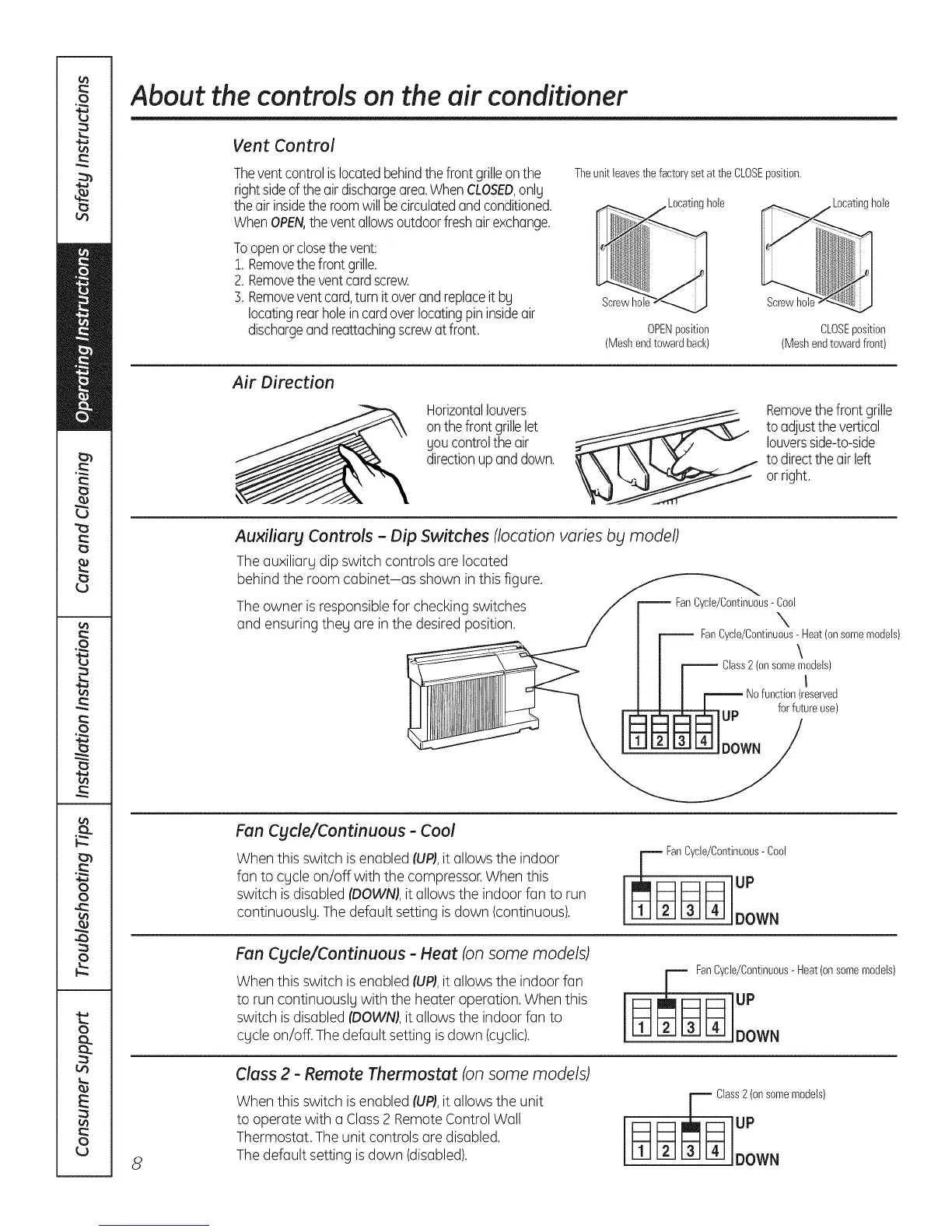
Theventcontrolislocatedbehindthe frontgrilleonthe
rightsideof theairdischargearea.WhenCLOSED,onlg
theairinsidetheroomwillbecirculatedandconditioned.
WhenOPEN,theventallowsoutdoorfreshairexchange.
Toopenorclosethevent:
1.Removethefrontgrille.
2. Removetheventcordscrew.
5. Removeventcard,turnit overandreplaceit bg
locatingrearholeincardoverlocatingpininsideair
dischargeand reattachingscrewat front.
Theunitleavesthe factoryset atthe CLOSEposition.
ocatinghole
OPENposition
(Meshendtowardback)
hole
Screwhal
CLOSEposition
(Meshendtowardfront)
Air Direction
Horizontallouvers
onthefront grillelet
goucontroltheair
directionupanddown.
Removethefront grille
toadjustthe vertical
louversside-to-side
todirectthe airleft
or right.
Auxiliary Controls - Dip Switches (location varies bg model)
The auxiliarg dip switch controls are located
behind the room cabinet-as shown in this figure.
The owner isresponsiblefor checking switches
and ensuringtheg are in the desired position.
FanCycle/Continuous- Cool
X
FanCycle/Continuous- Heat(onsomemodels)
\
8
Fan Cycle/Continuous - Cool
When this switch isenabled (UP),it allows the indoor
fan to cgcle on/off with the compressor.When this
switch isdisabled (DOWN),it allows the indoor fan to run
continuously. Thedefault setting is down (continuous).
v FanCycle/Continuous-Cool
DOWN
Fan Cgcle/Continuous - Heat (onsome models)
When this switch isenabled (UP),it allows the indoor fan
to run continuously with the heater operation. When this
switch isdisabled (DOWN),it allows the indoor fan to
cgcle on/off. Thedefault setting is down (cgclic).
anCycle/Continuous-Heat(onsomemodels)
Class 2 - Remote Thermostat (on some models)
When this switch isenabled (UP),it allows the unit
to operate with a Class2 Remote Control Wall
Thermostat. The unit controls are disabled.
The default setting isdown (disabled).
Chss2(onsomemodels)


 To Next Page
 Loading...