EasyManua.ls Logo

GE Crystal HD - User Manual

GE Crystal HD
6 pages
Print Icon
To Next Page IconTo Next Page
Loading...
Crystal HD
User Manual
Maximize the number of channels by testing
the antenna in several locations. Be sure
to run a TV channel scan in each position.
Refer to your TV’s instruction manual if
necessary.
Position the antenna as high as possible or
near a window for best performance.
Visit www.antennaweb.org to determine the
available television stations and broadcast
tower locations in your area.
Perform a TV channel scan.
1. Connect
2. Place
Helpful Antenna Tips
QUESTIONS? ISSUES?
CALL OUR U.S.-BASED EXPERTS AT
1-800-654-8483
3. Scan
See reverse for easy-to-follow
instructions and exclusive deals.
MADE IN TAIWAN
GE is a trademark of General Electric Company and is
under license by Jasco Products Company LLC,
10 E. Memorial Rd., Oklahoma City, OK 73114.
This Jasco product comes with a limited-lifetime
warranty. Visit www.byjasco.com for warranty details.
Questions? Contact our U.S.-based Consumer Care at
1-800-654-8483 between 7AM-8PM, M-F, Central Time.
12534/34134/35848/48732 V2 01/22
Questions? Contact our U.S.-based
Consumer Care at 1-800-654-8483
between 7AM–8PM, M–F, Central Time.
Please call before
returning to store
CALL
CHANNEL SEARCH
Scanning for channels
73% .
1. Open the TV’s setup or settings menu.
2. Select scan, autotune, channel search or
channel scan, making sure it’s set to scan
for over-the-air channels rather than cable.
3. Wait for the TV to complete the
channel scan.
Tip 1: Consult the TV manual or contact the TV’s
manufacturer for detailed instructions.
Tip 2: Rescan for over-the-air channels anytime you
move the antenna.
Connect the antenna to the TV.
Connect the power supply to the
antenna and a wall outlet.
Place the antenna on a at surface
in your desired location.
Extend the dipoles, as needed,
for best reception.
Antenna
Antenna
Attach the antenna
stand for tabletop
placement.
Power supply
HDTV
HDTV
Tabletop
Tabletop
Adjustable dipoles
OR
PLEASE NOTE: Use only the supplied AC adapter.
Connect to
TV’s coax
Question and Answer IconNeed help?

Do you have a question about the GE Crystal HD and is the answer not in the manual?

Summary

Antenna Connection Guide

Connect Antenna to TV

Connect the antenna's coaxial cable to the TV's input port.

Connect Power Supply

Connect the AC adapter to the antenna and a wall outlet.

Antenna Placement Instructions

Tabletop Placement

Place the antenna on a flat surface in the desired location.

Adjustable Dipoles

Extend the antenna's dipoles as needed for optimal signal reception.

TV Channel Scanning Process

Initiate Channel Scan

Access TV settings and select channel scan for over-the-air channels.

Scan Optimization Tips

Consult TV manual and rescan after moving antenna for best results.

Antenna Performance Tips

Maximizing Channels and Positioning

Test various locations and position antenna high or near window for best performance.

Using Online Resources

Utilize antennaweb.org to identify available stations and tower locations.

Overview

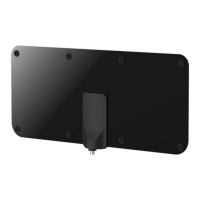
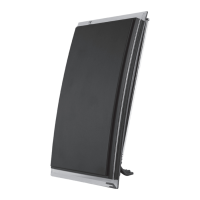
The document is a user manual for a "Crystal HD" antenna, likely an indoor digital TV antenna, given its design and instructions for tabletop placement. The GE logo on the cover indicates it's a product under the General Electric brand, manufactured under license by Jasco Products Company LLC.

Function Description:

The Crystal HD antenna is designed to receive over-the-air (OTA) television channels, providing access to free digital broadcasts. It connects directly to a television and requires a power supply to operate, suggesting it's an amplified antenna, which typically enhances signal reception, especially for distant or weaker signals. The primary function is to capture broadcast signals and transmit them to a TV for viewing, eliminating the need for cable or satellite subscriptions for local channels.
Important Technical Specifications (Inferred):

  • Type: Digital TV Antenna (likely indoor, given the form factor and placement instructions).
  • Power Supply: Requires an AC adapter (supplied with the antenna), indicating it's an amplified antenna. This amplification helps boost weak signals and improve overall reception quality.
  • Connectivity: Connects to a TV's coaxial input.
  • Brand: GE (General Electric), manufactured by Jasco Products Company LLC.
  • Warranty: Limited-lifetime warranty (details available at www.byjasco.com).
  • Support: U.S.-based Consumer Care at 1-800-654-8483, available 7 AM-8 PM, M-F, Central Time.
  • Manufacturing Origin: Made in Taiwan.

Usage Features:

  • Easy Connection: The manual outlines a straightforward 3-step process: Connect, Place, and Scan.
    • Connection:
      1. Connect the antenna's coaxial cable to the TV's coaxial input.
      2. Connect the supplied power supply to the antenna and then to a wall outlet.
      3. For tabletop placement, an antenna stand can be attached.
    • Placement:
      1. Place the antenna on a flat surface in a desired location.
      2. It features adjustable dipoles that can be extended for optimal reception. The manual suggests testing different locations and extending dipoles for best results.
      3. The antenna can be placed on a tabletop, likely near the TV.
    • Channel Scan:
      1. Access the TV's setup or settings menu.
      2. Select "scan," "autotune," "channel search," or "channel scan." Crucially, ensure the TV is set to scan for "over-the-air" channels, not cable.
      3. Wait for the TV to complete the channel scan.
  • Optimizing Reception:
    • The manual emphasizes the importance of performing a channel scan after installation and anytime the antenna is moved.
    • Users are advised to test the antenna in several locations to maximize the number of channels received.
    • Positioning the antenna as high as possible or near a window is recommended for best performance.
    • The manual suggests consulting the TV's manual or manufacturer for detailed scanning instructions.
    • Users can visit www.antennaweb.org to identify available television stations and broadcast tower locations in their area, which can aid in optimal antenna placement.

Maintenance Features:

  • No explicit maintenance instructions are provided in the document. However, as an electronic device, general care would involve keeping it clean and dry, and ensuring the power supply and coaxial connections are secure.
  • Troubleshooting (Implicit): The "Helpful Antenna Tips" section serves as a guide for troubleshooting reception issues, primarily by suggesting repositioning the antenna and rescanning for channels.
  • Customer Support: For questions or issues, users are directed to contact U.S.-based Consumer Care via phone.
  • Recycling: The packaging includes a "100% recyclable" label with instructions to separate the label from the package before recycling, promoting environmental responsibility. The website byjasco.com/recycle is provided for more information on recycling.

GE Crystal HD Specifications

General IconGeneral
BrandGE
ModelCrystal HD
CategoryAntenna
LanguageEnglish

Related product manuals