4-
6
DGP Digital Generator Protection System GE Power Management
4.4 USING GE-LINK 4 ACCEPTANCE TESTS
4
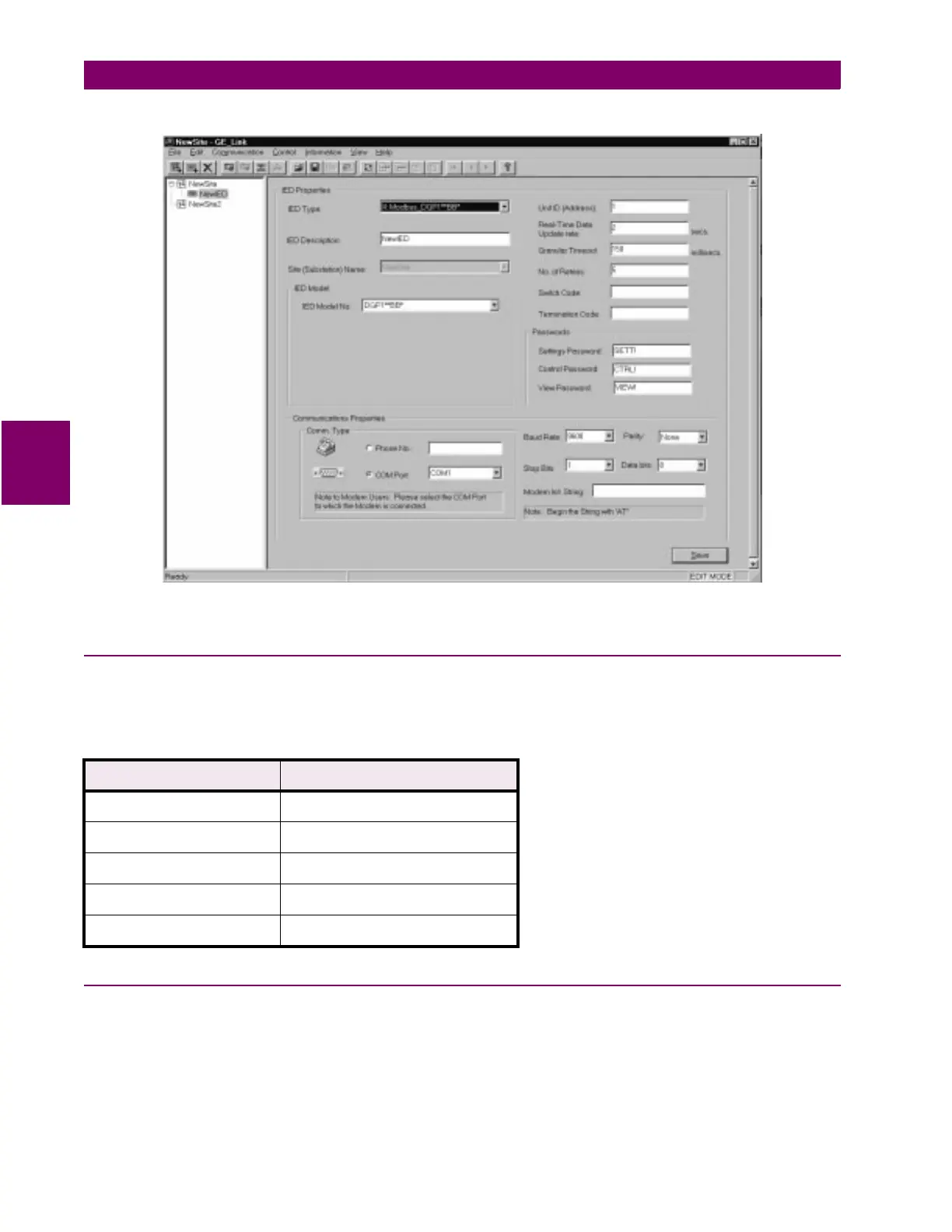
Figure 4–1: ADDING A NEW IED
4.4.4 RELAY SETUP
Before shipment, the relay is set with factory default settings. These include the Unit ID, the Baud Rate, and
the Factory Passwords. The default communications parameters are:
4.4.5 LOGGING INTO THE RELAY
1. To log on to the Test unit, click on the test unit IED to highlight it. Select the
Communication > Connect
Relay
menu item and click on
Connect
.
2. When prompted by GE-Link, enter the password for the appropriate access levels (GE Modem protocol
only).
Table 4–1: DEFAULT COMMUNICATION PARAMETERS
SETTING FACTORY DEFAULT
UNIT ID 0 (GE Modem) / 1 (Modbus)
VIEW PASSWORD VIEW!
CONTROL PASSWORD CTRL!
SETTINGS PASSWORD SETT!
BAUD RATE 2400



 To Next Page