33
Setting the Flush/Drain Interval:
4
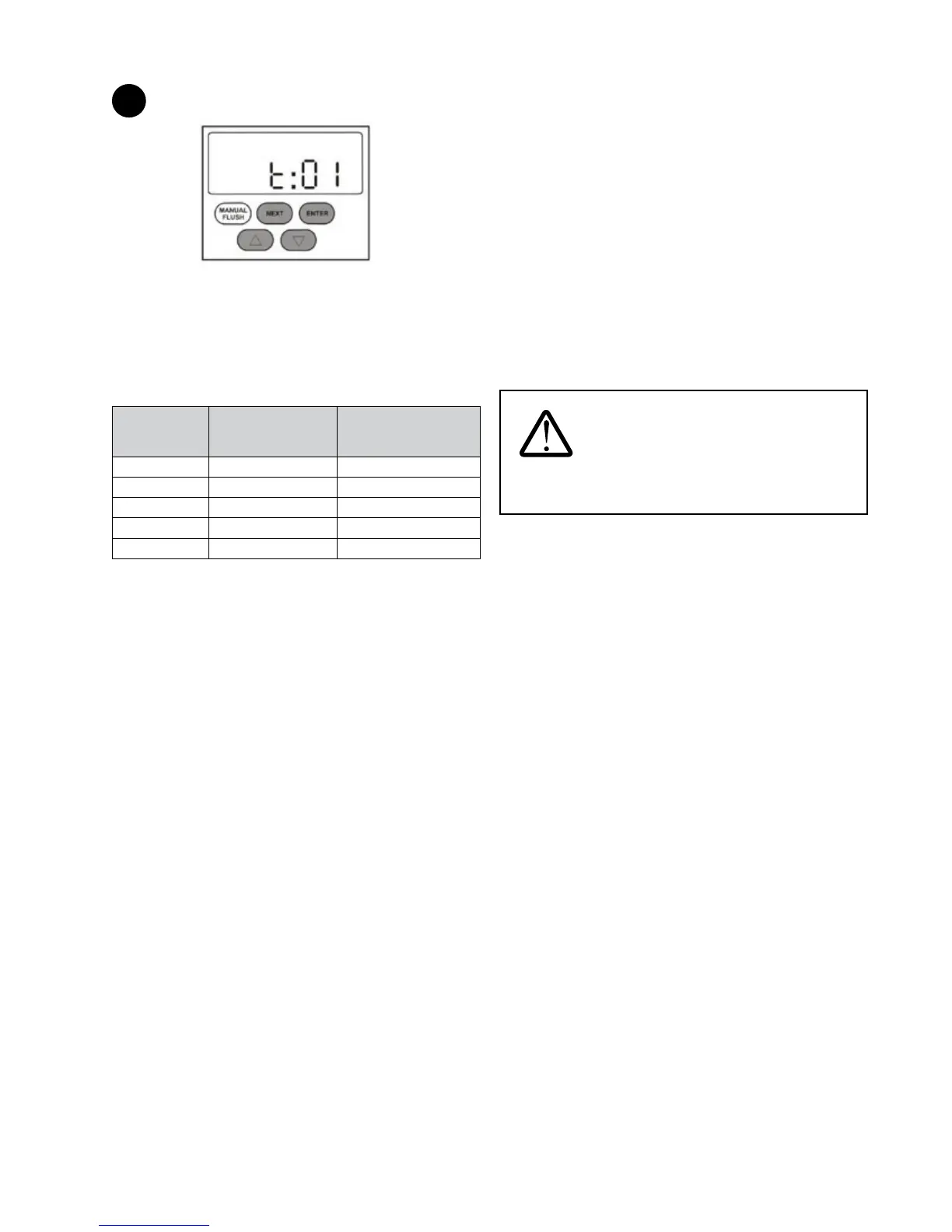
Figure 59
1) Press NEXT ve times until “t:01” appears on screen.
2) To change the ush/drain interval setting, press and
hold the UP and DOWN arrows together and press
NEXT. Release all buttons and repeat to shift to the next
interval. There are ve interval settings to choose from:
Flush/Drain
Interval Setting
No. of
Flush/Drain Cycles
per Day
Time Interval Between
Flush/Drain Cycles
t:01 1 time 24 hrs
t:02 2 times 12 hrs
t:04 4 times 6 hrs
t:08 8 times 3 hrs
t:24 24 times 1 hr
NOTE: Under conditions of turbid water and high usage of
the system, select a ush/drain interval setting appropriate
to the specic application. Increase frequency of ush/drain
cycle if the system TMP rises too quickly. Increasing the
number of ush/drain cycles per day will prolong the life of the
system; however, more water will be used for system cleaning
purposes.
Controller Functions
A. Manual Flush
NOTE: For use when the instructions in this manual or the
Owner's Manual call for a manual ush.
To manually ush the system, press NEXT once. “MANUAL”
ashes on the screen. Press MANUAL FLUSH to open the drain
solenoid valve. If the MANUAL FLUSH button is held down for
5 seconds, the drain solenoid valve will remain open for 5
minutes. To interrupt ushing, press MANUAL FLUSH again.
The drain solenoid valve will be closed automatically after 5
minutes if not interrupted.
B. Light and Alarm Function:
The green light on the controller indicates that the system is in
operation. The green light will be ON for 10 months from the
rst commissioning of the system.
WARNING: The green light is NOT an
indication of the integrity of the membrane inside the
system.
At the start of the system’s 11th month of operation, the
yellow service indicator light will come on. This is an indication
that the system’s annual maintenance is required.
After 11½ months of operation, the yellow service indicator
light will begin to ash and an audible alarm will start to beep.
To temporarily silence the alarm, depress and hold the UP and
DOWN arrows together for three seconds. The alarm will come
back on in seven days after this command is executed.
To permanently turn the alarm o, depress and hold the UP
and DOWN arrows together and press ENTER. “A oF” (alarm
o) will appear on the screen. To turn the alarm on again,
repeat the above step. “A on” (alarm on) will appear on the
screen.
To reset the controller, press NEXT and ENTER together and
hold for three seconds. The yellow light will go o and the
green light will come on again.


 To Next Page