EasyManua.ls Logo

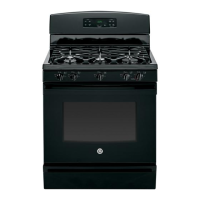
GE JGBS60DEFWW - User Manual

GE JGBS60DEFWW
56 pages
Print Icon
To Next Page IconTo Next Page
Loading...
49-85214-3 10-13 GE
GEAppliances.com
Safety Information ............2
Warranty ........................8
Assistance / Accessories ......9
Using The Cooktop
Surface Burners ...................10
Using The Oven
Oven Controls .....................12
Oven Air Vents ....................13
Special Features ..................14
Oven Racks .......................15
Broil Drawer ......................15
Cooking Modes ...................16
Cookware .........................16
Cooking Guide ....................17
Care and Cleaning
Cleaning the Oven ................18
Cleaning The Cooktop .............19
Cleaning The Door and Drawer ....22
Maintenance ......................23
Troubleshooting Tips .........25
Ranges
Self-Cleaning Gas
Write the model and serial
numbers here:
Model # __________________
Serial # ___________________
You can find them on a label on
the side trim or on the front of the
(lower) oven behind the oven door.
In Canada contact us at:
www.GEAppliances.ca
For a Spanish version of this
manual, visit our Website at
GEAppliances.com.
Para consultar una version
en español de este manual
de instrucciones, visite
nuestro sitio de internet
GEAppliances.com.
Owner’s Manual

Questions and Answers

  • S
    Shelley HerreraSep 18, 2025
    Why won't the lower drawer work on my GE JGBS60DEFWW?
    • J
      Jason LoveSep 18, 2025
      If your GE Ranges lower oven drawer or warming drawer isn't working, first check if a fuse in your home has blown or the circuit breaker has tripped; replace the fuse or reset the breaker if needed. Also, if the oven is self-cleaning, wait for the cycle to finish and the oven to cool down. Lastly, ensure that the controls are properly set by referring to the Electric warming drawer or Lower oven drawer section.
  • A
    Alan McgrathAug 25, 2025
    Why won't the burners light on my GE Ranges?
    • M
      meagan68Aug 25, 2025
      If your GE Ranges burners aren't lighting, start by ensuring the range is properly plugged into a functioning, grounded electrical outlet. Also, verify that the gas supply is connected and turned on. If the Lock Controls feature is activated, allow the range to cool down, then touch and hold the Lock Controls pad for about 3 seconds until “LOC OFF” appears on the display. If it’s a bridge burner issue, consult the ‘How to Light Bridge Burner’ section. Check the fuse or circuit breaker and replace/reset if necessary. Finally, make sure all burner parts were correctly replaced after cleaning, consulting the Care and Cleaning section if needed.
  • L
    Linda YangAug 25, 2025
    Why does my GE JGBS60DEFWW Ranges oven not work?
    • C
      Catherine JonesAug 26, 2025
      If your GE Ranges oven isn't working or seems inactive, first check whether a fuse in your home has blown or if the circuit breaker has tripped; replace the fuse or reset the breaker if needed. Also, make sure that the oven controls are properly set by referring to the Using the Oven section. Finally, verify that the oven is not in Sabbath Mode by checking the Special Features section.
  • M
    Meghan JonesAug 26, 2025
    Why aren't the clock and timer working on my GE Ranges?
    • R
      Rebecca ScottAug 27, 2025
      If your GE Ranges clock and timer aren't working, it's possible that a fuse in your home has blown or the circuit breaker has tripped. Replace the fuse or reset the circuit breaker to restore functionality.
  • S
    Stacy GutierrezSep 23, 2025
    Why is there condensation in my GE JGBS60DEFWW Ranges drawer?
    • H
      hflowersSep 23, 2025
      If you notice excessive condensation in the drawer of your GE Ranges, it could be due to liquid in the drawer; remove any liquid. It may also be caused by uncovered foods; cover food with a lid or aluminum foil. Additionally, the temperature setting might be too high; reduce the temperature setting.
  • D
    David KimSep 23, 2025
    Why does food dry out in my GE Ranges warming drawer?
    • A
      Amy MoralesSep 23, 2025
      If food dries out in the lower oven drawer or warming drawer of your GE Ranges, it's likely due to moisture escaping. Cover the food with a lid or aluminum foil to retain moisture. Also, ensure that the drawer is fully closed by pushing it in until the latch engages.
  • L
    Linda WintersSep 10, 2025
    What does 'F and a number' mean on my GE Ranges display?
    • S
      Sarah WilliamsSep 10, 2025
      If you see "F— and a number or letter" flashing in the display of your GE Ranges, it indicates a function error code. Press the Cancel/Off pad, allow the oven to cool for one hour, and then try putting the oven back into operation. If the error code repeats, disconnect all power to the oven for at least 30 seconds and then reconnect it. If the function error code continues to appear, it's recommended to call for service.
  • A
    Anthony GarrisonSep 12, 2025
    Why is the oven light not working on my GE JGBS60DEFWW?
    • E
      Eric ElliottSep 12, 2025
      If your GE Ranges oven light isn't working, first check if the light bulb is loose or defective. Try tightening it or replacing it. If the pad operating the light is broken, it may require professional service.
  • J
    Juan WintersSep 3, 2025
    What does the LOCKED light mean on my GE JGBS60DEFWW Ranges?
    • D
      Donna BellSep 4, 2025
      If the LOCKED light is on when you want to cook with your GE Ranges, it indicates that the oven door is locked because the temperature inside the oven hasn't dropped below the locking temperature yet. Press the Cancel/Off pad and allow the oven to cool down.
  • P
    parkchristopherSep 1, 2025
    Why does my GE Ranges take so long to preheat?
    • T
      Tony HayesSep 1, 2025
      If your GE Ranges oven is taking longer to preheat, it could be due to cookware or food inside the oven, which slows down the preheating process. Remove these items to reduce preheat time. Additionally, the number of racks in the oven can also affect preheating time, so removing some racks may help.

Summary

Safety Information

Anti-Tip Device

Instructions and warnings regarding the anti-tip safety device for the range.

General Safety Instructions

Essential safety guidelines for operating the appliance safely and correctly.

Additional General Safety Guidelines

Further essential safety guidelines for operating the appliance safely.

Flammable Materials Warning

Precautions regarding the storage and use of flammable materials near the oven.

Fire Safety Procedures

Steps to take in case of a fire to prevent injury and spread.

Cooktop Safety Instructions

Specific safety guidelines for operating the appliance's cooktop.

Oven Safety Instructions

Safety precautions related to the operation and use of the oven.

Self-Cleaning Oven Safety

Safety instructions for using the self-cleaning feature of the oven.

Warranty

Using the Cooktop

Surface Burner Operation

Instructions for lighting, using, and adjusting the flame size of surface burners.

Using the Oven

Oven Control Panel Overview

Visual guide to the controls for both non-convection and convection oven modes.

Care and Cleaning

Troubleshooting Tips

GE JGBS60DEFWW Specifications

General IconGeneral
BrandGE
ModelJGBS60DEFWW
CategoryRanges
LanguageEnglish

Related product manuals