8 49-7000130 Rev. 0
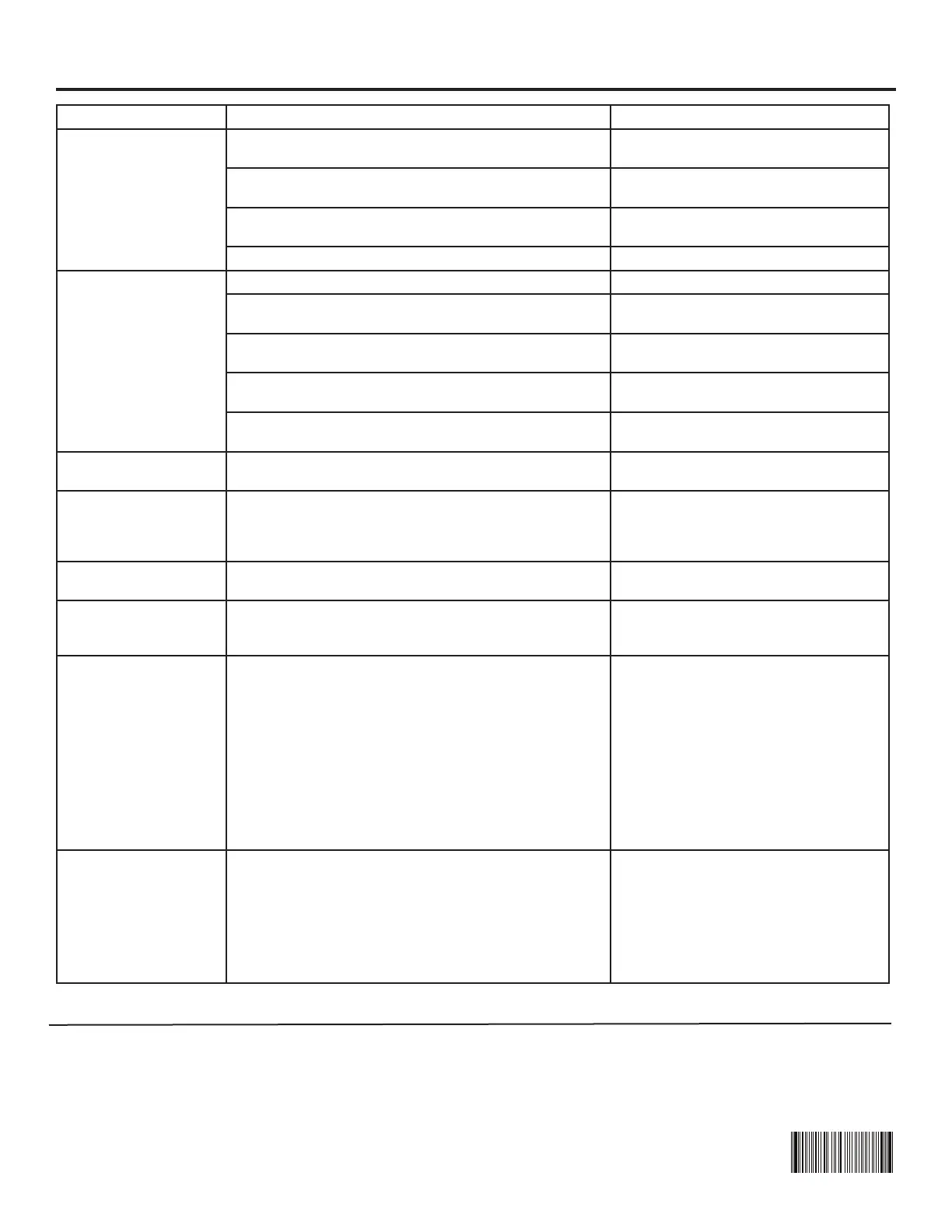
Problem Possible Cause What to Do
Oven will not start A fuse in your home may be blown or the circuit
breaker tripped
Replace fuse or reset circuit breaker.
Power surge Unplug the microwave oven, then plug
it back in.
Plug not fully inserted into wall outlet Make sure the 3-prong on the oven is
fully inserted into the wall outlet.
Door not securely closed Open the door and close it securely.
Control panel lighted,
yet oven will not start
Door not securely closed Open the door and close it securely.
START/PAUSEbuttonnotpressedafterentering
cooking selection
PressSTART/PAUSE.
Another selection entered already in oven and CAN-
CEL/OFFbuttonnotpressedtocancelit
PressCANCEL/OFF.
CookingtimenotenteredafterpressingCOOKTIME Make sure you have entered cooking
timeafterpressingCOOKTIME.
CANCEL/OFFwaspressedaccidentally Reset cooking program and press
START/PAUSE.
CONTROLLOCKED
appears on display
The control has been locked PressandholdLOCKCONTROLfor
about 3 seconds to unlock the control
Flooroftheovenis
warm even when the
oven has not been
used
Thecooktoplightislocatedbelowtheovenoor.
When light is on, the heat it produces may make the
ovenoorgetwarm
This is normal.
You hear an unusual
low-tone beep
You have tried to change the power level when it is
not allowed
Many of the oven’s features are preset
and cannot be changed.
Vent fan comes on
automatically
The vent fan automatically turns on to protect the
microwave if it senses too much heat rising from the
cooktop below
This is normal.
There are sparks in
the oven
• Metal or foil touching the side of the oven.
• Turntable ring support not installed correctly.
•Foilnotmoldedtofood(upturnededgesactlike
antennas).
• Metal, such as twist-ties, poultry pins, or gold-
rimmed
dishes, in the microwave.
• Recycled paper towels containing small metal
pieces
being used in the microwave.
• The metal rack (on some models) not installed
correctly so it touches the microwave wall.
Verify the turntable ring support and
(if applicable) metal rack are installed
correctly. Remove other arcing sourc-
es from the oven.
Bluetooth
connection not paired
Power interruption may disrupt bluetooth connection Try to reconnect by initiating the
CHEFCONNECTprocessonthe
GE Appliances range, then holding
theCHEFCONNECTbuttonfor3
seconds on the microwave. This will
restart the pairing process. If this
does not work, unplug unit or reset the
circuit breaker to reset the control.
Things that are normal with your microwave oven.
n Moisture on the oven door and walls while cooking. Wipe
the moisture off with a paper towel or soft cloth.
n Moisture between the oven door panels when cooking
certain foods. Moisture should dissipate shortly after
cooking is finished.
n Steam or vapor escaping from around the door.
n Light reflection around door or outer case.
n Dimming oven light and change in the blower sound at
power levels other than high.
n Noises while oven is operating.
Troubleshooting tips ... Before you call for service
MBM67475001
Card,User Guide


 To Next Page