Using the Sabbath Feature
Wall Oven
Designed For use on the Jewish Sabbath and Holidays.
TheSabbath Featurecan be usedForbaking/roasting
only.It cannot be usedForconvection,broiling,
self-cleaningor DelayStart cooking.
NOTE:Theovenlight comes on automatically (on
some models)when the door is openedand goesoff
when the door isclosed Thebulb may beremoved
Seethe OvenLight Replacementsection.Onmodels
with a light switch on the control panel, the ovenlight
may be turned on and left on.
Sabbath
Feature:
How to set
for regular
baking or
roasting
Make sure the clock shows the correct time oF day
and the oven is OFF.
4
5
6
7
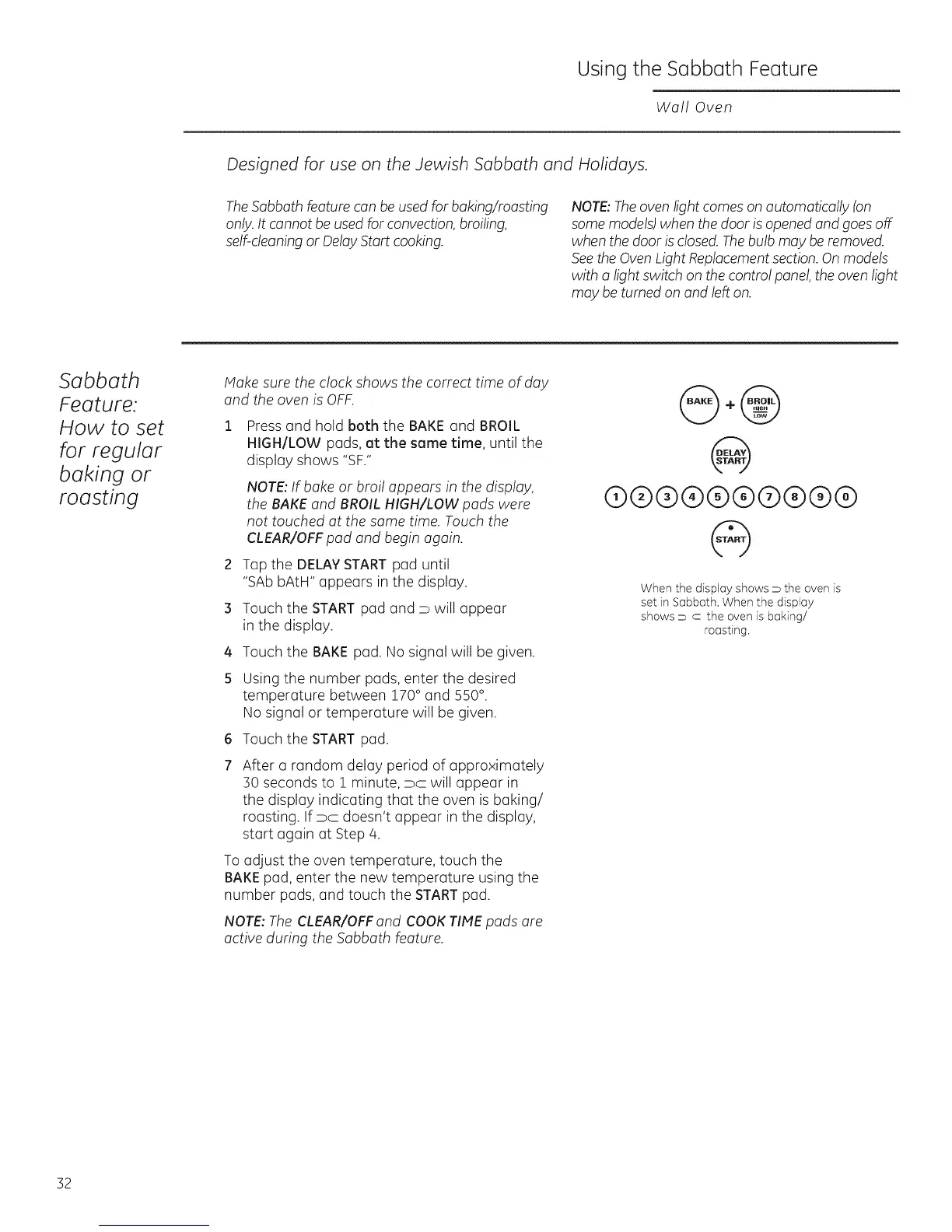
Pressand hold both the BAKE and BROIL
HIGH/LOW pads, at the same time, until the
display shows "SF."
NOTE:IFbake or broil appears in the display,
the BAKE and BROIL HIGH/LOW pads were
not touched at the same time. Touch the
CLEAR/OFFpad and begin again.
Tap the DELAYSTARTpad until
"SAb bAtH" appears in the display.
Touch the START pad and D will appear
in the display.
Touch the BAKE pad. No signal will be given.
Using the number pads, enter the desired
temperature between 170° and 550°.
No signal or temperature will be given.
Touch the START pad.
After a random delay period of approximately
:SOseconds to i minute, pc will appear in
the display indicating that the oven is baking/
roasting. If pc doesn't appear in the display,
start again at Step 4.
Toadjust the oven temperature, touch the
BAKEpad, enter the new temperature using the
number pads, and touch the STARTpad.
NOTE:The CLEAR/OFFand COOKTIME pads are
active during the Sabbath Feature.
@+@
@
(9@@@@@@@@@
@
When the display shows _ the oven is
set in Sabbath. When the display
shows D c the oven is baking/
roasting.
32







 To Next Page