About the controls with temperature settings.
EnerggSover Door Alarm
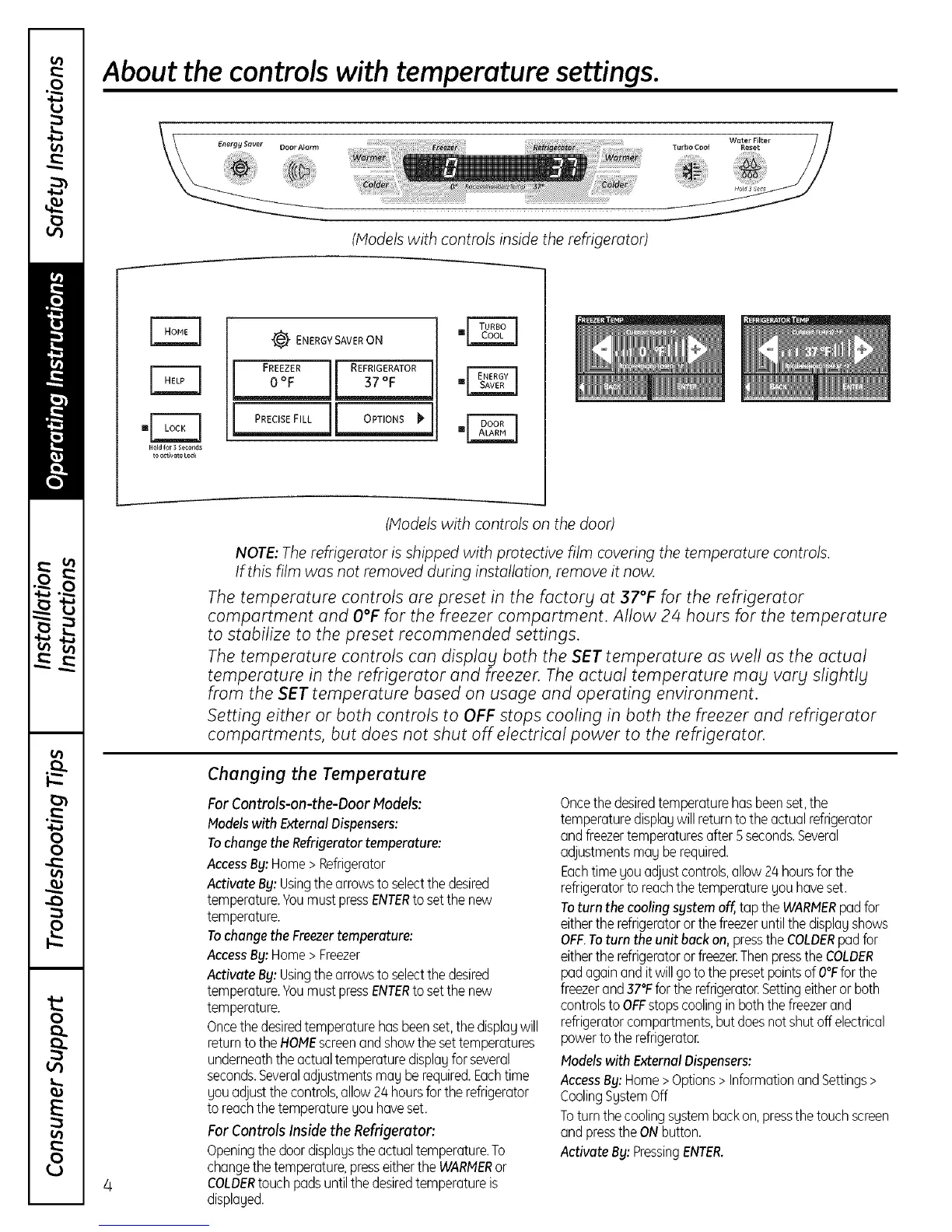
(Models with controls inside the refrigerator)
Hold for 3 Seconds
to _ctlvate LOCE
!_ ENERGYSAVERON
FREEZERJI REFRIGERATOR
°__EL_JL_2LE
4
(Models with controls on the door)
NOTE: The refrigerator is shipped with protective film covering the temperature controls.
If this film was not removed during installation, remove it now.
The temperature controls are preset in the factory at 37°F for the refrigerator
compartment and O°F for the freezer compartment. Allow 24 hours for the temperature
to stabilize to the preset recommended settings.
The temperature controls can display both the SET temperature as well as the actual
temperature in the refrigerator and freezer. The actual temperature may vary slightly
from the SET temperature based on usage and operating environment.
Setting either or both controls to OFF stops cooling in both the freezer and refrigerator
compartments, but does not shut off electrical power to the refrigerator.
Changing the Temperature
For Controls-on-the-Door Models:
Models with External Dispensers:
To change the Refrigerator temperature:
AccessBy: Home > Refrigerator
Activate By: Usingthe arrows to select the desired
temperature. Youmust press ENTERto set the new
temperature.
To change the Freezer temperature:
AccessBy: Home > Freezer
Activate By: Usingthe arrows to select the desired
temperature. Youmust press ENTERto set the new
temperature.
Once the desired temperature has been set,the dispbg will
return to the HOMEscreenand show the settemperatures
underneath the actual temperature display for several
seconds.Severaladjustments may be required.Each time
you adjust the controls, allow 24 hours for the refrigerator
to reach the temperature you have set.
For Controls Inside the Refrigerator:
Opening the door dispbgs the actual temperature. To
change the temperature, presseither the WARMERor
COLDERtouch pods until the desiredtemperature is
displayed.
Oncethedesiredtemperaturehasbeenset,the
temperaturedisplaywill returnto the actualrefrigerator
andfreezertemperaturesafter 5seconds.Several
adjustmentsmayberequired.
Eachtime youadjustcontrols,allow24hoursforthe
refrigeratorto reachthetemperatureyouhaveset.
Toturn thecoolingsystemoff,top the WARMERpodfor
eithertherefrigeratororthefreezeruntilthedisplayshows
OFF.Toturn the unit backon,pressthe COLDERpodfor
eithertherefrigeratororfreezer.ThenpresstheCOLDER
podagainand it willgoto the presetpointsof O°Fforthe
freezerand37°Ffor the refrigerator.Settingeitheror both
controlsto OFFstopscoolinginboththe freezerand
refrigeratorcompartments,butdoesnotshutoffelectrical
powertotherefrigeratoE
Modelswith ExternalDispensers:
AccessBy: Home>Options> InformationandSettings>
CoolingSgstemOff
Toturnthecoolingsystembackon,pressthetouchscreen
andpressthe ONbutton.
ActivateBy:PressingENTER.


 To Next Page
 Loading...