EasyManua.ls Logo

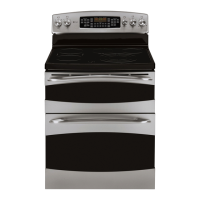
GE Profile PB965 - User Manual

GE Profile PB965
32 pages
Print Icon
To Next Page IconTo Next Page
Loading...
Write the model and serial
numbers here:
Model # _________________
Serial # _________________
You can find them on a label
behind the door or drawer.
ESPAÑOL
Para consultar una version en
español de este manual de
instrucciones, visite nuestro sitio de
internet GEAppliances.com.
OWNER’S MANUAL
RANGES
Electric Front Control
49-2000996 Rev. 1 11-21 GEA
30” Free Standing Double Oven
PB965
GE is a trademark of the General Electric Company. Manufactured under trademark license.
SAFETY INFORMATION .......... 3
USING THE RANGE
Surface Units ........................... 7
Cookware for Radiant Glass Cooktop. . . . . . 9
Double Oven Controls ...................10
Special Features ........................12
Sabbath Mode ..........................13
Oven Racks ............................14
Aluminum Foil and Oven Liners ...........14
Oven Cookware ........................14
Cooking Modes .........................15
Oven Cooking Guide ....................16
Air Fry Cooking Guide ...................18
CARE AND CLEANING
Cleaning the Range – Exterior ............19
Cleaning the Range – Interior ...........20
Cleaning the Glass Cooktop ............. 22
Oven Light ............................ 24
Oven Doors ........................... 25
TROUBLESHOOTING TIPS .......26
LIMITED WARRANTY ............30
ACCESSORIES .....................31
CONSUMER SUPPORT ........... 32

Questions and Answers

  • G
    Gary VargasSep 4, 2025
    Why is my GE Profile PB965 not clean after a clean cycle?
    • A
      April SuttonSep 5, 2025
      If your GE oven is not clean after running a clean cycle, ensure that the oven controls were set correctly by referring to the Cleaning the Oven section. Also, if the oven was heavily soiled, clean up major spills before starting the clean cycle. For heavily soiled ovens, running the self-clean cycle again or for a longer period may be necessary.
  • S
    suttonbrittanyAug 25, 2025
    What to do if my GE Profile PB965 door will not open after a clean cycle?
    • B
      Brandon DayAug 25, 2025
      If your GE oven door will not open after a clean cycle, it is likely that the oven is still too hot. Allow the oven to cool down below the locking temperature, and then try opening the door again.
  • A
    angela66Aug 25, 2025
    What to do if my GE Profile PB965 will not self-clean?
    • M
      Mary SmithAug 26, 2025
      If your GE oven will not self-clean, it might be because the temperature is too high. Allow the oven to cool down, and then reset the controls. Also, ensure that the oven controls are properly set by consulting the Cleaning the Oven section.
  • A
    Alexandria GallagherSep 12, 2025
    How to fix GE Oven light that does not work?
    • M
      Megan LewisSep 13, 2025
      If the oven light isn't working, first check if the bulb is loose or defective. Tighten or replace the bulb. If the pad operating the light is broken, you will need to call for service.
  • R
    Robert MurraySep 22, 2025
    What to do if Display goes blank on GE Profile PB965?
    • J
      Jeffery TuckerSep 22, 2025
      If the display goes blank, a fuse in your home may be blown or the circuit breaker tripped. Replace the fuse or reset the circuit breaker. Also, see the Special features section to check if the clock is turned off. Verify that the oven is not in Sabbath Mode.
  • R
    Rhonda SmithSep 8, 2025
    What does it mean if my GE Profile PB965 Oven displays "F— and a number or letter"?
    • J
      James HayesSep 8, 2025
      If your GE oven displays “F— and a number or letter”, it indicates a function error code. Press the Cancel/Off pad and allow the oven to cool for one hour before putting it back into operation. If the error code repeats, disconnect all power to the oven for at least 30 seconds, then reconnect it. If the error persists, call for service.
  • J
    Joanna PadillaSep 1, 2025
    What to do if my GE Oven oven does not work or appears not to work?
    • J
      Joshua JohnsonSep 1, 2025
      If your GE oven does not work or appears not to work, first check if a fuse in your home may be blown or the circuit breaker tripped, and replace the fuse or reset the circuit breaker. Also, ensure that the oven controls are properly set by referring to the Using the Oven section. Verify that the oven is not in Sabbath Mode, as described in the Special Features section.
  • D
    Daniel NguyenSep 23, 2025
    What does “Crackling” or “popping” sound mean in my GE Profile PB965 Oven?
    • D
      Desiree JonesSep 23, 2025
      This is normal.
  • J
    Jesse HowellSep 16, 2025
    What does “F— and a number or letter” flash in the display mean on GE Oven?
    • R
      Roberto SandovalSep 16, 2025
      If “F— and a number or letter” flash in the display, you have a function error code. Press the Cancel/Off pad. Allow the oven to cool for one hour. Put the oven back into operation. If the function code repeats, disconnect all power to the oven for at least 30 seconds and then reconnect power. If the function error code repeats, call for service.
  • K
    Kenneth WeaverAug 28, 2025
    Why does my GE Profile PB965 have a burning smell?
    • B
      Brandon HillAug 28, 2025
      A "burning" or "oily" odor from the vent of your new GE oven is normal and should disappear over time. To expedite this, run a self-clean cycle for at least 3 hours. Refer to the Cleaning the Oven section for instructions.

Summary

SAFETY INFORMATION

General Safety Instructions

Provides essential safety guidelines for using the appliance, including warnings about tipping, electrical hazards, and proper usage.

Range Fire and Burn Prevention

Details critical safety measures to prevent fires and burns, including keeping flammable materials away and steps to take in case of a fire.

Cooktop and Oven Safety

Outlines specific safety instructions for operating the cooktop, radiant cooktop, and oven, emphasizing hot surfaces and proper handling.

Self-Cleaning Oven Safety

Covers essential safety precautions for operating the self-cleaning oven feature, including temperature warnings and cleaning the door gasket.

USING THE RANGE

Surface Unit Operation

Explains how to use surface units, including control settings, indicator lights, and the warming zone for food safety.

Cookware Selection for Glass Cooktop

Guide to recommended and not recommended cookware for optimal performance and protection of glass cooktops.

Double Oven Controls

Details the function of each control pad for the upper and lower ovens, including cooking modes and timer settings.

Special Features

Describes special oven features such as temperature adjustment, timer signals, display settings, and sound volume.

Sabbath Mode

Instructions on how to set, use, and exit the Sabbath mode for continuous baking or timed baking.

Cooking Modes

Overview of various oven cooking modes like Bake, Convection, Broil, Warm, and Air Fry for achieving optimal cooking results.

Oven Cooking Guide

Provides recommended rack positions, modes, and additional suggestions for various food types in the lower oven.

Air Fry Mode Guide

Instructions and guidelines for using the Air Fry mode, including cookware recommendations and general tips for crispier results.

CARE AND CLEANING

Exterior Cleaning

Instructions for cleaning the range exterior, including control knobs, panel, oven exterior, painted surfaces, and porcelain cooktop.

Interior Oven Cleaning

Methods for cleaning the oven interior using manual cleaning, steam clean mode, or the self-clean mode.

Glass Cooktop Cleaning

Detailed steps for daily cleaning, removing burned-on residue, metal marks, scratches, and sugary spills from the glass cooktop.

Oven Light and Door Care

Guidance on replacing the oven light bulb and instructions for removing and replacing oven doors.

TROUBLESHOOTING TIPS

Surface Unit Troubleshooting

Addresses common issues with surface units, such as not maintaining heat, not working, or stopping glow.

Oven Performance Issues

Diagnoses problems related to oven temperature, baking results, and differences from older models.

Cooktop Issues

Covers problems like scratches, discoloration, melted plastic, and pitting on the glass cooktop surface.

Error Codes and Display Issues

Explains common error codes, blank displays, function errors, and other display-related troubleshooting.

LIMITED WARRANTY

GE Appliances Range Warranty

Details the limited one-year warranty coverage, exclusions, and terms for GE Appliances electric ranges.

ACCESSORIES AND SUPPORT

Oven Accessories

Lists available accessories such as broiler pans, oven racks, elements, light bulbs, and cleaning supplies.

Consumer Support and Service

Provides information on contacting GE Appliances, registering the appliance, scheduling service, and extended warranties.

GE Profile PB965 Specifications

General IconGeneral
Self-CleaningYes
Wi-Fi ConnectivityYes
ConvectionYes
Precision Cooking SystemYes
Wi-Fi EnabledYes
Interior LightYes
ColorStainless Steel
Cooking ModesBake, Convection Bake, Convection Roast, Proof, Warm
Control TypeTouch

Related product manuals