EasyManua.ls Logo

GEAppliances Profile Series - User Manual

GEAppliances Profile Series
64 pages
Print Icon
To Next Page IconTo Next Page
Loading...
Write the model and serial
numbers here:
Model # _________________
Serial # _________________
You can find the rating label
on a metal flag behind the rear
control panel. From the front
of the range, reach behind the
middle of the rear control panel
and rotate the rating label up.
ESPAÑOL
Para consultar una version en
español de este manual de
instrucciones, visite nuestro sitio de
internet GEAppliances.com.
OWNER’S MANUAL
RANGES
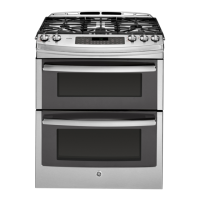
Double Oven Gas
49-85223-2 10-16 GEA
SAFETY INFORMATION .......... 2
WARRANTY ........................ 7
ASSISTANCE / ACCESSORIES ... 8
USING THE COOKTOP
In Case of a Power Failure ............... 9
Surface Burners ........................ 9
Griddle ................................11
USING THE OVEN
Oven Controls ..........................14
Special Features ........................16
Sabbath Mode ..........................17
Cookware Guidelines ....................18
Cooking Modes .........................18
Oven Racks ............................19
Oven Air Vents .........................19
Cooking Guide ........................20
Aluminum Foil and Oven Liners ...........21
CARE AND CLEANING
Cleaning the Oven ..................... 22
Cleaning The Cooktop .................. 23
Cleaning the Door ..................... 27
Maintenance .......................... 28
TROUBLESHOOTING TIPS .......30
GE is a trademark of the General Electric Company. Manufactured under trademark license.


Questions and Answers

  • D
    Daisy KaneAug 18, 2025
    Why is there a strong burning odor from my GEAppliances Ranges vent?
    • Y
      Yolanda CarrAug 19, 2025
      A strong burning or oily odor from the vent is normal in a new GEAppliances Ranges oven and will dissipate over time. To speed up the process, set a self-clean cycle for a minimum of 3 hours. This is temporary.
  • E
    Elizabeth EdwardsAug 21, 2025
    What to do if my GEAppliances Ranges burners do not light?
    • J
      Jonathan HallAug 21, 2025
      If the burners on your GEAppliances Ranges do not light, there could be several reasons: * Ensure the range is fully plugged into a live, properly grounded electrical outlet. * Check that the gas supply is connected and turned on. Refer to the Installation Instructions. * Replace any blown fuses or reset tripped circuit breakers in your home. * Make sure burner parts are correctly replaced. Consult the Care and Cleaning section. * Clean clogged burner ports or remove food residue from the electrode. Polish the electrode tip with a nail file or sandpaper until shiny.
  • S
    Sara GrossAug 23, 2025
    What to do if my GEAppliances Ranges oven door will not open?
    • A
      Anita VelezAug 23, 2025
      If the oven door of your GEAppliances Ranges will not open or the LOCKED light is on when you want to cook, the oven door is locked because the temperature inside the oven has not dropped below the locking temperature. Press the Cancel Off pad and allow the oven to cool below the locking temperature.
  • C
    Chad DaltonAug 26, 2025
    What to do if "F— and a number or letter” flash in the display of GEAppliances Ranges?
    • A
      Anthony BaileyAug 26, 2025
      If “F— and a number or letter” flash in the display of your GEAppliances Ranges, it means there is a function error code. Press the Cancel Off pad and allow the oven to cool for one hour. Put the oven back into operation. If the function error code repeats again, call for service.
  • R
    Richard TaylorAug 28, 2025
    Why are my GEAppliances Ranges top burners not burning evenly?
    • M
      melissa53Aug 28, 2025
      Uneven burning of the top burners on your GEAppliances Ranges can be caused by improper burner assembly or clogged burner slots. Make sure the burner caps are seated correctly. Also, remove the burners for cleaning.
  • B
    Brittany CarpenterAug 30, 2025
    How to fix power outage lock flashes on GEAppliances Ranges?
    • S
      Stephanie DavisAug 30, 2025
      If the power outage lock flashes on your GEAppliances Ranges, it indicates a power outage or surge. Reset the lock. If the oven was in use, you must reset it by pressing the Cancel Off pad, setting the clock, and resetting any cooking function.
  • J
    jenkinstracySep 1, 2025
    Why won't my GEAppliances Ranges oven self-clean?
    • V
      vhartmanSep 1, 2025
      Your GEAppliances Ranges oven might not self-clean if the temperature is too high. Allow the oven to cool and reset the controls. Or, the oven controls might be improperly set.
  • L
    Lawrence MillerSep 4, 2025
    What causes large or yellow burner flames on GEAppliances Ranges?
    • N
      Natalie NguyenSep 4, 2025
      Very large or yellow burner flames on your GEAppliances Ranges indicate an improper air to gas ratio. If your range is connected to Propane gas, contact the technician who installed your range or made the conversion.
  • A
    April JohnstonSep 6, 2025
    What to do if my GEAppliances Ranges oven is not clean after a clean cycle?
    • Q
      qrichardsSep 6, 2025
      If your GEAppliances Ranges oven is not clean after a clean cycle, the oven controls may be improperly set, or the oven was heavily soiled. Clean up heavy spillovers before starting the clean cycle. Heavily soiled ovens may need to self-clean again or for a longer period of time.
  • E
    Elizabeth ThomasSep 8, 2025
    Why do surface burners light but bake and broil burners do not on GEAppliances Ranges?
    • R
      russellkathleenSep 9, 2025
      If the surface burners light but the bake and broil burners do not on your GEAppliances Ranges, the gas to the oven burners may have been shut off. The oven gas shut-off is located on the gas regulator near the gas line attachment to your range. Locate it and flip the lever. The lever is shown closed.

Summary

Safety Information

Anti-Tip Device Safety

Crucial safety measure to prevent the range from tipping over, protecting against serious injury.

General Safety Instructions

Essential safety rules for operating the appliance, handling hazards like gas leaks, fires, and prohibited uses.

Specific Appliance Safety

Safety guidelines tailored for cooktop, oven, and self-cleaning operations, including material handling.

California Proposition 65 Warnings

Notification about chemicals known to the state of California to cause cancer or birth defects.

Using the Cooktop

Cooktop Operation and Safety

How to operate burners, including during power outages, and general safety for cooktop use.

Cookware and Griddle Usage

Guidelines on suitable cookware, limitations on grills, wok usage, and griddle operation.

Using the Oven

Oven Control Functions

Explanation of all buttons, modes, and functions available on the oven control panel.

Oven Features and Settings

Details on adjusting temperature, timer signals, display units, sound volume, and Sabbath mode.

Cooking Modes and Guidelines

Advice on cookware, descriptions of cooking modes, and recommendations for various food types.

Oven Racks, Vents, and Liners

Proper use of racks, importance of vents, and guidelines for using foil or liners.

Care and Cleaning

Oven Cleaning Procedures

Instructions for manual, steam, and self-cleaning the oven interior and exterior.

Cooktop Cleaning Guide

Procedures for cleaning the control panel, knobs, cooktop surface, burners, grates, and griddles.

Oven Door Cleaning

Specific methods for cleaning the interior and exterior of the oven door glass and gasket.

Maintenance and Light Replacement

Procedures for replacing the oven light bulb and removing/replacing the oven door.

Troubleshooting Tips

Oven Performance Issues

Solutions for common oven performance problems like uneven cooking, incorrect temperatures, or display errors.

Burner and Ignition Problems

Troubleshooting steps for issues related to surface burner ignition, flame size, and gas supply.

Error Codes and Lockout Features

Guidance on interpreting error codes, managing door lock features, and power-related display issues.

GEAppliances Profile Series Specifications

General IconGeneral
BrandGEAppliances
ModelProfile Series
CategoryRanges
LanguageEnglish

Related product manuals