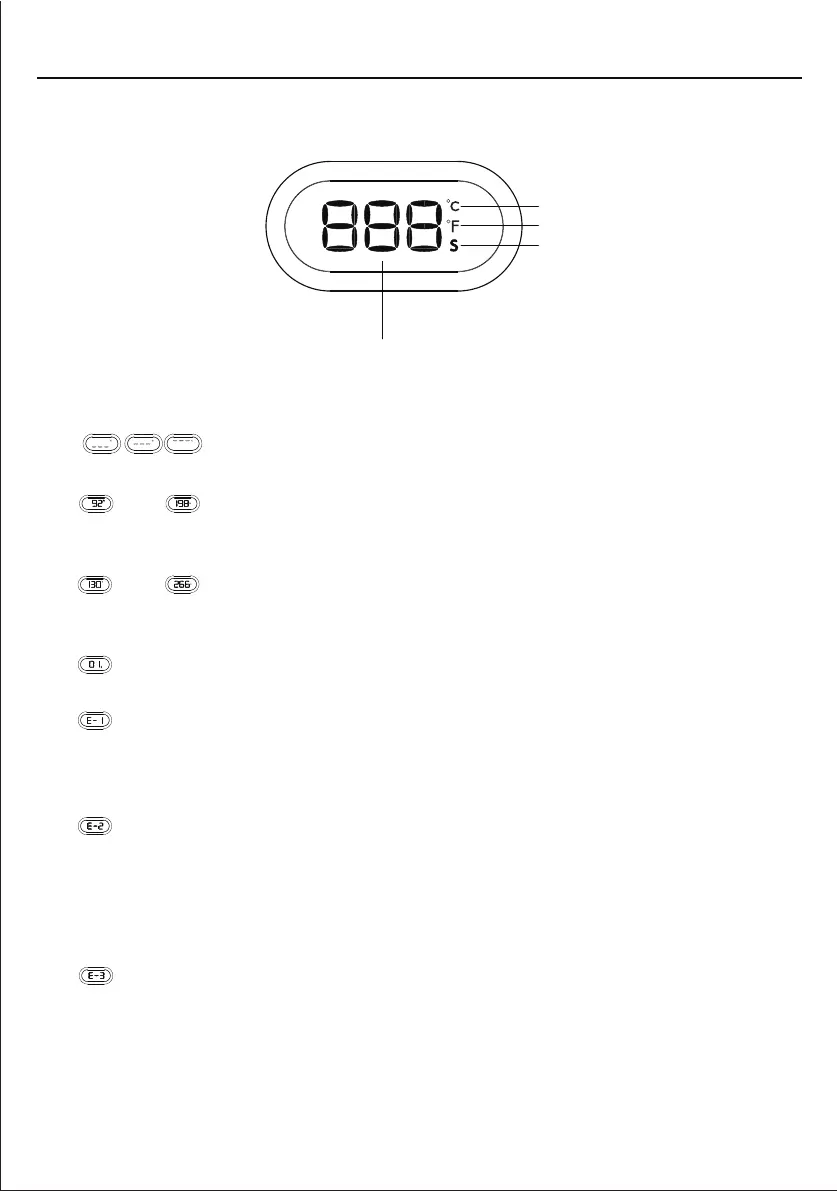
1. " "
Coffee brewing preheating or steam preheating process.
2. " " or " "
After the coffee brewing preheating is completed, the status is displayed in
Celsius or Fahrenheit.
3. " " or " "
After the steam preheating is completed, the status is displayed in Celsius or
Fahrenheit.
4. " "
Displays the coffee brewing time or making hot water/steam time.
5. " "
The steam control knob is turned on: When turn on the machine, the steam preheat
indicator keeps flashing quickly, which means that the steam control knob is not
turned off. Solution: Turn the steam knob to the OFF position.
6. " "
The machine internal temperature is too high: When switch to coffee brewing mode
after making steam immediately, the machine internal temperature is too high
to brew coffee. Solution: Wait a moment for the machine internal temperature
cool down naturally or turn on the steam control knob to release the hot water
to cool down (put a cup under the steam wand).
7. " "
The temperature sensor is short-circuited or open, the temperature fuse is open,
or the connection between the power board and the display board is poor.
Solution: Please contact the Customer Service Center.
DISPLAY
7
PRODUCT COMPONENTS
Celsius
Fahrenhei
Time (second)
Time and temperature digital display


 To Next Page