10
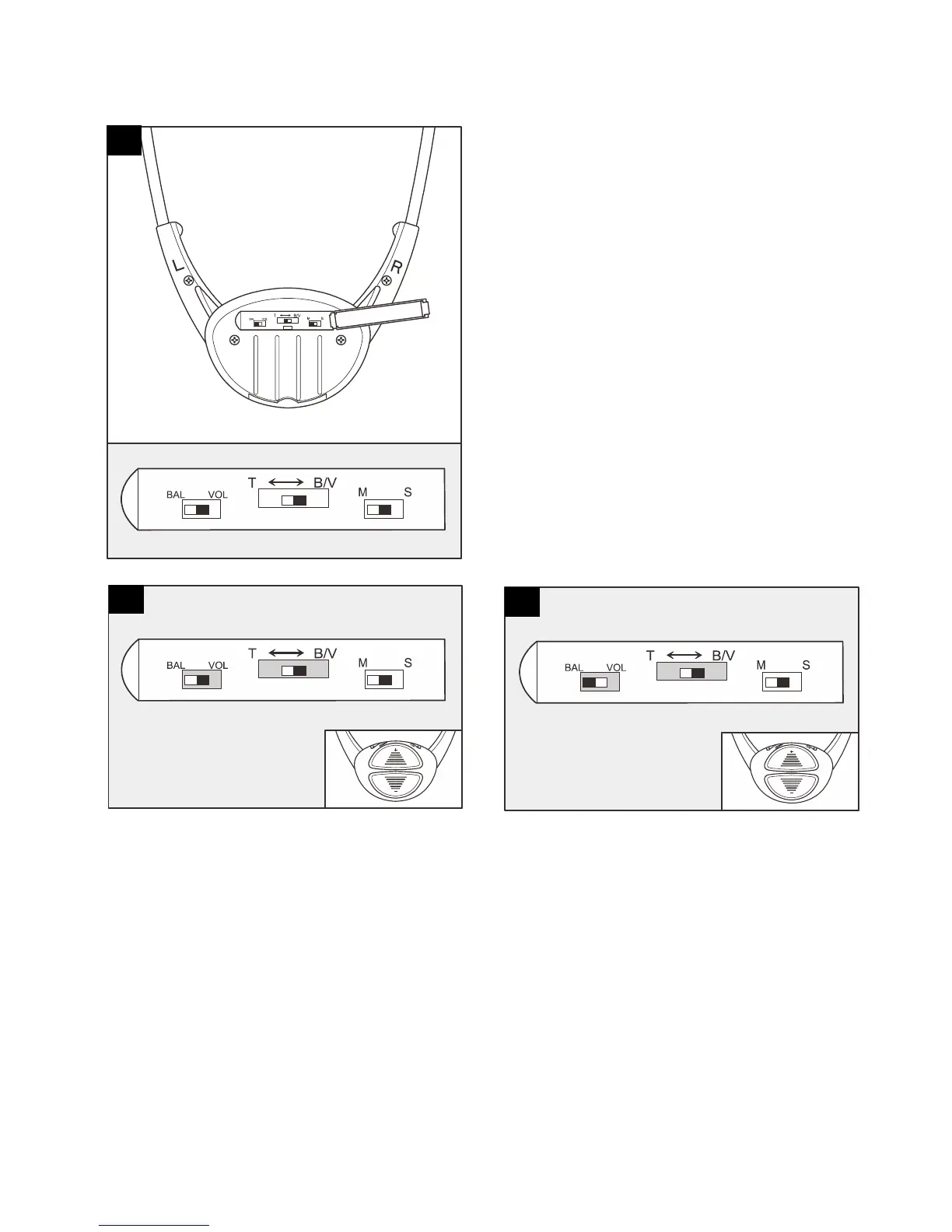
Use the slider tool (5) to adjust the
Volume, Balance, Tone or switch
Mono to Stereo. Open the back panel
on the Headset. 3 ‘slider switches’ will
be present.
Volume adjustment:
Set ‘BAL VOL’ slider to ‘VOL’.
Set ‘T <-> B/V’ slider to ‘B/V’
Press ‘+’ button to increase volume and
‘-‘ button to decrease volume.
Headset beeps when volume reaches
maximum or minimum.
Balance adjustment:
Set ‘BAL VOL’ slider to ‘BAL’
Set ‘T <-> B/V’ slider to ‘B/V’
Press ‘-’ button to decrease sound on
RIGHT side. Press ‘+’ button to
decrease sound on LEFT side.
Headset beeps when balance reaches
maximum, middle or minimum.
11
12
13



 To Next Page