CLEANING AND MAINTENANCE
06
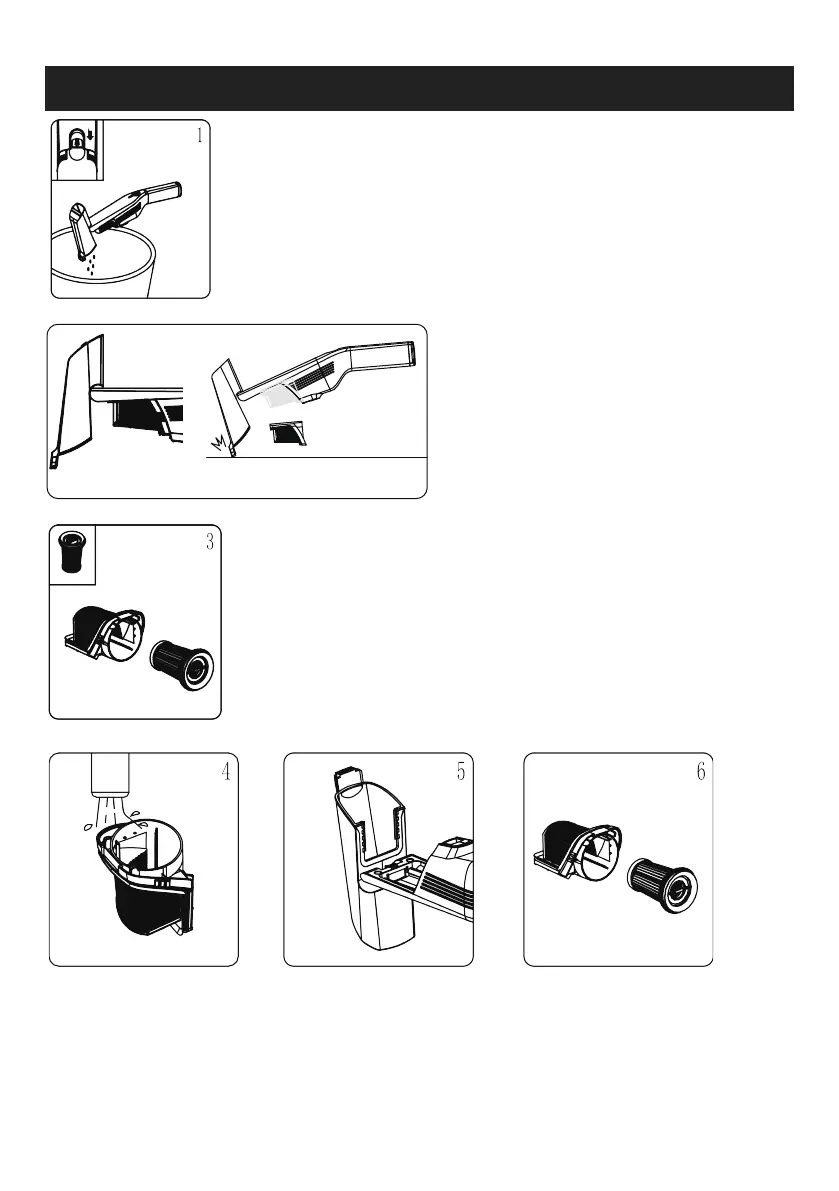
1. When the power is off, aim at the dust
container and push the release button of the
dust cup backward to empty the dust.
2. Take out the filter assembly diagonally
by holding the convex ribs on both sides of
the external filter assembly or knock down
the filter as figure showed, and tap the
metal filter net gently to remove the dust .
3. Hold the center bar of the HEPA filter and take
out the HEPA filter along the arrow.
4. Wash the external
filter assembly with
clean water or detergent
and dry completely.
5. Gently wipe the inner
wall of the dust cup and
soft rubber scraper with a
wet towel to remove dust.
6. Reload the HEPA filter
assembly into the external filter
assembly and make sure the
assembly is in place.
2


 To Next Page