TROUBLESHOOTING
08
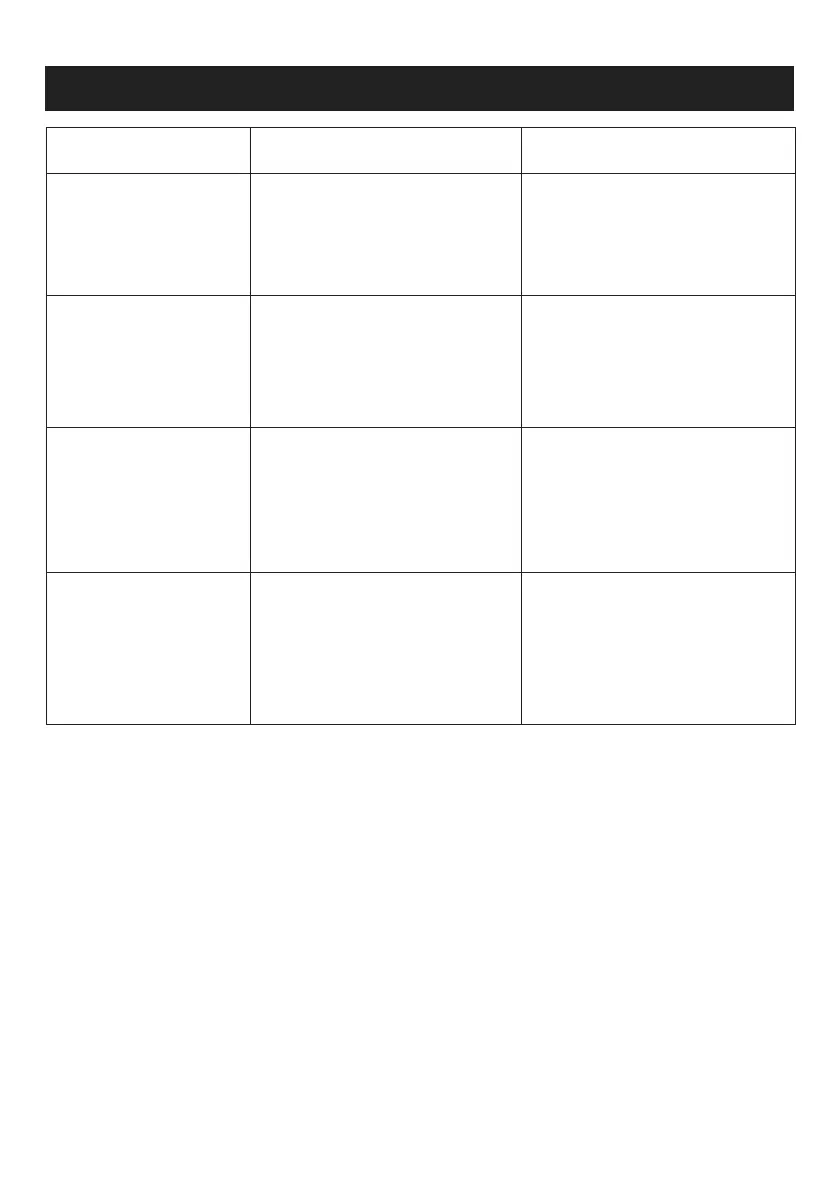
Problem Possible reason Potential solutions
The appliance does not work
Unit is abnormal working
Poor vacuuming effect
Noise and air leakage
Battery runs our;
No normal press the power switch;
The appliance is charging;
Dust container is poor position;
Suction inlet is blocked;
HEPA filter is blocking ;
Dust cup is full;
HEPA filter Frame is poor position;
Dust container is damaged
Dust cup is full;
Suction inlet is blocked;
The HEPA filter filter is not installed well
The filter components are dirty
Check whether the dust container
rotates in place;
Check the suction inlet and clean it ;
Clean the HEPA filter
Empty the dust cup;
Check if need to clean the HEPA filter
Check if the cleaner needs charging;
Reload the HEPA filter frame;
Empty and clean the dust cup;
Check and clean the suction inlet;
Install the HEPA filter well
Clean the HEPA filter and frame;
Charging again;
Press the power switch;
Unplug the USB charging cable;


 To Next Page