H
F
8
G
F
7
F
F
6
E
F
5
D F
4
C
F
3
B
F
2
A
F
1
H
F
8
G
F
7
F
F
6
E
F
5
D F
4
C
F
3
B
F
2
A
F
1
navigation
H
F
8
G
F
7
F
F
6
E
F
5
D F
4
C
F
3
B
F
2
A
F
1
Edit parts upgrade
Page6
manual addendum genesys s
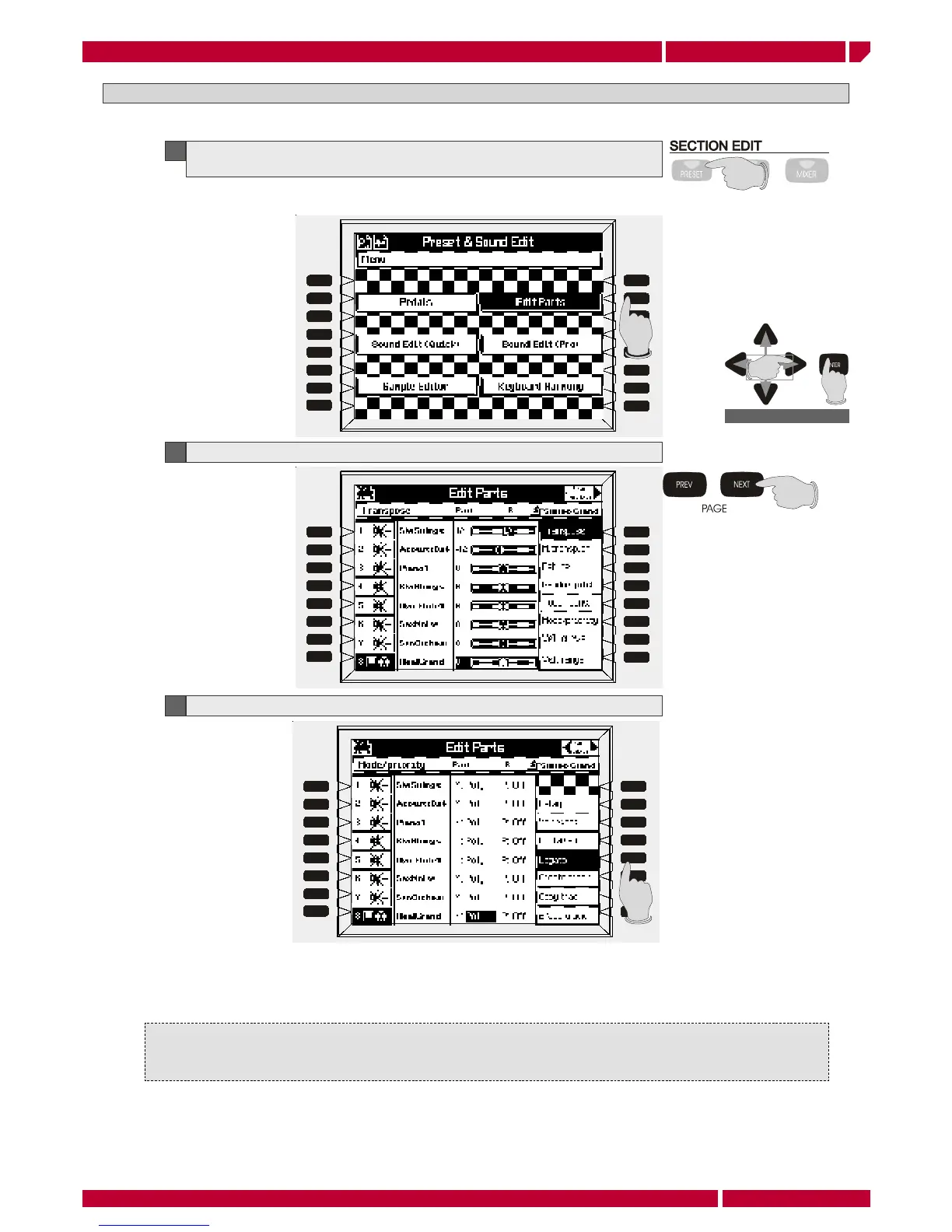
EDIT PARTS MENU: LEGATO
This function cause the sound initial attack portion bypass, playing the keys in “LEGATO” mode.
To select the EDIT PARTS menu can be also used the CURSOR to select and the ENTER button to enter.
1
Enter the EDIT PARTS menu pressing the PRESET button in the panel and then the
function button [F2]
2
Press the button PAGE NEXT on the panel to select the Page 2 control menu
3
Press the button LEGATO [F4] on the panel. The function is now enabled
This function allows to obtain impressive results in wind and brass solo simulation. Try to select any of internal
Genesys s sound of these families and enable the function.
To memorize any of the functions described in these page it is enough to press the button STORE, select a
destination location (MEMORIES, PRESETS, STYLE PRESETS) for the current edited preset, then press ENTER.
For more details please refer to the STORE chapter in the owners manual.


 To Next Page
 Loading...