The Gemini Gigabeat Party System, available in models GLS-550 and GLS-880, is a portable audio system designed for various entertainment needs. It features a robust design and a range of connectivity options, making it suitable for both indoor and outdoor use.
Function Description:
The Gigabeat Party System serves as a versatile audio playback device, supporting Bluetooth, USB, FM radio, and line-in connections. It is equipped with a built-in battery for portability and offers features like True Wireless Stereo (TWS) for connecting two speakers. The system also includes inputs for a wired microphone and a guitar, making it suitable for karaoke or live performances. An integrated LED display provides status information, and various light modes enhance the party atmosphere.
Important Technical Specifications:
- Models: GLS-550 and GLS-880
- Frequency Response: 30Hz-20KHz
- Power Source: 100-240V~, 50/60Hz
- Power Consumption:
- GLS-550: 80W
- GLS-880: 100W
- Connectivity: Bluetooth, USB, FM Radio, Line In, Microphone Input, Guitar Input
- Battery: Built-in rechargeable battery
- Display: LED display
- Controls: Physical buttons and a remote control
Usage Features:
Panel Controls:
The top panel of the speaker provides comprehensive controls:
- FM ANTENNA: Input socket for the FM antenna.
- DC INPUT: Input socket for DC power.
- MIC: Input socket for a wired microphone.
- GUITAR: Input socket for a guitar.
- LINE IN: Input socket for external audio devices.
- CHARGING LIGHT: Indicator for charging status.
- USB: Input socket for USB playback.
- POWER SWITCH: Toggles the unit ON or OFF.
- LED DISPLAY: Shows the speaker's current status.
- VOLUME/MULTI: Rotary knob to adjust the main speaker volume. This knob also functions for adjusting various effects parameters.
- STANDBY: Puts the unit in standby mode.
- SOURCE: Cycles through input sources: Bluetooth (BT), Line In (LINE), FM Radio (FM), and USB.
- LIGHT MODE: Changes the light mode between LED1, LED2, LED3, LED4, and OFF.
- X DRIVE: Toggles X DRIVE mode ON or OFF.
- PREV (◄◄): In USB/BT mode, skips to the previous track. In FM mode, tunes to the previous channel.
- PLAY/PAUSE/TWS (►ll): In USB/BT mode, plays or pauses a track. In FM mode, initiates a full automatic search for channels. Pressing and holding activates or deactivates True Wireless Stereo (TWS) mode.
- NEXT (►►): In USB/BT mode, skips to the next track. In FM mode, tunes to the next channel.
- EFFECTS: Cycles through adjustment menus for MIC/GUITAR VOLUME, ECHO VOLUME, BASS, and TREBLE.
- "2010" (MIC/GUITAR VOL 10): Adjusts microphone/guitar volume from 0-30 using the VOLUME/MULTI knob.
- "E 10" (ECHO VOL 10): Adjusts echo volume from 0-30 using the VOLUME/MULTI knob.
- "600" (BASS 00): Adjusts bass level from ±6 dB using the VOLUME/MULTI knob.
- "Ł 00" (TREBLE 00): Adjusts treble level from ±6 dB using the VOLUME/MULTI knob.
Remote Control:
The remote control provides convenient access to various functions:
- STANDBY: Turns the unit ON or OFF.
- 0-9 NUMERIC KEYS: Used to directly select tracks in USB mode (e.g., press "1" then "2" for track 12).
- VOL-: Decreases the volume.
- ◄◄/CH-: In USB/BT mode, plays the previous song. In FM mode, selects the previous channel.
- ►ll: In USB/BT mode, plays/pauses. In FM mode, performs a full automatic search.
- ◄◄/TU-: In USB mode, fast rewinds. In FM mode, tunes to the previous channel.
- ►►/TU+: In USB mode, fast forwards. In FM mode, tunes to the next channel.
- ►►|/CH+: In USB/BT mode, plays the next song. In FM mode, selects the next channel.
- VOL+: Increases the volume.
- MUTE: Toggles mute ON/OFF.
- REPEAT: Selects repeat mode in USB input mode.
- SOURCE: Changes the input source between BT, LINE, FM, USB.
Bluetooth Pair and Connect:
- Ensure any previously paired Bluetooth devices are turned off.
- Activate Bluetooth on your phone or music player.
- Turn on the speaker and set it to Bluetooth mode. The flashing blue "BT" light on the LED display indicates pairing mode.
- Search for Bluetooth devices on your phone/player.
- Select "GEMINI GLS-550" or "GEMINI GLS-880" from the search results.
- Confirm pairing by selecting OK or YES.
- If prompted for a pass key, enter "0000".
- A steady blue light indicates a successful connection.
TWS (True Wireless Stereo) Mode:
- Turn on two speakers and set both to Bluetooth input mode.
- On one speaker, press and hold the "►ll" key for 2 seconds. "ton" will be displayed. TWS is established when the display shows "L" or a tone is heard from the other device.
- On your mobile phone, search for Bluetooth devices and select "GEMINI GLS-550" or "GEMINI GLS-880" from the search result.
- Confirm pairing. A steady blue light indicates a successful connection. You can now play music from your mobile phone through both speakers.
- To turn off TWS, press and hold the "►ll" key on the speaker unit for 2 seconds. " of " will be displayed.
Battery Features:
- AC (Power) Mode: When connected to AC power, the battery charges automatically. A slow red flashing light indicates charging, and a green light appears when fully charged.
- DC (Battery) Mode: A green light indicates the battery is full. A red light indicates a low battery level, requiring immediate charging to prevent the speaker from turning off.
Maintenance Features:
- Cleaning: Clean the unit only with a dry cloth.
- Ventilation: Do not block ventilation openings. Ensure sufficient ventilation (minimum 10cm clearance) and avoid placing items like newspapers, table-cloths, or curtains over the openings.
- Power Cord Protection: Protect the power cord from being walked on or pinched, especially at plugs, convenience receptacles, and where it exits the apparatus.
- Servicing: Refer all servicing to qualified service personnel, especially if the apparatus has been damaged (e.g., damaged power cord/plug, liquid spilled, objects fallen into the apparatus, exposure to rain/moisture, or abnormal operation).
- Storage: Unplug the apparatus during lightning storms or when unused for long periods.
Safety Precautions:
- Electric Shock Hazard: Do not connect to mains power supply while the grille is removed. Do not open the apparatus; refer servicing to qualified personnel.
- Heat Sources: Do not install near radiators, heat registers, stoves, or other heat-producing apparatus.
- Water/Moisture: Do not use near water or expose the apparatus to rain or moisture, dripping, or splashing. Do not place objects filled with liquids (e.g., vases) on the apparatus.
- Naked Flame Sources: Do not place naked flame sources (e.g., lighted candles) on the apparatus.
- Battery Safety: Batteries (battery pack or installed batteries) should not be exposed to excessive heat such as sunshine, fire, or the like. Danger of explosion if the battery is incorrectly replaced; replace only with the same or equivalent type.
- Polarized/Grounding-Type Plug: Do not defeat the safety purpose of the polarized or grounding-type plug. If the plug does not fit your outlet, consult an electrician for replacement.
- Attachments/Accessories: Use only attachments/accessories specified by the manufacturer.
- Cart/Stand Use: Use only with a cart, stand, tripod, bracket, or table specified by the manufacturer or sold with the apparatus. Exercise caution when moving a cart/apparatus combination to prevent tip-over injuries.
- Environmental Aspects: Pay attention to the environmental aspects of battery disposal.
- Climate: The apparatus is suitable for use in moderate climates.
- FCC Compliance: Any changes or modifications not expressly approved by the party responsible for compliance could void the user's authority to operate the equipment. This equipment has been tested and found to comply with the limits for a Class B digital device, pursuant to part 15 of the FCC Rules. If interference occurs, try reorienting the receiving antenna, increasing separation between equipment and receiver, connecting the equipment to a different circuit, or consulting a dealer/experienced radio/TV technician. This equipment complies with FCC radiation exposure limits set forth for an uncontrolled environment.
Accessories:
- Instruction Manual: 1 pc
- FM Antenna: 1 pc
- Remote Control: 1 pc
- Microphone: 1 pc
Due to continuous product development, specifications and functions may be changed without prior notice.

 Need help?
 General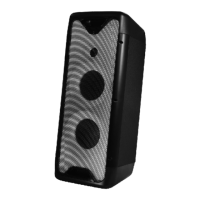

 To Next Page