EasyManua.ls Logo

Gemini PS-626 - User Manual

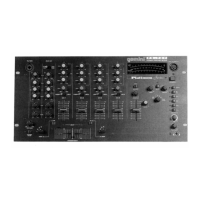
Gemini PS-626
12 pages
Print Icon
To Next Page IconTo Next Page
Loading...
(1)
MULTI LANGUAGE INSTRUCTIONS:
English......................................................................................................Page 4
Deutsch....................................................................................................Page 6
Español.....................................................................................................Page 8
Francais.................................................................................................Page 10
OPERATIONS MANUAL
BEDIENUNGSHANDBUCH
MANUAL DEL OPERADOR
MANUEL D’INSTRUCTIONS
PS-626i/676i
PROFESSIONAL MIXER
PROFESSIONNELLER VORVERSTÄRKERMISCHPULT
MEZCLADOR PARA EL PROFESIONAL
MÉLANGEUR LE PROFESSIONNEL
Question and Answer IconNeed help?

Do you have a question about the Gemini PS-626 and is the answer not in the manual?

Gemini PS-626 Specifications

General IconGeneral
BrandGemini
ModelPS-626
CategoryMusic Mixer
LanguageEnglish

Summary

Introduction

Features

Lists the key features of the Gemini Platinum Series mixer.

Cautions

Provides essential safety and handling precautions for the mixer.

Ground Lift Switch

Ground Lift Switch Operation

Explains how to adjust the ground lift switch for optimal signal quality.

Mixer Operation

Power and Channel Controls

Covers powering on the mixer and adjusting channel gain, EQ, and input sources.

Crossfader and Beat Indicators

Details the crossfader section and the function of beat indicators.

Output and Cue Controls

Explains master, booth, and headphone output level adjustments.

Talkover and Cue Sections

Describes the talkover function and how to use the cue monitoring.

Display and Crossfader Curve

Explains the display modes and crossfader curve adjustment.

PS-676 i Sampler Operation

Sample Record

Instructions for recording samples using the PS-676i mixer.

Sample Playback

How to play back recorded samples in single or repeat modes.

Robo Play

Operation of the Robo Play feature for sampler playback.

Pitch Control

Adjusting the pitch of recorded samples.

Sampler Pan Control

Controlling the stereo panning of the sampler output.

Specifications

Related product manuals