EasyManua.ls Logo

GemOro HORIZON LED - User Manual

GemOro HORIZON LED
6 pages
Print Icon
To Next Page IconTo Next Page
Loading...
HORIZON
®
LED
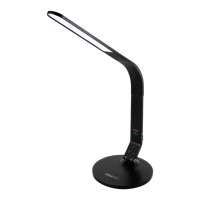
Natural Daylight Task Lamp
e definitive ource fo lighting.
Question and Answer IconNeed help?

Do you have a question about the GemOro HORIZON LED and is the answer not in the manual?

Summary

Instructions for Use and Safety Precautions

Product Specifications

Lists technical details like voltage, amperage, and power for the Horizon LED task lamp.

Key Product Features

Highlights illumination, design, adjustability, and charging capabilities of the task lamp.

Product Components Diagram

Visual guide identifying lamp parts like flex arm, base, and LED illumination.

Assembly Instructions

Step-by-Step Assembly Guide

Provides detailed instructions for connecting the lamp arm to the base using the screw cap.

Operating Instructions

Lamp Control and Adjustment

Explains how to turn the lamp on/off, dim, and adjust the light angle.

USB Charging Port Usage

Details how to use the integrated USB port for charging external devices.

Warranty Information

Warranty Coverage and Terms

Outlines the duration, conditions, and terms of the limited warranty for the Horizon LED.

Warranty Registration and Exclusions

Details registration process, contact info, and specific conditions not covered by the warranty.

Overview

The Horizon LED is a natural daylight task lamp designed to provide optimal lighting for various applications, including diamond color grading, jewelry display, stamp, coin, and art collecting, executive desks, bedside tables, and reading. It features super bright, high-power, natural daylight LEDs that are intended to improve color acuity, productivity, and overall health.

Technical Specifications:

  • Model: Horizon LED
  • Output Voltage: DC24V
  • Output Amperage: 240mA
  • Power: 8W
  • Illumination: 6,000K Full Spectrum Natural Daylight Illumination

Usage Features:

  • High-Power Long Life LED Technology: Ensures durable and efficient lighting.
  • Sleek, Modern Ergonomic Design: Aesthetically pleasing and functional for various settings.
  • Electronic Membrane Touch Sensor Power Switch: Located at the base of the arm, this switch allows users to power the lamp on and off with a simple touch.
  • Dimmable Light Intensity: To adjust brightness, users can touch and hold the power switch until the desired light level is achieved.
  • Flex-Arm & Swivel: Provides fully adjustable light angle, allowing users to position the light precisely where needed.
  • 100V-240V Multi-Voltage UL Listed Adapter: Ensures compatibility with various power outlets.
  • USB Power Port: Located on the side of the lamp's flex arm near the base, this port allows for recharging smartphones, iPods, and other devices.
  • Heavy Weighted Base: Provides stability and prevents the lamp from tipping over.

Assembly Instructions:

  1. Remove Screw Cap: Turn the screw cap from the lamp flex arm counter-clockwise to remove it.
  2. Insert Screw Cap into Base: Place the screw cap into the hole from the bottom of the lamp base.
  3. Insert Lamp Arm: Insert the threaded end of the lamp arm into the top of the lamp base, ensuring the threads align with the screw cap.
  4. Secure Lamp Arm: While holding the screw cap steady, turn the lamp arm clockwise to screw it into the cap. A coin can be used for leverage to tighten the cap securely.

Operating Instructions:

  1. Connect DC Adapter: Locate the DC socket on the backside of the lamp's arm, near where it attaches to the weighted base, and insert the AC adapter plug.
  2. Plug into Power Outlet: Plug the other end of the AC adapter into a suitable wall power outlet.
  3. Power On/Off and Dimming: Touch the chrome electronic membrane touch sensor power switch at the base of the arm to turn the lamp on or off. To dim the light, touch and continue pressing the switch until the desired brightness level is reached.
  4. Adjust Light Angle: Use the lamp's flex arm to optimally position the light.
  5. Use USB Port: Plug an appropriate USB power cord into the USB socket power port on the side of the lamp's flex arm to charge compatible devices.

Maintenance Features (Warranty Information):

The Horizon LED comes with a One Year Limited Warranty. The warranty period begins on the purchase date, as noted on the bill of sale or through the serial number tracking system. During this period, the lamp is warranted against defects in materials and workmanship under normal and intended use.

Warranty Coverage:

  • If a defect occurs, GemOro will, at its option:
    • Repair the product at no charge using new or refurbished replacement parts.
    • Exchange the product with a new or functionally equivalent product manufactured from new or serviceable used parts.
    • If the Horizon LED is no longer available or discontinued, a substantially equivalent task lamp may be substituted.
    • Refund the purchase price of the product.
  • When a product or part is exchanged, the replacement item becomes your property, and the replaced item becomes GemOro's property. If a refund is given, the product becomes GemOro's property.
  • The purchaser is responsible for the cost of return postage, insurance, and handling for all warranty and non-warranty repairs.

Exclusions from Warranty:

The warranty does not cover:

  • Damage caused by accident, abuse, misuse, misapplication, or non-GemOro products.
  • Damage caused by service (including upgrades and expansions) performed by unauthorized service providers.
  • Products or parts modified without written permission from GemOro.
  • Any GemOro product with a removed or defaced serial number.

Contact Information for Warranty Registration:

GemOro Horizon LED 10455 Olympic Drive, Dallas, Texas 75220 USA Tel: 800.527.0719 or 214.351.0380 Fax: 800.832.9871 or 214.351.1903 Website: www.gemoroproducts.com Email: support@gemoroproducts.com Warranty Registration: www.gemoroproducts.com/warrantyregistration/

Disclaimer:

The warranty and remedies provided are exclusive and in lieu of all other warranties, remedies, and conditions, whether oral or written, express or implied. GemOro specifically disclaims any and all implied warranties, including, without limitation, warranties of merchantability and fitness for a particular purpose. If implied warranties cannot be lawfully disclaimed, they are limited in duration to the one-year warranty period. No GemOro reseller, agent, or employee is authorized to modify, extend, or add to this warranty. GemOro is not responsible for direct, special, incidental, or consequential damages resulting from any breach of warranty or condition, or under any other legal theory, including but not limited to lost profits, downtime, goodwill, and damage to or replacement of equipment and property.

GemOro HORIZON LED Specifications

General IconGeneral
BrandGemOro
ModelHORIZON LED
CategoryHome Lighting
LanguageEnglish

Related product manuals