© 2013 I-View Now, LLC. All Rights Reserved.
Gen IV HDE-X Installation Guide rev 1.1 Page 7
SMTP Settings
This section describes how to set up SMTP (email) on the DVR to allow Alarm notifications to be sent to I-View Now.
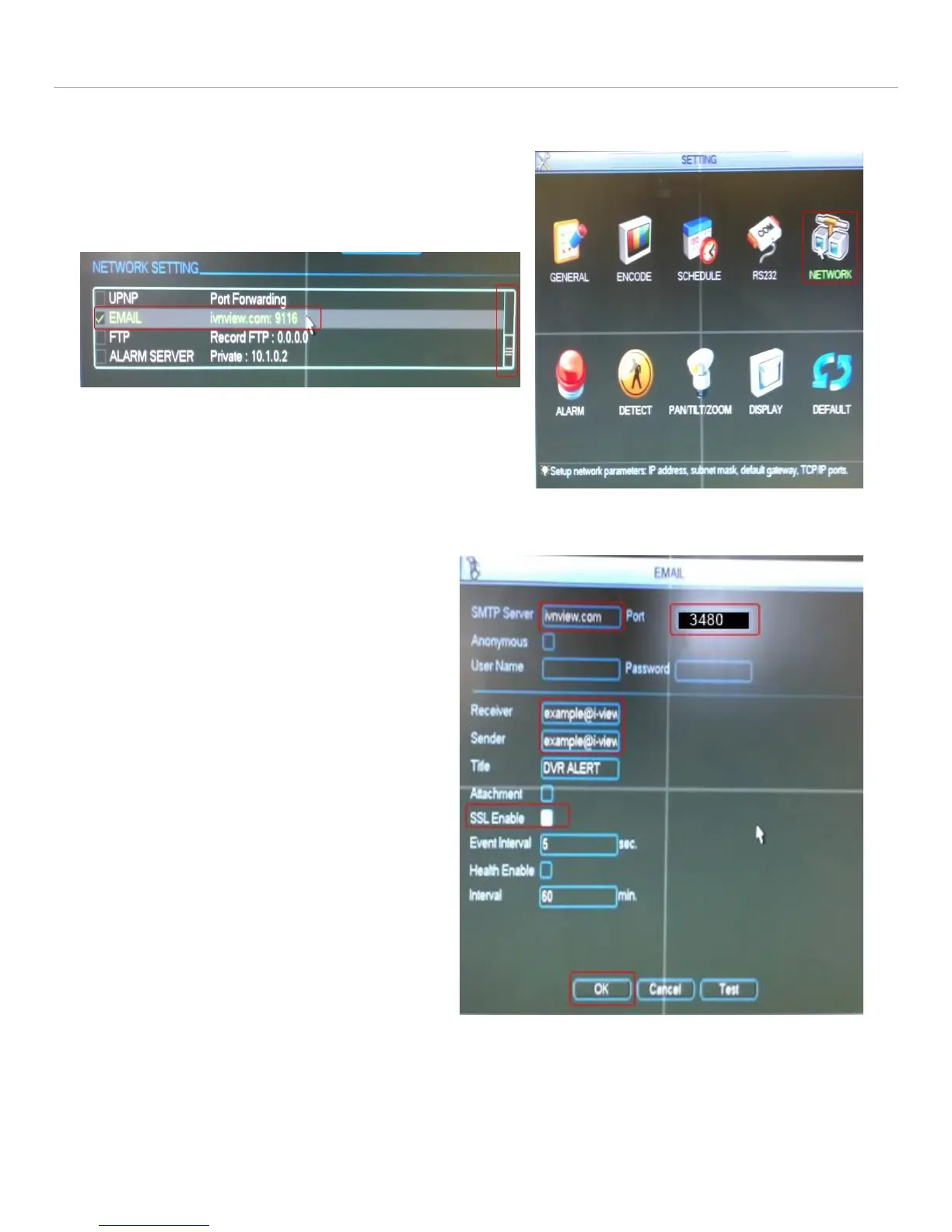
Navigate back to the general network settings interface
Under the network settings submenu use the scroll bar to
scroll down to EMAIL.
Double click EMAIL to enter EMAIL setup
Enter ivnview.com for the SMTP server
Enter 3480 for the Port
For Sender, Enter the SMTP ID from the Installer’s
Worksheet.
For Receiver, Enter the SMTP ID from the Installer’s
Worksheet.
Yes, Sender and Receiver are the same
Ensure Enable SSL is NOT Checked
Set Event interval to 5
Click Test
Click OK
Test Failure can occur if the SMTP Server, SMTP Port,
SSL/TLS, DNS, or Firewall settings are incorrect. This
Test will not verify that the Sender and Receiver are
correct. It just verifies connectivity to the I-View Now
SMTP Server.
Network settings can be reached
from the settings menu
Email Setup Interface. Reachable through
Network Settings interface



 To Next Page