EasyManua.ls Logo

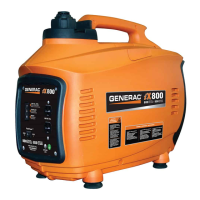
Generac Power Systems IX 800 - User Manual

Generac Power Systems IX 800
54 pages
Print Icon
To Next Page IconTo Next Page
Loading...
www.generac.com or 1-888-GENERAC
iX 800
Digital Inverter Generator Operator's Manual
MODEL: 005791-3

DEADLY EXHAUST FUMES! ONLY use OUTSIDE
far away from windows, doors and vents!
NOT INTENDED FOR USE IN CRITICAL LIFE
SUPPORT APPLICATIONS.

SAVE this Manual. Provide this manual to any
operator of the generator.

Table of Contents

Questions and Answers

  • R
    Rachel FloresAug 2, 2025
    Why Generac Power Systems IX 800 has no AC output?
    • M
      Michael SmithAug 2, 2025
      If your Generac Power Systems Portable Generator isn't producing AC output, several factors could be the cause. The generator might be overloaded, indicated by the OVERLOAD LED being on; in this case, shut down the generator to reset the module, reduce the electrical load, and restart it. Low AC voltage, also indicated by the OVERLOAD LED, suggests verifying that the vent is open and the choke is OFF. An overheated inverter module (OVERLOAD LED on) requires ensuring the service door is ON, letting the unit cool for 15 minutes, and then restarting. A short circuit in the load (OVERLOAD LED on) necessitates checking the condition of extension cords and connected devices. Lastly, a defective inverter assembly may be the culprit, requiring replacement.
  • T
    Tina JonesAug 7, 2025
    What to do if my Generac Power Systems Portable Generator engine won't start?
    • T
      Tara PatelAug 7, 2025
      If your Generac Power Systems Portable Generator engine won't start, consider these potential causes and solutions: * The fuel tank may be empty. Add fuel to the tank. * The fuel valve might be turned off. Turn the fuel valve on. * The spark plug could be defective. Replace the spark plug. * The engine stop switch may be defective or stuck. Replace the engine start switch.
  • S
    smithjamesAug 13, 2025
    Why does my Generac Power Systems IX 800 start, then shuts down?
    • J
      jaime19Aug 13, 2025
      Your Generac Power Systems Portable Generator might start and then shut down due to several reasons: * Low fuel level: Add fuel to the tank. * Closed fuel tank vent: Open the fuel tank vent. * Incorrect engine oil level: Check the engine oil level and adjust as needed. * Contaminated fuel: Replace the fuel filter. * Defective low oil level switch: Replace the low oil level switch. * Defective ignition coil: Replace the ignition coil.
  • L
    Larry HillAug 19, 2025
    How to fix a Generac Power Systems IX 800 Portable Generator that starts, then runs rough?
    • D
      David BallardAug 19, 2025
      If your Generac Power Systems Portable Generator starts but runs roughly, here are a few possible causes and solutions: * The choke may be stuck or left on. Turn the choke off. * The air filter might be dirty or clogged. Clean or replace the air filter element. * The spark plug could be defective or dirty. Replace the spark plug. * A defective FlexPower switch may be the issue. Replace the FlexPower switch.
  • J
    Jo GonzalesAug 26, 2025
    What to do if fuel leaks from drain hoses in Generac Power Systems IX 800 Portable Generator?
    • M
      Maureen RamirezAug 26, 2025
      If you notice fuel leaking from the drain hoses of your Generac Power Systems Portable Generator, it could be due to: * A fuel system that is over-primed (flooded): Turn the vent in the cap ON and let the generator sit for 15 minutes before restarting. * A carburetor drain in the bowl that is not closed: Turn the valve clockwise to close it.

Summary

Safety Rules and Precautions

Introduction to Generator Safety

Explains the purpose of the generator and the importance of reading the manual before operation.

Understanding Safety Symbols

Defines DANGER, WARNING, CAUTION, and NOTE symbols used in the manual and on the generator.

General Generator Hazards

Outlines general safety precautions for operating the generator, including location and moving parts.

Specific Hazard Categories

Details exhaust, electrical, and fire hazards with critical safety precautions.

Relevant Safety Standards

Lists national and international standards applicable to generator installation and operation.

Generator Identification Plate

Illustrates the location of the generator's identification plate for model and serial number.

General Information and Specifications

Generator Specifications

Provides detailed technical specifications including engine size, fuel capacity, output, and dimensions.

Unit Component Identification

Identifies and describes the function of various external components of the generator.

Emissions Information

Details EPA emission standards and the generator's emission control system components.

Generator Operation Guide

Control Panel Functions

Explains the indicators (LEDs) and switches on the generator's control panel.

Pre-Use Checks and Setup

Outlines essential steps to perform before starting the generator, including safety and fluid checks.

Starting the Generator

Provides a step-by-step guide on how to properly start the generator engine.

Connecting Electrical Loads

Details how to connect loads safely, avoid overloading, and lists power consumption of common devices.

Using the FlexPower Switch

Explains how to use the FlexPower switch to conserve fuel and reduce engine wear.

Shutting Down the Generator

Provides the correct procedure for safely shutting down the generator and its fuel supply.

Low Oil Level Shutdown Feature

Describes the automatic engine shutdown mechanism triggered by low oil levels.

Fueling the Generator Safely

Details safe procedures for fueling the generator, including fuel type and handling precautions.

Filling the Fuel Tank

Step-by-step instructions on how to fill the generator's fuel tank correctly.

Adding Engine Oil

Guidance on selecting the appropriate oil viscosity and the procedure for adding oil to the engine.

Generator Maintenance Procedures

General Generator Care

Provides guidelines for keeping the generator clean, dry, and free from obstructions.

Recommended Maintenance Schedule

Outlines a schedule for essential maintenance tasks like checking fluids and changing oil.

Cleaning Generator Exterior

Details methods for cleaning the generator's exterior surfaces and cooling slots.

Engine Air Filter Maintenance

Instructions on how to access, clean, or replace the engine's air filter element.

Changing Engine Oil

Step-by-step instructions for draining and refilling the engine oil.

Replacing the Spark Plug

Guide on how to remove, replace, and gap the spark plug for optimal performance.

Cleaning the Spark Arrestor Screen

Instructions for inspecting and cleaning the spark arrestor screen to prevent exhaust system issues.

Transportation and Storage Guidelines

Provides instructions for safely transporting and storing the generator, including fuel preparation.

Troubleshooting Common Issues

Troubleshooting Guide

A guide to diagnosing and resolving common engine and generator operational issues.

Product Warranty Information

Two-Year Limited Warranty Overview

Details the two-year limited warranty for Generac iX Series generators for consumer applications.

Warranty Exclusions

Lists specific conditions, parts, and uses that are not covered by the Generac warranty.

Warranty Liability and Legal Rights

Outlines limitations of liability, legal rights, and state-specific variations for the warranty.

Australia and New Zealand Warranty

Specific warranty terms and contact information for customers in Australia and New Zealand.

Generac Power Systems IX 800 Specifications

General IconGeneral
ModelIX800
Engine Type4-Stroke OHV
Fuel TypeGasoline
AC Voltage120 V
Starting SystemRecoil
Frequency60 Hz
Starting Wattage800 W
Voltage120V
Outlets1 x 120V 20A (5-20R)

Related product manuals