v.: 2020-09-04
Copyright of the European Union is effective (Copyright EU) (c) 2019 GENEREX Systems GmbH, Hamburg, Germany, All rights reserved
TEL +49(40)22692910 - EMAIL generex@generex.de - WEB www.generex.de (This and all other product datasheets are available for download.)
23
Enabling shutdown control when using a vSAN
Before starting, please read the following configuration notes carefully to prevent shutdown issues caused by a wrong
configuration of RCCMD.
RCCMD can handle vSAN VMware environments. Due to the fact, a vSAN is very complex and the operating conditions of a
vSAN differs when compared with a single host or a standard cluster, there are some pre-conditions that must met before
RCCMD can shut down a vSAN:
The RCCMD client that handles the vSAN cannot be installed inside a vSAN
Due to the fact, each host of a vSAN must be set to in maintenance mode before the can be switched off. As long as one virtual
machine is running, it is not possible to switch off the hosts.
The vCenter that handles the vSAN is the first virtual machine that starts and the last virtual machine that shuts down.
The vCenter is the control unit of a vSAN. It is allowed to install the vCenter inside the vSAN as well as running it on a single
host that is not part of the cluster. The essential function of the vCenter is managing the all data synchronization inside a vSAN
after all other virtual machines are down. You need to ensure that the vCenter can complete this operation.
If you run a Witness-Server as a virtual machine inside a vSAN
The Witness Server has a special task If two hosts do not match which host holds the most recent data, they ask the witness
server. The witness server acts like a complete host, but cannot maintain virtual machines.
Due to this fact, the witness server can also be virtualized in the vSAN and still acts as a stand-alone host. In that case, you
need to differ between the Witness server's IP address and the host's virtual machine where the witness server's virtual
machine is located:
The witness server is shut down regularly within the vSAN cluster.
The host that maintains the virtual machine that contains a witness server, needs a second RCCMD client for enabling the
maintenance mode after the witness server is switched off.
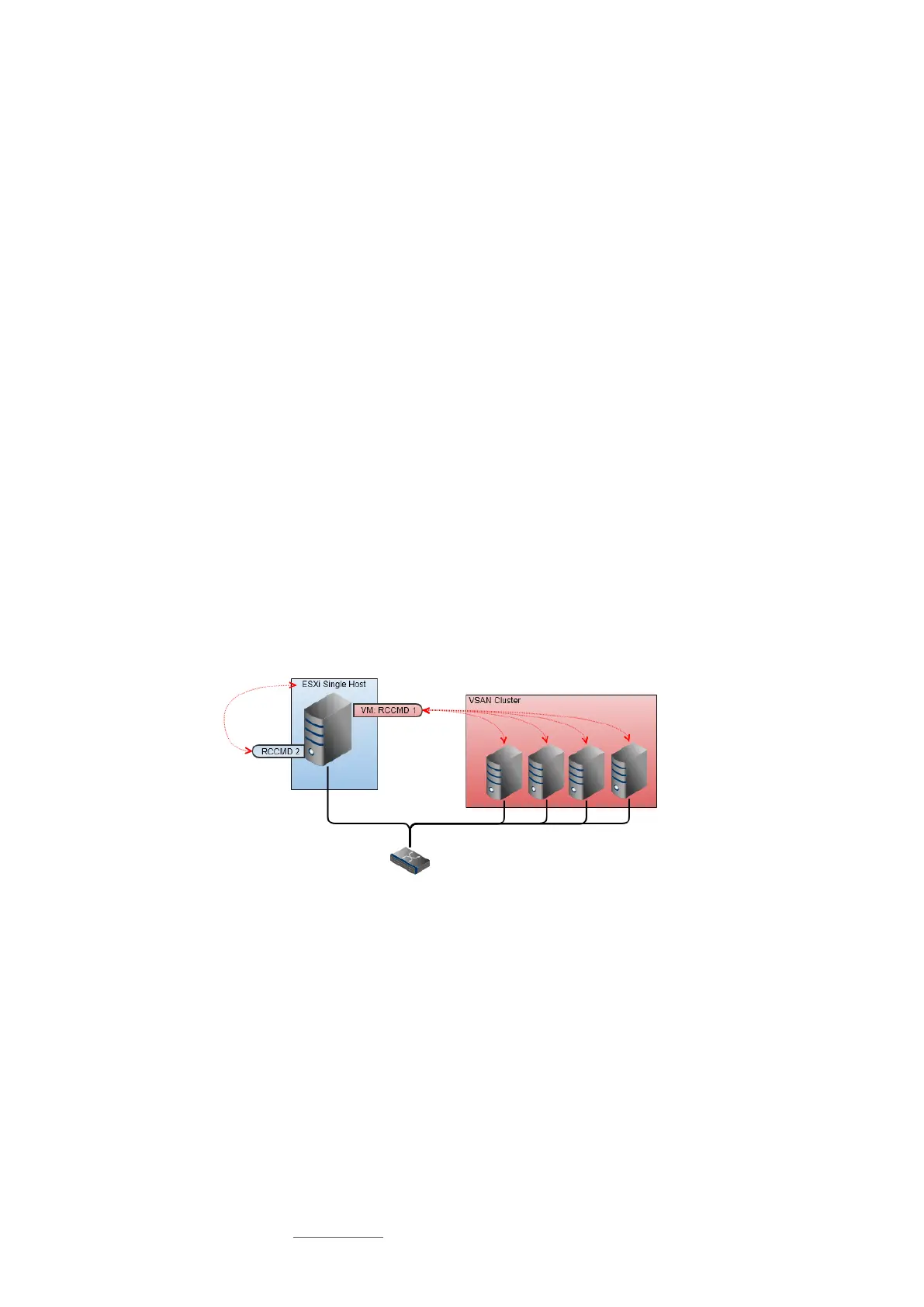
Technically, an RCCMD client can only handle the vSAN or the host it runs on
As a consequence, if you have single hosts AND a VSAN cluster, you will need at least 2 RCCMD clients: RCCMD 1 manages
the shutdown of the VSAN cluster and RCCMD 2 manages the shutdown of the single host. The shutdown routine is then
divided into 2 different commands for the CS141:
o Shutdown the VSAN cluster
o Shutdown of the single host
Since the two RCCMD clients run side by side:
When choosing the correct time window for shutdown tasks, ensure the VSAN has turned off all hosts completely before turning
off the last remaining single host - otherwise the RCCMD client that manages the shutdown of the VSAN may not be able to
complete the shutdown routine because the second RCCMD client performs a local virtual machine shutdown.


 To Next Page
 Loading...

