- 8 -
Switch to the TEST
TEST
TEST
TEST position to enter the Test mode. In this mode
you can take pictures or video clips like a regular digital camera,
or enter the Menu to set up parameters. On the keypad there are
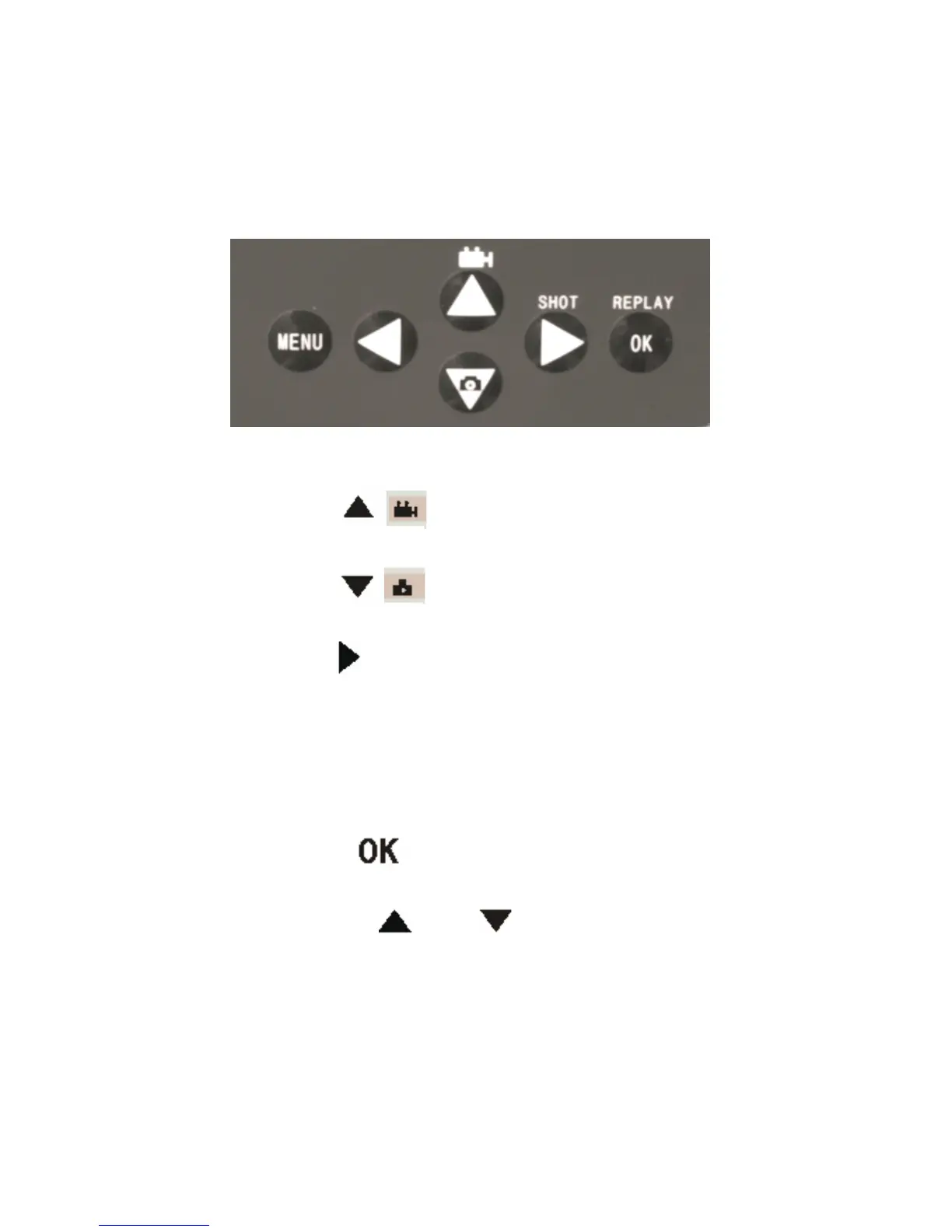
four “ shortcut ” functional keys (see Figure 2-1) working as below:
Figure 2.2
• Press the key to set the camera to shoot video
clips.
• Press the key to set the camera to take still
pictures.
• Press the SHOT
SHOT
SHOT
SHOT key to manually trigger the shutter.
A photo or video (depending on the camera setting) will
be taken and saved to the SD card. If the display shows
“ CARD PROTECTED ” when you press the SHOT
SHOT
SHOT
SHOT key,
switch the power OFF, remove the SD card and slide its
write-protect switch to off.
• Press the REPLAY
REPLAY
REPLAY
REPLAY key to review/playback
photos/videos on the LCD screen, or a connected TV
monitor. Use and key to navigate.
There is another key, MENU
MENU
MENU
MENU , on the keypad that allows you to
program the camera to work the way you want. Please make


 To Next Page