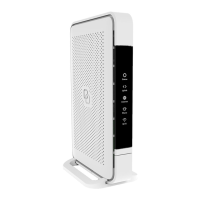
LED & buton oveview
Status
Green – system is operational ready
Green (blinking) – connectiviy lost
Yellow – system statup or WiFi OFF
Yellow (blinking) – system is not ready
Blue – automated pairing (WPS) successful
Blue (blinking) – automated pairing (WPS) in progress
Red – system booting failure
O – power o
Mode buton
Pairing (WPS) – press and release once
WiFi ON – press and hold until Status LED turns green
(blinking or solid)
WiFi OFF – press and hold until Status LED turns solid
yellow
Changing your nework setings
You can access the Pulse EX
web inteface (GUI) to change your
nework setings. The Pulse EX
must be in router mode to access
the GUI.
. Use a web browser on your
personal device and navigate to
the GUI URL as printed on the label
on the botom of the Pulse EX
. Login using the credentials as
printed on the labels on the
botom of the Pulse EX.
Power saving options
Power saving options are available via
the web inteface.


 To Next Page